How can I make a Bézier curve into a 3D-noodle-like structure (like a tube)? When I try, it keeps turning out like a rectangle with corners.
Asked
Active
Viewed 7.8k times
28


-
Did you see there is a way to make a tree with a built-in addon in Blender? See here: http://blender.stackexchange.com/questions/8688/is-there-an-easy-way-to-make-a-tree-in-blender – Thom Blair III Apr 18 '14 at 02:27
-
1Great article! Also wrote a similar one that included using this same method but with tapering tubes as well: http://benchung.com/making-tubes-blender/ – Mar 27 '15 at 18:56
-
You can do simple tapers by adjusting the Radius of control points: Select any control point of the curve in Edit mode, then press Alt+S (Option+S on macOS). See https://docs.blender.org/manual/en/latest/modeling/curves/editing/curve.html – Arda Nov 11 '21 at 20:17
2 Answers
35
To make a tube, set the Fill to full in Curve > Shape:

Then increase the bevel Depth and Resolution in Curve > Geometry:

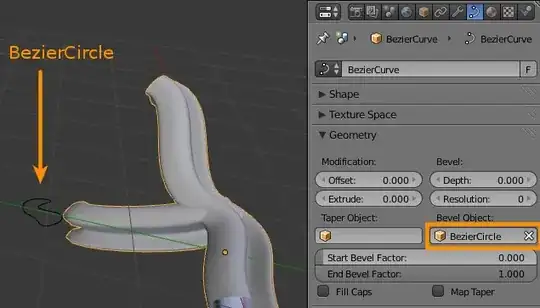
If you want a more complex/custom shape, you can use a bevel object:

gandalf3
- 157,169
- 58
- 601
- 1,133
-
Thanks so much!!! I had everything right except the resolution lol. Also how do I make it branch off? – Zachooz Apr 18 '14 at 01:32
-
I just duplicated a segment and then extruded it in another direction. This will work as long as you don't mind the branches not actually being connected to each other, but if you do want them connected, you might want to try using a mesh object with a skin modifier. – gandalf3 Apr 18 '14 at 01:34
-
1It would be better if you asked this as a separate question, asking multiple questions per post is discouraged. – gandalf3 Apr 18 '14 at 01:45
14
Make a Curve into a Tube
Add a Curve: SHIFTA -> Curve -> Bezier

Now add a Circle Curve: SHIFTA -> Curve -> Circle

Now use the circle as the bevel object for the bezier curve:
Select the bezier curve
Object Properties window -> Curve tab -> set Bevel Object to the circle
Scale the circle until the tube is the size you want

If you would then like to edit the shape of your tube, just edit the Bevel Object, which here is the circle:


Thom Blair III
- 16,535
- 20
- 75
- 112
-
I really like this tutorial! I just wonder, why is there such a big size difference between the "tube" and the bevel object? – drmariod Mar 09 '16 at 06:34