0

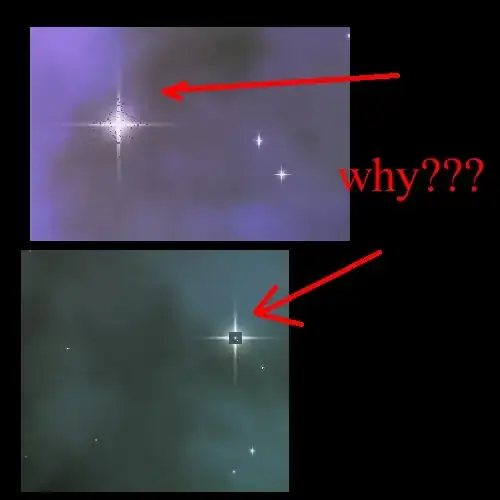
I am making a star system, by using a star based off a plane (various custom coloring nodes), and then populating a particle system using that star, - but I am getting some weird rendering.

If it was an error with the nodes - I figure it would happen for all the stars. But it just seems to be happening for some, and is consistent. (I.e., I can render the same image over & over with the same error, and/or animate it - and it renders the exact same star 'wrong').

I am wondering if I have something with cycles renderer not set correctly, or something else?

Any insight as to why this is happening?

Here is an image example of what I am getting, thanks in advance![enter image description here]1
  • 1
    Two things, z-fighting or alpha clipping probably. Need a little more info exactly what this is first. – J Sargent Jan 17 '18 at 01:48
  • What do you mean/what info do you need? Do you mean what it is a picture of?

    a) Basically - I have a plane that I am using for the background/various shaders to give it a 'cloudy' effect b) Then, I create another plane and play around with various nodes to make it into a 'star' shape c) Then, I create a particle system (basically so I can animate it) - using the star as the basis.

    When I render it in blender - it gives me these strange artifacts on the stars. In the first image, it should not have that 'noise', and in the second, it shouldn't have that 'square'. Does that help?

    – user6262902 Jan 17 '18 at 01:54
  • Yes, I think so. Are all these objects on the same level or are they at different heights on the Z axis? – J Sargent Jan 17 '18 at 02:00
  • Please use the [edit] link at the bottom of your question (https://i.stack.imgur.com/lXFuK.png) and add more information. We don't know how you set up your project or your textures, nodes or render settings. Consider sharing your .blend file (with the images used as textures packed into the file) so that others can inspect it. You can upload it at http://blend-exchange.giantcowfilms.com/ and then paste the resulting link as part of your question. –  Jan 17 '18 at 02:01
  • The particle system is in a cube (so I can volume animate it). So yes - the 'stars' are at different heights on the z-axis – user6262902 Jan 17 '18 at 02:03
  • Strange thing - I just found if I changed my "Random size" of the objects in the particle system to 0, I don't get these strange artificats. (the question isn't 'exactly' solved - because I still want random star sizes). Any idea why that would effect it? Because the "star" is simply a plane with nodes to make it look like a star (as opposed to say an actual 'star' image) - so it's all "math" - so doesn't make sense... any ideas? – user6262902 Jan 17 '18 at 02:08
  • Again, if you don't share any information as part of your question is hard to help. –  Jan 17 '18 at 05:01

0 Answers0