First, let's get the colors right:
Plot3D[
 Sin[x] Cos[y], {x, 0, 4 Pi}, {y, 0, 4 Pi},
 ColorFunction -> Function[{x, y, z}, ColorData["Rainbow"][z]]
]

That one is easy enough. If you really want it to look like a mesh, that's not so easy. I don't know of an option that colors mesh as flexibly as it normally colors the plot in question. I'd recommend a cheap hack like making up a list lie this:
t = 0.03;
myRanges = Map[# + {-t, t} &, Range[0, 4 Pi, Pi/8]];
myRanges[[1, 1]] = 0; myRanges[[-1, -1]] = 4 Pi;
myRanges = Interval @@ myRanges;
and then including the option as follows:
Plot3D[
 Sin[x] Cos[y], {x, 0, 4 Pi}, {y, 0, 4 Pi},
 ColorFunction -> Function[{x, y, z}, ColorData["Rainbow"][z]],
 RegionFunction -> Function[{x, y, z},
  IntervalMemberQ[myRanges, x] || IntervalMemberQ[myRanges, y]],
 PlotPoints -> 150
]

Not a great method, considering the PlotPoints required. Another alternative would be a 3D list plot to get a similar discrete effect, like the following:
ListPointPlot3D[
 Flatten[Table[{x, y, Sin[x] Cos[y]},
  {x, 0, 4 Pi, Pi/16}, {y, 0, 4 Pi, Pi/16}], 1],
 ColorFunction -> Function[{x, y, z}, ColorData["Rainbow"][z]]
]
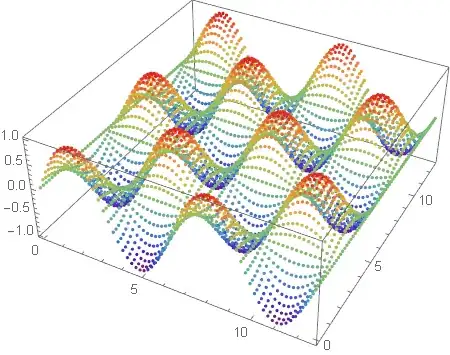
Now, I'm not sure this is an important diversion. There are probably half a dozen other ways to get a similar effect, some of which are better than the two I've offered.
All that aside, there is a function called SliceContourPlot3D. This is the key to getting what you want. You can obtain the regions you want with:
SliceContourPlot3D[Sin[x] Cos[y],
 z == 0,
 {x, 0, 4 Pi}, {y, 0, 4 Pi}, {z, -1, 1}
]

This gives you a 2D contour plot in 3D, where the contour is drawn on the surface defined by the second argument. Now, we just want to bump it down to z=-2 (important: and change the z range accordingly) and change the style, to give your final output:
Show[
 Plot3D[Sin[x] Cos[y], {x, 0, 4 Pi}, {y, 0, 4 Pi},
  ColorFunction -> Function[{x, y, z}, ColorData["Rainbow"][z]],
  PlotStyle -> Opacity[0.7]
 ],
 SliceContourPlot3D[Sin[x] Cos[y],
  z == -2,
  {x, 0, 4 Pi}, {y, 0, 4 Pi}, {z, -3, 1},
  Contours -> Table[
   {t, ColorData["Rainbow"][(t + 1)/2]}, {t, -1, 1, 0.2}
  ],
  ContourShading -> None
 ],
 PlotRange -> All
]
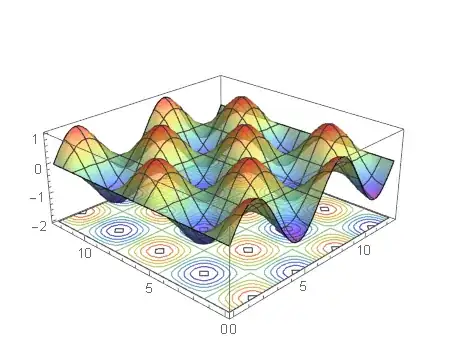
I also added some opacity to the plot as well. Note that you have to specify the contours explicitly (which I've done in the table) in order to individually modify their colors.
One last remark, the function you've plotted in MatLab does not appear to be the same one you give for plotting in Mathematica. I assume you know this.


