5

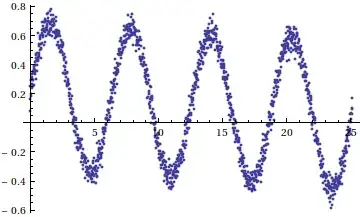
I have a set of 1500 data points (which are some energy eigenvalues) corresponding to a parameter H0 (which represents magnetic field. H0 values are equispaced going from $-3.0$ to $3.0$ in steps of $0.005$. Please note that the energy eigenvalues are not exact and they have experimental error in them. What I am trying to do is first plot those data points in Mathematica.

I have found the command ListLinePlot[{{x1, y1}, {x2, y2}, ...}]. However, feeding such a huge set of data points consumes a lot of time. So is there any other way out? For example, importing the data file from Fortran. I have used the command Import["file", "table"] where "file" is a Fortran data file. But it is giving the error message "File not found during import".

Then I would like to find the second derivative of the plot. Accurate evaluation of second derivative is very crucial for my purpose. I have done the plot using "gnuplot" and then found the first derivative of the plot using the central difference formula: $\frac{f(x+h)-f(x-h)}{2h}$. Here $h = 0.005$. Then I evaluated the first derivative of the latter plot using the same formula to get the second derivative plot.

I am getting the plot but not the desired result (a peak is to be obtained near a value of H0, pre-calculated). In other words, I am getting a disagreement between theoretical and numerical values of H0. The eigenvalue evaluation is OK I think because I have checked it both in Mathematica and Fortran. Maybe something is going wrong in the second derivative evaluation. Kindly advise how to carry out numerical differentiation from a set of data points in Mathematica.

J. M.'s missing motivation
  • 124,525
  • 11
  • 401
  • 574
  • 2
    Are the $y_k$ exact, or do they have experimental error in them? – J. M.'s missing motivation Sep 18 '12 at 08:51
  • 2
    As to the Import error: probably the path name to your file is incorrect. Don't forget, on Windows, you need to escape the backslashes in a file name string with a backslash. A good trick is to copy the path string using the Insert/File path menu item. Additionally, "table" should be with uppercase T. You might want to read this Import doc page – Sjoerd C. de Vries Sep 18 '12 at 09:21
  • @J.M. no yk's are not exact they have experimental error in them – Shrabanti Dhar Sep 18 '12 at 09:29
  • @Sjoerd.C.de Vries...Thanks for the advise. I am trying it. – Shrabanti Dhar Sep 18 '12 at 09:32
  • Ah, then you'll have to do some smoothing, and you can't exactly use Markus's solution. Anyway, please include this vital piece of information into your question. – J. M.'s missing motivation Sep 18 '12 at 09:33
  • Since your points are evenly spaced and include some error you may use the Savitzky-Golay filter to find the smoothed second derivative. This is easy enough to accomplish in Mathematica. Here you ask two questions: one about the plot (is it only 1500 points? That should not take too long to plot; 15 million will be a different matter) and one about the derivative. If you split this into two questions I am sure you will get better answers. – Oleksandr R. Sep 18 '12 at 10:10
  • @OleksandrR. Since 1500 points indeed shouldn't be a problem for ListPlot my guess was that the time-consuming part consists of entering the data as a literal argument to ListPlot. That's why he asked the question about Import. – Sjoerd C. de Vries Sep 18 '12 at 11:52
  • @Sjoerd C.de Vries...thank you very much Sir, I tried the "Import" command as u said and it worked !! :) . I got rid of that tedious job of feeding my data one by one. – Shrabanti Dhar Sep 19 '12 at 06:28

4 Answers4

7

There is a Fourier transform method here. Using the example from belisarius it might be done as below. Caveat: I do not guarantee I made no cut-and-paste errors. Your mileage may vary. Considerably.

(* sample data *)
g[x_] := x + 1/2 Sin[x] + RandomVariate[NormalDistribution[.2, .05]];

SeedRandom[1111];
xmax = 8*Pi;
nHalf = 750;
n = 2*nHalf;
xt = Table[i*xmax/n, {i, 0, n}]; (* the domain sampling points *)
t = Table[g[x], {x, 0., 8. Pi, xmax/n}];

(* Subtract beginning from end to get drift; we need to remove that to get something that is periodic-like. Probably should average the first few and last few points to get a better approximation to the drift. *)

range = t[[-1]] - t[[1]];

t2 = t - Range[Length[t]]*range/Length[t];

(* Smoothing magic...*)
ismooth = 10;

(* Get FT, multiply appropriately to get FT of derivative, then invert by IFT. last, add back the linear drift. *)

fourier = Fourier[t2];
freq1 = -2*Pi*I*
  Table[i*Exp[-(i/ismooth)^2], {i, 1, nHalf}]/(xmax);
freq2 = 
 2*Pi*I*Table[i*Exp[-(i/ismooth)^2], {i, 1, nHalf}]/(xmax);
freq = Join[{0}, freq1, Reverse[freq2]];
fourierd = fourier*freq; 
der = InverseFourier[fourierd] + range/xmax;

(* Pictures *)
ListPlot[Transpose[{xt, t}]]

enter image description here

(* Plot of samples minus drift *)
ListPlot[Transpose[{xt, t2}], PlotStyle -> {Thickness[0.001]}]

enter image description here

(* approximated derivative *)

ListPlot[Transpose[{xt, der}], PlotStyle -> {Thickness[0.001]}

enter image description here

(* We can get the second derivative similarly. Since we used a linearized approximated drift we need not add it back at the end.*)

freq1b = (-2*Pi*I)^2*
   Table[i^2*Exp[-(i/ismooth)^2], {i, 1, nHalf}]/xmax^2;
freq2b = (2*Pi*I)^2*
   Table[i^2*Exp[-(i/ismooth)^2], {i, 1, nHalf}]/xmax^2;
freqb = Join[{0}, freq1b, Reverse[freq2b]];
fourierd2 = fourier*freqb;
der2 = InverseFourier[fourierd2];

ListPlot[Transpose[{xt, der2}], PlotStyle -> {Thickness[0.001]}]

enter image description here

I also tried this with

g2[x_] := Exp[x^(1/10)] - Exp[-x^2*Abs[Cos[x]]] + 
   RandomVariate[NormalDistribution[.2, .05]];

I got what I believe were tolerable results, although maybe not useful at the ends. No surprise, given that this is not so close to "periodic plus linear drift".

Daniel Lichtblau
  • 58,970
  • 2
  • 101
  • 199
  • Thanks a lot for giving your time to write such a descriptive answer to my question. I will surely try this. – Shrabanti Dhar Sep 19 '12 at 07:28
  • Nice answer! But could someone explain please, why the "freq" are calculated in two parts? – Dr_Zaszuś Feb 24 '14 at 10:29
  • @Szczypawka My vague recollection is that it was to handle the way Fourier wraps frequencies-- one needs to reverse the second half. – Daniel Lichtblau Feb 24 '14 at 16:05
  • @DanielLichtblau Yeah, you are write. It seems to be a mathematical artifact of converting from Sin and Cos to Exp and losing physical meaning of frequency. Still, it's a very interesting question, but suprisingly it is not discussed here. – Dr_Zaszuś Mar 03 '14 at 08:44
4

Here is a way that combines two filters and a numerical eighth order approximation to the derivatives. Depending on your data, it may work pretty well.

Another (perhaps better) alternative is using a Savitzky-Golay style filter.

Some code:

(* Derivative Coeffs *)
ld = With[{m = 1, s = 8, n = 16}, CoefficientList[Normal[Series[x^s Log[x]^m, {x, 1, n}]], x]]
g[x_] := x + 1/2 Sin[x] +  RandomVariate[NormalDistribution[.2, .05]]; 
(*Our data*)
t = Table[g[x], {x, 0, 8 Pi, 8 Pi/1500}];
(*filtered data*)
tvf = TotalVariationFilter[t, 20, MaxIterations -> 100]
(* First derivative*)
fd = ListCorrelate[ld, MovingAverage[tvf, 30]];
(*second derivative*)
sd = MovingAverage[ListCorrelate[ld,TotalVariationFilter[fd, 20, MaxIterations -> 100]], 20];
GraphicsGrid[{ListPlot /@ {t, tvf}, ListPlot /@ {fd, sd}}]

Mathematica graphics

Dr. belisarius
  • 115,881
  • 13
  • 203
  • 453
  • Just for guidance, if you're using CoefficientList[Normal[Series[x^s Log[x]^m, {x, 1, n}]], x]: for a central difference construction, you can simplify this to CoefficientList[Normal[Series[x^s Log[x]^m, {x, 1, 2 s}]], x]; m is the order of the derivative, and 2 s + 1 is the number of points used. For more details, see this article. – J. M.'s missing motivation Sep 18 '12 at 19:00
4

Depending on the data, you may be able to use the built-in DerivativeFilter to locate the peak in the second derivative.

Create some noisy example data with a pronounced peak in the second derivative:

data = Table[
   1 - TriangleWave[x] + RandomReal[NormalDistribution[0, .05]], 
  {x, 0, 0.5, 0.5/1500.}];

Use a DerivativeFilter with a large value for the regularization parameter:

smoothedSecondDerivative = DerivativeFilter[data, {2}, 50.];

This produces a rather wide peak, but it may be good enough to locate the position of the peak. For data with a higher SNR you could use a smaller regularization parameter and obtain a narrower peak.

ListLinePlot[{data, 50000 smoothedSecondDerivative}, PlotRange -> All]

enter image description here

Simon Woods
  • 84,945
  • 8
  • 175
  • 324
  • I think this question is rather relevant if the data look like this. The code is computationally intensive and will need some tweaking, but the algorithm is intended specifically for cases such as this. – Oleksandr R. Sep 18 '12 at 19:42
  • @OleksandrR.,thanks for the link, that looks like a powerful method. Without seeing some example data from the OP it's hard to know what approach is best. – Simon Woods Sep 19 '12 at 19:17
3

You can use Interpolation to create an InterpolationFunction and then perform the derivation on the interpolation function:

data = Table[{x, Cos[x]}, {x, 0, 2 Pi, 0.01}];
fkt = Interpolation[data];
Plot[{fkt[x], fkt'[x]}, {x, 0, 2 Pi}]

enter image description here

The prime (fkt') gives you the first derivative. Alternatively you can use D[fkt[x], x]

Markus Roellig
  • 7,703
  • 2
  • 29
  • 53
  • Using interpolation of course assumes that the points do not have experimental error in them. Additionally, it should be noted that Interpolation[] by default yields a piecewise cubic function; to change the degree of the polynomial pieces used, change the setting of InterpolationOrder. – J. M.'s missing motivation Sep 18 '12 at 09:12
  • @ M.Roellig,Thanks for your advise. But, I don't know the functional dependence of my data points. I simply have a large set of data points which I want to plot. How to go about that? coz' writing the (xi,yi) points individually is too tedious.Thank you. – Shrabanti Dhar Sep 18 '12 at 09:41
  • @ShrabantiDhar That is just an set of example data. Just use your data points (paris of x,y values instead). – Markus Roellig Sep 18 '12 at 10:44
  • @J.M. agreed, but without further knowldge of the posters data it is hard to be more specific. Of course some initial smoothing and hand-massaging of the data might be necessary. – Markus Roellig Sep 18 '12 at 10:45