8

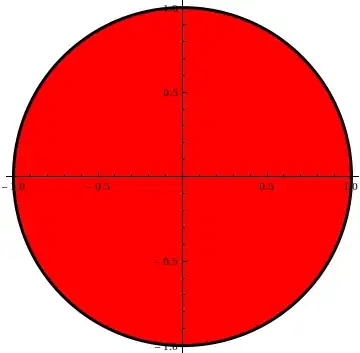
I have a very simple question but I am new with Mathematica. I made a circle on a parametric plot and I made the line black. I want to make the inside of the circle on the parametric plot red. So the result should be a red-filled circle with a black outline on an x and y axis.

Code:

ParametricPlot[{Cos[u], Sin[u]}, {u, 0, 2 Pi}, PlotStyle -> Black]
J. M.'s missing motivation
  • 124,525
  • 11
  • 401
  • 574
Michelle
  • 171
  • 1
  • 3

6 Answers6

16

One simple way to go about it:

ParametricPlot[{Cos[u], Sin[u]}, {u, 0, 2 Pi}] /.
  Line[l_List] :> {{Red, Polygon[l]}, {Black, Line[l]}}

filled circle

If you want the border to be a tad more prominent:

ParametricPlot[{Cos[u], Sin[u]}, {u, 0, 2 Pi}] /. 
  Line[l_List] :> {{Red, Polygon[l]}, {Directive[AbsoluteThickness[3], Black], Line[l]}}
filled circle with thicker border

An alternative would be

ParametricPlot[{Cos[u], Sin[u]}, {u, 0, 2 Pi}] /. 
  l_Line :> {EdgeForm[Directive[AbsoluteThickness[3], Black]], Red, FilledCurve[l]}

(after some prompting by Sjoerd)

All three snippets act by replacing any Line[] object produced by ParametricPlot[], via ReplaceAll[] (/.) and RuleDelayed[] (:>). With the first two, the instruction reads as "replace any Line[]s present with a Red Polygon[] (for filling the inside) and a Black Line[] (with a thickening through AbsoluteThickness[] in the second version)", the Polygon[] object coming first in the right-hand side of the RuleDelayed[] so that it is rendered first before the Line[].

The third version makes use of the FilledCurve[] primitive, which is new in version eight. EdgeForm[] is used to make the edges of the FilledCurve[] object black and thick, and Red colors the filling red.

J. M.'s missing motivation
  • 124,525
  • 11
  • 401
  • 574
6

What about

ListLinePlot[Table[{Cos[u], Sin[u]}, {u, 0, 2 Pi, .05}], 
PlotStyle -> {Thick, Black}, Filling -> Axis, FillingStyle -> Red, 
AspectRatio -> 1, Axes -> None, Frame -> True]

enter image description here

If you insist on ParametricPlot

Show[ParametricPlot[{{r Cos[u], r Sin[u]}}, {u, 0, 2 Pi}, {r, 0, 1}, 
PerformanceGoal -> "Quality", Mesh -> 0, 
ColorFunction -> Function[{x, y, u, v}, Red], 
ColorFunctionScaling -> False, BoundaryStyle -> None, 
Exclusions -> {Cos[u] == 1}, Axes -> False, ExclusionsStyle -> Red],
ParametricPlot[{{ Cos[u], Sin[u]}}, {u, 0, 2 Pi}, 
PerformanceGoal -> "Quality", 
PlotStyle -> Directive[Black, Thickness[0.01]], Axes -> False]]

enter image description here

PlatoManiac
  • 14,723
  • 2
  • 42
  • 74
6

Two-parameter ParametricPlot with Exclusions:

 ParametricPlot[{r Cos[t], r Sin[t]}, {t, 0, 2 Pi}, {r, 0, 1}, 
 Mesh -> None, PlotStyle -> Directive[Red, Opacity[1]],
 Exclusions -> {r == 1},
 ExclusionsStyle -> Directive[EdgeForm[{AbsoluteThickness[3], Black}]],
 BoundaryStyle -> None, (* thanks to J.M.'s comment *)
 PlotPoints -> 100]

enter image description here

kglr
  • 394,356
  • 18
  • 477
  • 896
3

Using Show with a parametric region plot and a parametric curve plot:

Show[
 ParametricPlot[v {Cos[u], Sin[u]}, {u, 0, 2 Pi}, {v, 0, 1},
  Mesh -> False, PlotStyle -> Directive[Red, Opacity[1]],
  BoundaryStyle -> None],
 ParametricPlot[{Cos[u], Sin[u]}, {u, 0, 2 Pi},
  PlotStyle -> {AbsoluteThickness[8], Black}],
 Frame -> False, Axes -> False, ImageSize -> 240]

enter image description here

Chris Degnen
  • 30,927
  • 2
  • 54
  • 108
  • 1
    I was about to suggest using BoundaryStyle -> Black, but then thought to try to remove the axes first... there's a radius cutting into the circle. Maybe include BoundaryStyle -> None in the options? – J. M.'s missing motivation Sep 19 '12 at 09:14
  • 1
    PlotStyle->Directive[Opacity[1],Red] gets rid of the default opacity (Opacity[0.2]). – kglr Sep 19 '12 at 10:23
2

Great question. Too bad I missed it until today. Anyway, after viewing the existing solutions I think have something to offer. It is a variation of Chris Degnen's method, but I control Mesh instead of using a second plot and give a simpler form for PlotStyle.

ParametricPlot[v {Cos[u], Sin[u]}, {u, 0, 2.1 Pi}, {v, 0, 1},
 Mesh -> {0, {1}},
 MeshStyle -> Thick,
 PlotStyle -> Opacity[1, Red],
 BoundaryStyle -> None,
 Axes -> None
]

enter image description here

Mr.Wizard
  • 271,378
  • 34
  • 587
  • 1,371
1

Using Cases to extract plot data:

ParametricPlot[{Cos[t], Sin[t]}, {t, 0, 2 Pi}] //
  Cases[#, Line[x_] -> x, Infinity] & //
 Graphics[{EdgeForm[{Black, Thick}], Red, Polygon[First@#]}, Axes -> 1] &
chyanog
  • 15,542
  • 3
  • 40
  • 78