5

I'm new to Mathematica and am unfamiliar with the notebook interface. I haven't been able to delete cells with error messages.

For example, when I try to ask Mathematica to compute something, it returns a message like

Solve::nsmet: This system cannot be solved with the methods available to Solve

when it fails. Once I see that, instead of proceeding to the next line, I would like to highlight that error message (along with the erroneous command) and delete it. But Mathematica won't let me do it.

How do I do this the right way?

rm -rf
  • 88,781
  • 21
  • 293
  • 472
Lemon
  • 631
  • 8
  • 18

2 Answers2

15

A notebook consists of a collection of input and output lines.

enter image description here

The output lines are where your results appear, they're not the results themselves. You can edit output lines, but then they become new input lines instead. Mathematica will remember the result from the now disappeared output line, and you can always get it back with the function

a = Out[n]  

So, editing or deleting a result only deletes its representation, not the content. Even when you deleted a result in the notebook you can always recall it.


Further reading
Notebook basics in Documentation Center
Notebooks and documents in Tutorial Collection

stevenvh
  • 6,866
  • 5
  • 41
  • 64
2

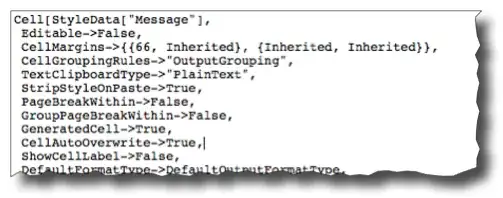
The error messages generated in the notebook use the "Message" style from the stylesheet. If you look at the corresponding entry in Core.nb (base definitions), you'll find that cells of this type have Editable -> False and CellAutoOverwrite->True:

What this means is that you cannot select the contents and edit it (or erase it), which is why your attempts failed. In addition, you don't have to delete your incorrect attempt and try again — you can just fix your mistake (typo/syntax error/whatever) and re-evaluate the input and this cell will be automatically overwritten (and will disappear if there are no errors).


Since you're new, you might also find this answer useful in learning some basic shortcuts to navigate around the notebook.

rm -rf
  • 88,781
  • 21
  • 293
  • 472