23

Bug introduced in 10.4 or earlier and persisting through v11.3 (misleading documentation inconsistency)


According to the documentation it is a basic unit for size spec. WindowSize and ImageSize says:

enter image description here

I think the reasoning below proves that documentation is not correct in this fundamental matter:

  1. Assuming PP is this the same what Wikipedia calls Point(in typography)?

  2. Assuming: PP is this the same what dot from dpi - dots per inch is

  3. The relation between pixel and PP is:

    (1.) ==> 1 pp = 1/72inch

    that and (2.) ==> relation 'pp:px' is 1:1 only for 72 dpi screens

  4. I have 96 dpi screen (according to facts and to what MMA says Last /@ CurrentValue[$FrontEnd, {"ScreenInformation"}])

    with 2560 x 1440 resolution then

    CreateDocument[{}, WindowSize -> {2560, 200}] should not have full screen width? Right? It could have had if I had 72dpi screen.


Worth to mention that for fonts MMA by default assumes you have 72 dpi screen: Fontsize is too small. Is that the case for everything else too?

That would be a very logical explanation (disappointing though), my tests are confirming that:

Framed[Grid[{{
       "This Framed is 30pp tall:"
        Framed[{}, ImageMargins -> 0, ImageSize -> {Automatic, 30}],
       #
       }},
     Alignment -> {Left, Center}, Spacings -> {0, 0}
     ], FrameMargins -> 0] & /@ {
   Style["Öj - 30pp font and default assumed 72dpi", FontSize -> 30],
   Style["Öj - 30pp font and automatic dpi ", FontSize -> 30, 
    FontProperties -> {"ScreenResolution" -> Automatic}]
   } // Column

enter image description here

So the first line shows that ImageSize and FontSize are consistent. And since font is ignoring your dpi then ImageSize is consistent in ignoring ;-).

This is a mess. What can I do? Changing global Magnification is not an option because your user get used to default font sizes in Input/Output etc, yet I want to display well sized Labels and Grids in GUI. Moreover, WindowSize will not be affected by Magnification.

For fonts I can define styles with FontProperties -> {"ScreenResolution" -> Automatic} inside but how can I establish a proper interpretation of ImageSize and friends?

Do I have to CurrentValue["ScreenResolution"][[1]] / 72 prefix everywhere? :D


Related topics:

Kuba
  • 136,707
  • 13
  • 279
  • 740
  • 2
    Alpha says that there are 72 points in an inch, so I'm inclined to believe Mathematica uses that convention as well. (This is consistent with the fourth entry in the screenshot.) – J. M.'s missing motivation Mar 12 '16 at 09:16
  • @J.M. Where is the flaw then? – Kuba Mar 12 '16 at 09:19
  • I would guess that Mathematica again wants to be clever about the whole thing and does not use a 1:1 ratio for ppi (Pixel per Inch) to dpi because it knows that your screen does not have a 72 dpi screen but a 96 dpi screen. Most people would probably assume that WindowSize -> {2560, 200} gave them a full screen windows on a 2560 px screen regardless of the pixel density. – Sascha Mar 12 '16 at 10:14
  • 3
    Regarding (1) it is true that pt is the same point that you link to, when I wrote code to convert graphics to SVG I based my coordinate system on the pt unit because AbsoluteThickness and other commands use this unit, and it is already supported in SVG/CSS. – C. E. Mar 12 '16 at 10:22
  • @C.E. Sascha J.M. So it means the safe way to go is just to assume that the base unit in FrontEnd is pixel. But when printed it will behave as defined with correct printer points. It will be problematic becuse Printout styles can't directly base on Working and that it is uncommon to set a font size in pixels. But it will be more stable than playing with FontProperties and Magnification, the more that you may be not allowed to do so for cusomer's FrontEnd. – Kuba Mar 12 '16 at 11:31
  • Regarding "assume that the base unit in FrontEnd is pixel", I think that is what I'm always doing. As I never really printed out a notebook, I guess that's why I never found any inconsistency. :) – Silvia Mar 12 '16 at 11:38
  • Yes, unless other specified pixels will always be used. Absolute units like pt are extremely rare for anything but things that are meant to be printed. Web designers never use pt for text or anything else, they use either px or em, which is practically the same thing (in browsers 1 em = 16px by default.) – C. E. Mar 12 '16 at 14:17
  • 2
    You may find enlightening this discussion of the size of 1 pt relative to inches: http://tex.stackexchange.com/questions/200934/why-does-a-tex-point-differ-from-a-desktop-publishing-point – murray Mar 12 '16 at 17:31
  • 2
    good reading, and to bring it full circle, mathematica graphics are fundamentally based on postscript, so it is clearly the postscript 1/72 inch point we are discussing here. – george2079 Mar 12 '16 at 18:10
  • 1
    @Kuba The documentation is actually contradicting itself, if you look under "background and context" on the page for ImageSize you will find this sentence: "Image size values given as explicit numbers are assumed to specify the size in units of pixels." It can't be correct in both places so I would say that you are right that the documentation is flawed. – C. E. Mar 12 '16 at 18:24
  • 3
    for historical reference, mathematica was first developed on the original macintosh which had a 72 dpi screen. So once upon a time a point was a pixel..No excuse for ambiguity in the docs near thirty years later – george2079 Mar 12 '16 at 18:48
  • this stuff always gives me a headache. related: http://mathematica.stackexchange.com/questions/17795/grid-layout-problems-different-sizes-when-rendering-on-mac-and-windows – Mike Honeychurch Mar 12 '16 at 23:55
  • 2
    Related: 58119. Disabling display scaling on high DPI settings should help. I have done this on all my Mma installs and it works very well. – Edmund Mar 15 '16 at 13:06
  • @Kuba ok, that's surprising. Thank you for keeping me updated. – C. E. Apr 04 '16 at 13:56
  • 1
    @C.E. At the top I've included the recent answer. – Kuba Apr 28 '16 at 06:29
  • @Kuba ok, very authoritative. Good to know, and good that they intend to fix the documentation. – C. E. Apr 28 '16 at 08:39
  • I was trying to get some old fonts displaying pixel-perfect in M, so I'm re-investigating this point issue. It seems it's much more messier than I thought. Even inside Windows there are multiple different behaviors. – Silvia Dec 24 '21 at 06:01

3 Answers3

16

There are three kinds of units for measuring on-screen length, i.e. pixels, points and physical units (like inches/centimeters/etc.). For me the confusing part is pixels vs. the so-called "points". Before investigating OP's question, I didn't know that "point" is the size of an ink-point on printer.

I have a screen with the PPI (pixels per inch) as $96\;(\rm{px/in})$. And I have a Microsoft Word installed and I assume its ruler is correct. Inspired by P. Fonseca's comment in chat, I compared Word's ruler and Mathematica's ruler with magnification of 100% and 500% both under unit of "point" (i.e. $\frac{1}{72}$inches) and centimeter. The result is: Word's ruler does display correctly (can be confirmed by comparing with an actual ruler or A4 paper) and acting correctly under magnification. While Mathematica's ruler displays wrongly exactly as if it takes a $\rm{PPI}=72\;(\rm{px/in})$.

Suppose we have a horizon line segment $L$ on screen of length $W_{\rm{px}}$ (measured in pixels). So the same length of $L$ measured in inches should be $$W_{\rm{in}}=\frac{W_{\rm{px}}}{\rm{PPI}}$$. And in "point" it should be $$W_{\rm{pt}}=W_{\rm{in}}\times72\;(\rm{pt/in})=W_{\rm{px}}\frac{72\;(\rm{pt/in})}{\rm{PPI}}$$.

Now if Mathematica uses $\rm{PPI}=72\;(\rm{px/in})$, we will get $W_{\rm{pt}}=W_{\rm{px}}\times1\;(\rm{pt}/\rm{px})$ on ruler, i.e. a pixel-wise alignment, which is exactly what I observed. (Also because of which I always thought the ruler's unit "point" means it's measuring in pixels..)

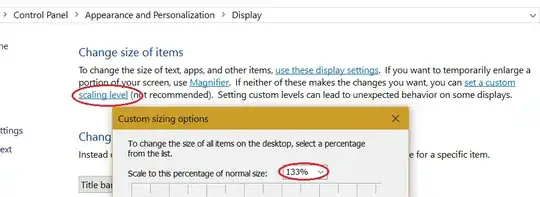
So one (ugly) solution on Windows is to set a system-wise "custom scaling level" (the drawback is quite a lot of applications, including Mathematica, will appears "blurred" at a non-100% scaling level):

custom scaling level

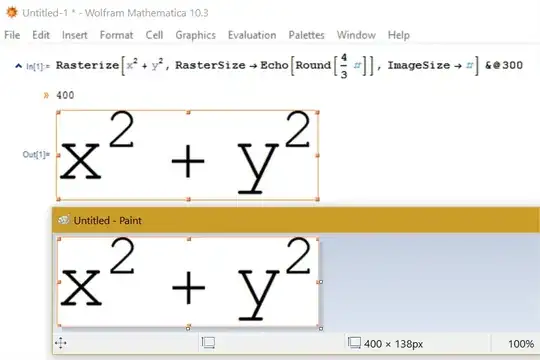
Now we can check that an image of $300\,\rm{pt}$ width does take $400\,\rm{px}$ on my $\rm{PPI}=96$ screen:

enter image description here

Silvia
  • 27,556
  • 3
  • 84
  • 164
  • Thanks for the investigation :) Could you refer to the questions I've asked. Also, am I right in that comment about safe assumption which is to consider them pixels in FE world? – Kuba Mar 12 '16 at 18:54
  • 2
    @Kuba 1 point is 1 pixel in the notebooks, all my experience with creating figures for publications supports this. My experience of exporting plots and stuff to pdf also supports the idea, that vector graphics are generated with 72 dpi in mind (e.g. make a 72pt wide image with a 12pt sized letter, include that in a TeX source, telling it to scale the image to 1 inch wide, and the size of the letter will match the size of the surrounding text, which I have also at 12pt at the moment). – LLlAMnYP Mar 12 '16 at 19:24
  • @Kuba I guess Mathematica detected the resolution correctly but doesn't really use it in most place. And for the last question, if you are on Windows 8+ and can live with the system-wise non-standard scaling level, you don't have to change anything in Mathematica. (But if it were me, I won't do this. I can live with small font, happy to have pt = px, but never want a blurred desktop especially when I wear my glasses.) – Silvia Mar 12 '16 at 20:17
  • @LLlAMnYP Could you post your comment? I will gladly accept it. The point is to leave a short summary of what to expect, for future readers. – Kuba Jun 22 '17 at 09:28
  • @Kuba here you go. – LLlAMnYP Jun 22 '17 at 10:05
5

My two cents: The one issue that massively adds to the confusion is that Wolfram continues to set the font resolution to a fixed value of 72dpi on Windows machines, even though the system in principle knows the correct resolution: Setting the ScreenResolution parameter to Automatic fixes the font-scaling issue on Windows machines. The fact that this error is still not corrected even in Mma11 is a scandal, in my opinion. It's not as if the remedy is not well known, let alone hard to implement for Wolfram. Also see my answer here.

Pirx
  • 4,139
  • 12
  • 37
  • 2
    The problem with FontProperties -> {"ScreenResolution" -> Automatic} is that it doesn't affect ImageSize and WidowSize which are both said to be in printers points (in many places but not everywhere :)). And to fix them we would need to use Magnification globally. Or we can say _Size spec is in pixels and Fonts are in pps. Unless we use Mac 144dpi screens, then I'm lost :D – Kuba Aug 11 '16 at 20:36
  • @Kuba: Yeah, I agree, so, yes, the problem isn't that trivial to fix, but it's an issue of Wolfram's own making nevertheless. And it certainly isn't rocket science. Sheesh, this is about getting a couple of scaling factors right! How hard can that be, over the course of a decade or so? ;-) – Pirx Aug 11 '16 at 21:35
3

Disclaimer: I have long forgotten the details of this discussion and haven't really concerned myself with such problems for a while now. For the sake of housekeeping and at Kuba's request I convert my comment-answer into a proper answer.

  • 1 point is 1 pixel in the notebooks.

My experience with creating figures for publications supports this.

My experience of exporting plots and other output to PDF also supports the idea that...

  • Vector graphics are generated with 72 dpi in mind.

This can be tested by...

  1. Making a 72pt wide image with a 12pt sized letter.
  2. Export that, e.g. as PDF.
  3. Include that in a TeX source, setting the width to 1 inch.
  4. The size of the letter will match the size of the surrounding text (if it's 12pt, of course).

Kuba: Edit 28. IV 2016, Reply from WRI:

The developer replied today to the documentation question we are having.

He agrees the statements in the 2 reference pages can be clarified.

[...]

In terms of which one is right, he said, 'We don't yet support HiDPI under Windows. On Mac, we do the right thing, which is that '1' is effectively 72 dpi, and Retina displays are treated as effectively 144dpi.' Hopefully, this clears up your question about the documentation inconsistency to an extent.

Thank you again for your patience while our developers try to clarify the documentation.

LLlAMnYP
  • 11,486
  • 26
  • 65
  • I'm now playing with Printout and Magnification for Printout is set to 0.72, but then your pdf test should've failed. What am I missing :P – Kuba Oct 25 '17 at 13:23
  • Indeed when I check prinout preview for wordpad and mma, they differ. But in different way than appearance :) The former ratio is 72/96 and the latter 72/100 :-D – Kuba Oct 25 '17 at 13:31