20

I am trying to quickly calculate the intersection of polygons with more than 6,000 points. A compiled solution would be preferable.

Here is one example of the problem:

o = First[
       First[ImportString[
         ExportString[
          Style["O", Italic, FontSize -> 24, FontFamily -> "Times"], 
          "PDF"], "PDF", "TextMode" -> "Outlines"]]];

p = First[
   First[ImportString[
     ExportString[
      Style["P", Italic, FontSize -> 24, FontFamily -> "Times"], 
      "PDF"], "PDF", "TextMode" -> "Outlines"]]];

Graphics[{EdgeForm[Black], ColorData["Crayola", "Sunglow"], {o, p}}]

Another:

    Module[{a = FilledCurve[{{Line[{{2, 3}, {0.8125, 0.625}}],
      BezierCurve[{{0.6875, 0.375}, {0.375, 0.25}, {1.125, 0.25}}, 
       SplineDegree -> 2], 
      BezierCurve[{{0.8125, 0.375}, {0.9375, 0.625}}],
      Line[{{1.3125, 1.375}, {2.4375, 1.375}, {2.8125, 0.625}}],
      BezierCurve[{{2.9375, 0.375}, {2.625, 0.25}, {3.625, 0.25}}, 
       SplineDegree -> 2], 
      BezierCurve[{{3.3125, 0.375}, {3.1875, 0.625}}]},
     {Line[{{1.875, 2.5}, {1.375, 1.5}, {2.375, 1.5}}]}}]}, 
 Graphics[Table[{EdgeForm[Black], Hue[RandomReal[]], 
    Translate[Rotate[Scale[a, RandomReal[5]], RandomReal[2 Pi]], 
     RandomReal[20, {2}]]}, {30}]]]

So in the problem is: how to intersect of multiple (or two at a time) polygons (with or without) holes (and with up to 6000 points in their triangulations)?

I have tried using the Weiler–Atherton clipping algorithm but my implementation was too slow (anything relying on bitmaps is too slow). Perhaps there is a solution that uses LibraryLink to harness a standard library? I found one here http://www.cs.man.ac.uk/~toby/alan/software/gpc.html

Updates

It was suggested in the comments that GraphicsMesh be used but this is way too slow in even 100 points and doesn't handle holes:

a = Polygon@RandomReal[1, {100, 2}];
b = Polygon@RandomReal[1, {100, 2}];
AbsoluteTiming[c = Graphics`Mesh`PolygonIntersection[a, b]]
Graphics[{Blue, a, Red, b, Yellow, Polygon /@ List @@ c}]
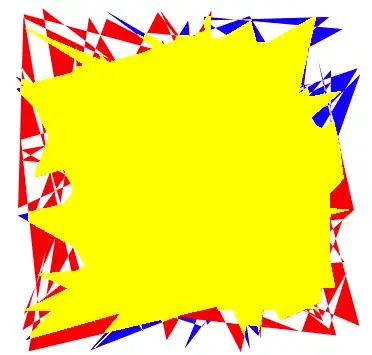
enter image description here

Here is a sample input polygon for the letter G:

 G = Polygon[{{-0.466796, -0.0328696}, {-0.466336, 0.0186753}, {-0.463089, 
   0.0682893}, {-0.459379, 0.100181}, {-0.451495, 
   0.146241}, {-0.444693, 0.175763}, {-0.432171, 0.21827}, {-0.422278,
    0.245423}, {-0.411147, 0.271628}, {-0.39878, 0.296886}, {-0.37791,
    0.332996}, {-0.362451, 0.355885}, {-0.345756, 
   0.377826}, {-0.327823, 0.398819}, {-0.300607, 
   0.426707}, {-0.281598, 0.443668}, {-0.251786, 
   0.466663}, {-0.231046, 0.480362}, {-0.198638, 
   0.498465}, {-0.176168, 0.508902}, {-0.141165, 
   0.522112}, {-0.116964, 0.529288}, {-0.0793649, 
   0.537605}, {-0.0534337, 0.541519}, {-0.013239, 
   0.544944}, {0.0144228, 0.545596}, {0.0521431, 
   0.544603}, {0.0973423, 0.540566}, {0.140374, 0.533423}, {0.181237, 
   0.523175}, {0.212366, 0.512741}, {0.249327, 0.496903}, {0.283288, 
   0.47845}, {0.310993, 0.459561}, {0.336333, 0.438254}, {0.359309, 
   0.414528}, {0.379921, 0.388384}, {0.398168, 0.359821}, {0.414052, 
   0.328839}, {0.427571, 0.295438}, {0.438725, 0.259618}, {0.444849, 
   0.234395}, {0.449921, 0.208096}, {0.309296, 0.208096}, {0.299494, 
   0.244597}, {0.29219, 0.264834}, {0.283819, 0.283824}, {0.267496, 
   0.312703}, {0.256279, 0.328367}, {0.243996, 0.342784}, {0.235215, 
   0.351703}, {0.221153, 0.364041}, {0.206024, 0.375133}, {0.189953, 
   0.385077}, {0.161346, 0.399325}, {0.14309, 0.406478}, {0.124015, 
   0.412584}, {0.0904026, 0.420435}, {0.0691431, 0.42375}, {0.0470644,
    0.426018}, {0.00844619, 0.427471}, {-0.0284694, 
   0.425533}, {-0.0551123, 0.421535}, {-0.0892443, 
   0.412813}, {-0.121786, 0.400214}, {-0.152737, 
   0.383739}, {-0.182097, 0.363387}, {-0.209866, 
   0.339158}, {-0.235987, 0.311056}, {-0.248019, 
   0.295569}, {-0.259191, 0.279133}, {-0.269503, 
   0.261747}, {-0.278956, 0.243411}, {-0.291525, 
   0.214127}, {-0.298829, 0.193418}, {-0.305275, 
   0.171759}, {-0.313331, 0.137489}, {-0.321066, 
   0.0884734}, {-0.325362, 
   0.0356589}, {-0.32624, -0.0188127}, {-0.324105, -0.0667413}, \
{-0.319123, -0.112199}, {-0.311294, -0.155187}, {-0.300618, \
-0.195705}, {-0.294213, -0.215037}, {-0.28327, -0.242878}, \
{-0.270726, -0.269329}, {-0.25151, -0.302436}, {-0.235136, \
-0.325433}, {-0.216766, -0.346138}, {-0.196376, -0.3645}, {-0.173967, \
-0.380518}, {-0.149538, -0.394191}, {-0.123089, -0.405521}, \
{-0.104334, -0.411771}, {-0.0846818, -0.41698}, {-0.0535202, \
-0.422841}, {-0.0203389, -0.426357}, {0.0148622, -0.427529}, \
{0.0509528, -0.426065}, {0.0853497, -0.421672}, {0.118053, \
-0.414352}, {0.149062, -0.404104}, {0.171208, -0.394496}, {0.1924, \
-0.383241}, {0.212641, -0.370339}, {0.231928, -0.35579}, {0.250217, \
-0.339572}, {0.266916, -0.321406}, {0.281843, -0.301207}, {0.290811, \
-0.286611}, {0.302785, -0.263022}, {0.312987, -0.237399}, {0.321418, \
-0.209743}, {0.326054, -0.190175}, {0.331531, -0.159129}, {0.334198, \
-0.137302}, {0.336722, -0.102866}, {0.337421, -0.0787786}, {0.174296, \
-0.0787786}, {0.0111708, -0.0787786}, {0.0111708, 
   0.0393464}, {0.238983, 0.0393464}, {0.466796, 
   0.0393464}, {0.466796, -0.517529}, {0.377235, -0.517529}, \
{0.343661, -0.386923}, {0.320697, -0.411362}, {0.294314, -0.43722}, \
{0.26921, -0.459296}, {0.245385, -0.477589}, {0.222841, -0.492099}, \
{0.200503, -0.503935}, {0.174026, -0.515381}, {0.145794, -0.524995}, \
{0.108033, -0.534437}, {0.0758485, -0.539931}, {0.0331483, \
-0.544223}, {-0.0029876, -0.545596}, {-0.0362581, -0.545124}, \
{-0.0713561, -0.542341}, {-0.10544, -0.537172}, {-0.138509, \
-0.529619}, {-0.170564, -0.51968}, {-0.191371, -0.511729}, \
{-0.211727, -0.502717}, {-0.231632, -0.492646}, {-0.260644, \
-0.475551}, {-0.279422, -0.462829}, {-0.29775, -0.449047}, \
{-0.315626, -0.434205}, {-0.324396, -0.426386}, {-0.34277, \
-0.405934}, {-0.367955, -0.373398}, {-0.390289, -0.338633}, \
{-0.403595, -0.314218}, {-0.415633, -0.288813}, {-0.426404, \
-0.262417}, {-0.440185, -0.220965}, {-0.447788, -0.192092}, \
{-0.456817, -0.146926}, {-0.461252, -0.115577}, {-0.465529, \
-0.0666954}, {-0.466796, -0.0328696}}];
Tom Wellington
  • 1,539
  • 1
  • 12
  • 19
  • Great question! I've often wondered this myself... – M.R. Sep 27 '12 at 01:08
  • http://mathematica.stackexchange.com/questions/7174/non-convex-polygon-union-and-intersection-functions only solved unions – M.R. Sep 27 '12 at 01:09
  • The library you point to appears to be an outstanding option, particularly if you think you'll need to solve this problem many times and quickly each time. As a library, one could probably link to it relatively easily via a MathLink program. Also, the parent page points to a java port, which could be linked to via JLink. Both of those options would take a bit of time, though. (By parent page, I mean here: http://web.archive.org/web/20090213122910/http://www.seisw.com/GPCJ/GPCJ.html – Mark McClure Sep 27 '12 at 01:56
  • What about using some existing java routine, see: http://mathematica.stackexchange.com/questions/6144/looking-for-longest-common-substring-solution/6376#6376, http://sourceforge.net/projects/geom-java/ and http://web.archive.org/web/20090213122910/http://www.seisw.com/GPCJ/GPCJ.html – s0rce Sep 27 '12 at 03:45
  • 1
    Theres ``GraphicsMesh`PolygonIntersection`` to check out perhaps? – Rojo Sep 27 '12 at 04:02
  • @rojo thanks, I looked at that but it doesn't work well enough. – Tom Wellington Sep 27 '12 at 04:47
  • @s0rce I'm on OSX 10.8 and when I run the reloader I get the error: JCompileLoad::cmperr: The following compilation errors were encountered: sh: /Users/tw/Documents/Mathematica.app/SystemFiles/Java/MacOSX-x86-64/bin/javac: No such file or directory – Tom Wellington Sep 27 '12 at 05:04
  • @s0rce Has anyone on Mac been able to get that reloader working? – Tom Wellington Sep 27 '12 at 05:16
  • I suggest that a custom program using openCL 2D mode to do all the tests in parallel might be a viable solution. Go here for video introduction. – Fred Daniel Kline Sep 27 '12 at 06:43
  • @freddaneilkline Opencllink is very dicey, even simple questions on this are difficult to answer. Not to mention he probably wants a solution that is device independent. – M.R. Sep 27 '12 at 06:57
  • @M.R., I posted my comment as an answer because I wasn't aware of your comment. (name misspelled) – Fred Daniel Kline Sep 27 '12 at 07:14
  • Some of these links are broken or very old. I'd sugest if someone knows the algorithm it would be useful to summarise here for archive purpose instead of just using links. – george2079 Sep 27 '12 at 14:28
  • I think it's more difficult in your examples than just calculating intersection of polygons because of involving Bezier/spline curves in almost all modern computer fonts. – Silvia Oct 08 '12 at 15:55

2 Answers2

14

Graphics`Mesh`PolygonIntersection[] is not documented; it builds full polygon triangulations. To handle holes, you can use:

PolygonIntersection[a, b, FillingMethod -> "OddEvenRule"]

or

PolygonIntersection[a, b, FillingMethod -> "WindingRule"]

To create the visualization:

Graphics`Mesh`MeshInit[];
a = Polygon@RandomReal[1, {100, 2}];
b = Polygon@RandomReal[1, {100, 2}];
c = Graphics`Mesh`PolygonIntersection[a, b, FillingMethod -> "OddEvenRule"];
Graphics[{Blue, Opacity[.5], a, Red, Opacity[.5], b, EdgeForm[Black], FaceForm[Yellow], 
          Polygon /@ List @@ c}]

intersections of two self-intersecting polygons

J. M.'s missing motivation
  • 124,525
  • 11
  • 401
  • 574
  • 3
    @rm-rf Alternatively, executing Graphics`Mesh`MeshInit[] loads the full context, including any dependencies. – Mark McClure Sep 27 '12 at 19:16
  • Hey Ulises! Welcome to the party! Got any more hidden gems for us? – Yves Klett Sep 27 '12 at 20:55
  • 1
    Right, PolygonIntersection[] is defined in the Graphics\Mesh`` context. Just wanted to show which option needed to be set to make it more useful. As pointed out, it is not as fast as we want it to be, that is why is undocumented. Hi Yves!, if you are in town for the technology conference next month, we can discuss hidden and not so hidden features ... – Ulises Cervantes Sep 27 '12 at 21:56
  • @UlisesCervantes If I try Graphics`Mesh`PolygonIntersection[a, b, FillingMethod -> "OddEvenRule"] I get no result where a and b is defined by Polygon@RandomReal[1, {100, 2}]!! – PlatoManiac Sep 28 '12 at 08:48
  • In Mathematica V8.0.4. (or even 8.0): GraphicsMeshMeshInit[]; a = Polygon@RandomReal[1, {100, 2}]; b = Polygon@RandomReal[1, {100, 2}]; c = PolygonIntersection[a, b, FillingMethod -> "OddEvenRule"]; Graphics[{Blue, a, Red, b, Yellow, Polygon /@ List @@ c}] Valid XHTML. – Ulises Cervantes Sep 28 '12 at 18:09
  • The timing of the previous comment is around 1 order of magnitude slower versus the Java library mentioned before. Part of the reason is because these functions construct full triangulations of the polygons. By the way, sorry for the bad formatting in the previous answer, trying to figure out how to add an image... – Ulises Cervantes Sep 28 '12 at 18:21
  • @UlisesCervantes you should register, you can interact with the site better. – rcollyer Sep 29 '12 at 13:02
0

I worked through this problem some years ago (Sorry I don't have mathematica code to share.) It turns out the most efficient algorithm is the fairly obvious direct approach. (assuming you want a 'precise' result..so rastering wont do)

1) compute all possible edge-edge intersections

2) decompose original polygons into edge sets on those boundaries

3) order edge sets by angle at each intersection point

4) construct sub-regions by following smallest angle at each intersection point

finally depending on what you want as output do an insideness test on each sub-region against the original input polygons.

The approaches discussed so far (meshing, etc) address the last parts, while for the problem posed with thousands of edges step 1 is by far the most expensive part of the calculation. Meshing actually makes that worse as now you have a least 2-3 x as many edges to deal with.

Now for the original example (Not the random table thing) we have thousands of mostly small segments. For this case you can dramatically reduce the O(N^2) edge-intersection problem by binning edges onto a regular grid and only check those edges that are near enough each other to possibly intersect.

george2079
  • 38,913
  • 1
  • 43
  • 110