Normally, in Global context, these 2 are equivalent
eqn = "r-x";
r = -2;
Plot[ToExpression[eqn], {x, -5, 5}]
and
eqn = r - x;
r = -2;
Plot[eqn, {x, -5, 5}]
But inside Manipulate (which is a DynamicModule) and assuming r is a control variable, then these are not equivalent. There is some context or scope change that is causing this which I do not fully understand. i.e. the following do not work the same way:
Manipulate[

 eqn = "r-x";
 Plot[ToExpression[eqn], {x, -5, 5}],
 {{r, -1, "r"}, -2, 2, .1, Appearance -> "Labeled"},
 TrackedSymbols :> {r}

 ]
and
Manipulate[

 eqn = r - x;
 Plot[eqn, {x, -5, 5}],
 {{r, -1, "r"}, -2, 2, .1, Appearance -> "Labeled"},
 TrackedSymbols :> {r}

 ]
The reason this would be useful, is that one can use an InputField, to enter an equation as a String, then convert it to an Expression and use it inside Manipulate, where the equation can have in it a variable which happens to be a control variable. Here is an example:
Manipulate[
 Plot[ToExpression[eqn], {x, -5, 5}],
 Grid[{
   {"r=", Control[{{r, -1, ""}, -2, 2, .1, Appearance -> "Labeled"}]},
   {"eqn", InputField[Dynamic[eqn], String], Dynamic[eqn]}
   }],
 {{r, -2}, None},
 {{eqn, "r-x"}, None}
 ]
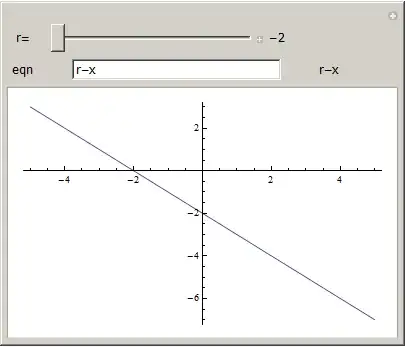
The idea is that one can enter an expression in the InputField with r in it, and then change r using the slider afterwords.
The current solution to this is shown in this Prevent interdependence of controls but it is a work around and it helps if one understands better why the above example does not produce the same result when used inside Manipulate.


r, the control forrdecouples from the rest and does not affect things any more. – Leonid Shifrin Sep 28 '12 at 15:57risn't it supposed to stop depending onr? If I typerback and press return it works again for me – Rojo Sep 28 '12 at 16:03reither in theInputFieldor by the slider - which is probably not what was asked. – Leonid Shifrin Sep 28 '12 at 16:05InputFieldandSlidercontrol the same parameter simultaneously". – Leonid Shifrin Sep 28 '12 at 16:10