Update: Speaking of "pie slices", you can use SectorChart3D directly as follows:
ClearAll[sliceF]
sliceF[opts : OptionsPattern[]][x_, y_, r_: {0, 2}, h_: 2] :=
 SectorChart3D[{{(y - x) Degree, r[[2]], h}, {(360 - y + x) Degree ,
    r[[2]], h}}, SectorOrigin -> {{x Degree}, r[[1]]}, opts]

sliceF[BoxRatios -> 1, Axes -> True][30, 70]
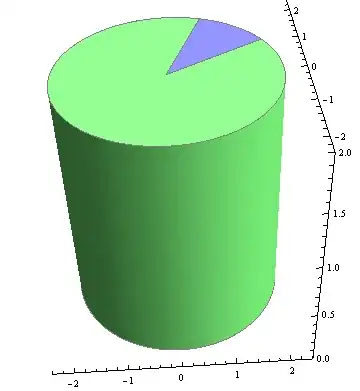
sliceF[BoxRatios -> 1, Axes -> True][30, 70, {1, 2}]

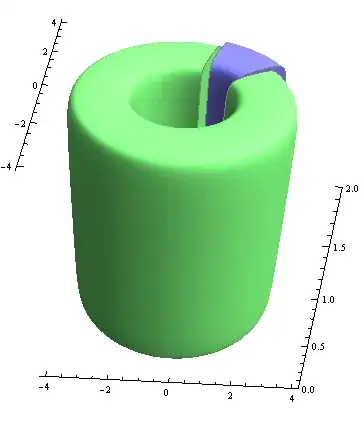
sliceF[BoxRatios -> 1, Axes -> True,  ChartElementFunction ->
  ChartElementDataFunction["ProfileSector3D", "Profile" -> 5]][30, 70, {3/2, 2}]
Original post:
ClearAll[csF]
csF[opts : OptionsPattern[]][angle_: {0, Pi/2}, radii_: {0, 1},
  minmaxheight_: {0, 1}, style_: {EdgeForm[], Opacity[1], Orange}] :=
 Graphics3D[{## & @@ style,
   ChartElementData["CylindricalSector3D"][{angle, radii, minmaxheight}, 0]}, opts]

csF[][{0, 3 Pi/4}]

csF[Boxed -> False, ImageSize -> 400][{0, 3 Pi/4}, {.5, 1}]

Panel@Row[csF[ Boxed -> False, ImageSize -> 200][{0, #}, {0, 1}, {0, 1},
  {EdgeForm[]}] & /@ (Pi {1/3,  3/2, 4/3})]
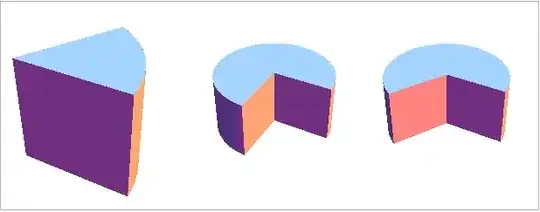
Panel@Row[csF[ Boxed -> False, ImageSize -> 200][{0, Pi/4}, {#, 1}, {0, 1},
   {EdgeForm[]}] & /@ ({0, 1/3, 2/3})]

Panel@Row[csF[ Boxed -> False, ImageSize -> 200, PlotRange -> {0, 1}][{0,
      Pi/4}, {0, 1}, {#, 1}, {EdgeForm[]}] & /@ ({0, 1/3, 2/3})]


ellipse3D– Jens Apr 17 '16 at 02:34