6

What I'd like to be able to do is dynamically change the axis of a 3D plot inside a manipulate.

For example if I have a function that has three input variables I'd like a 3D plot using 2 of the input variables and be able to manipulate the third. The part that I've had trouble with is making the axis of the plots dynamic.

This is how far I've got:

axes = {{x, 0, 10}, {y, 0, 10}, {z, 0, 10}};
Manipulate[
Plot3D[fun1[x, y, z], {x, 0, 10}, {y, 0, 10}], {z, 0, 
10}, {{axis1, x, "Axis 1"}, axes[[All, 1]], 
PopupMenu}, {{axis2, y, "Axis 2"}, axes[[All, 1]], PopupMenu}]

which gives me

result

Any help would be greatly appreciated.

To be more clear;

The axes I would like to change are the x and y axis on the 3d plot. What I'd like to be able to do is select axis 1 = x and axis 2 = z and have the manipulate change to y.

Cam
  • 1,596
  • 12
  • 20

1 Answers1

5
fun1[x_, y_, z_] := (x - 1) (y - 2) (z - 3);
h[u_, n_] := Complement[{x, y, z}, {u}][[n]]

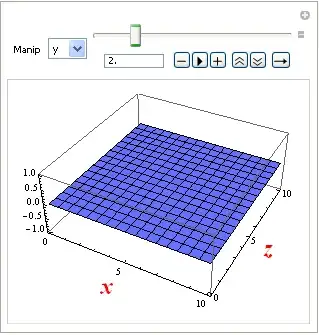
Manipulate[
 Plot3D[fun1[x, y, z] /. m -> m1 /. h[m, 1] -> x /. h[m, 2] -> y, {x, 0, 10}, {y, 0, 10}, 
        Evaluated -> True, AxesLabel -> {Style[h[m, 1], Large, Bold, Red], 
                                         Style[h[m, 2], Large, Bold, Red]}],
 Row[{Control[{{m, z, "Manip"}, {x, y, z}, PopupMenu}],
      Control[{{m1, 0,}, 0, 10}]}]]

Mathematica graphics Mathematica graphics Mathematica graphics Mathematica graphics

Edit

Perhaps this is safer

fun1[x_, y_, z_] := (x - 1) (y - 2) (z - 3);
h[a_, n_] := Complement[{u, v, w}, Position[{x, y, z}, a][[1]]][[n]]

Manipulate[
 Plot3D[fun1[x, y, z] /. m -> m1 /. {x -> u, y -> v, z -> w} /. h[m, 1] -> x /. h[m, 2] ->y, 
       {x, 0, 10}, {y, 0, 10}, Evaluated -> True, 
  AxesLabel -> {Style[h[m, 1], Large, Bold, Red], Style[h[m, 2], Large, Bold, Red]}], 
 Row[{Control[{{m, z, "Manip"}, {x, y, z}, PopupMenu}], 
     Control[{{m1, 0,}, 0, 10}]}]]
Dr. belisarius
  • 115,881
  • 13
  • 203
  • 453
  • Much appreciated belisarius. I think that's what I'm after. – Cam Oct 01 '12 at 04:17
  • I was thinking of something like this where you select the two axes and manipulate the one that's left; Manipulate[ Plot3D[fun1[x, y, m3] /. {m1 -> x, m2 -> y}, {x, 0, 10}, {y, 0, 10}, Evaluated -> True, AxesLabel -> {Style[m1, Large, Bold, Red], Style[m2, Large, Bold, Red]}, PlotRange -> {-100, 100}], {{m1, x, "Axis 1"}, Complement[{x, y, z}, {m2}], PopupMenu}, {{m2, y, "Axis 2"}, Complement[{x, y, z}, {m1}], PopupMenu}, {{m3, 5, Dynamic[Complement[{x, y, z}, {m1, m2}][[1]]]}, 0, 10}] – Cam Oct 01 '12 at 07:31
  • @Cam Selecting only for manipulating it seems the same thing to me – Dr. belisarius Oct 01 '12 at 07:54
  • Yes belisarius in this example that is true. What I want to do ultimately though is have 10 or so inputs, select the x/y axes and have all the others as manipulate controls. Thanks for your help, you've pointed me in the right direction. – Cam Oct 01 '12 at 22:52
  • Cam, were you able to build "have 10 or so inputs, select the x/y axes and have all the others as manipulate controls"? – den.run.ai Apr 28 '14 at 16:01