I want to do a Delaunay triangulation on scattered 3D surface data. Mathematica itself does it only for 2D through the command DelaunayTriangulation[], which gives a triangulation for points in a plane.
I also tried the MathLink package "TetGenLink", which can itself perform a Delaunay triangulation for three-dimensional data. The problem here is that TetGenDelaunay[] produces a triangulation through the inner region of the data, but I can't see how I can manage that the triangulation is only done for the surface (like what is done by MATLAB's DelaunayTri (see this SO question).
Asked
Active
Viewed 5,502 times
8


2 Answers
10
In Version 10, this can be done elegantly in one line:
SeedRandom[400]
pts = RandomReal[5, {400, 3}];
Then:
surftri = RegionBoundary @ TriangulateMesh @ DelaunayMesh @ pts

We can look inside to see that only the surface triangulation remains:
HighlightMesh[surftri, {Style[0, Directive[PointSize[0.015], Blue]], Style[1, Thin, Black],
  Style[2, Opacity[0.7], Cyan]}]


RunnyKine
- 33,088
- 3
- 109
- 176
9
As you state, TetGenDelaunay is for a tetrahedralization of the 3D space of the input data, and you'd then need to extract the surface triangulation. So for TetGenDelaunay there is no way around the tetrahedralization. (But I wonder if this is not also the case for DelaunayTri) TetGen is quite efficient, so maybe this is still an option. Perhaps, depending on the purpose of your computation, you could make use of ListSurfacePlot or RegionPlot3D.
In any case, here is how you'd extract the surface from the tetrahedralization:
Needs["TetGenLink`"]
data3D = RandomReal[{0, 1}, {1000, 3}];
in = TetGenCreate[];
TetGenSetPoints[in, data3D];
out = TetGenTetrahedralize[in, ""];
coords = TetGenGetPoints[out];
(* issue in TetGen interface, thus + 1 *)
surface = TetGenGetFaces[out] + If[$VersionNumber < 9.0, 1, 0];
Graphics3D[GraphicsComplex[coords, Polygon[surface]], Boxed -> False]
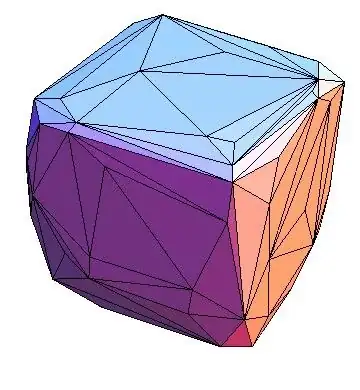
To set vertex colors you can use:
values = Sqrt[Total[coords^2, {2}]];
cf = ColorData["TemperatureMap"];
vc = Developer`ToPackedArray@(List @@@ (cf[#] & /@ values));
Graphics3D[{Opacity[0.5],
 GraphicsComplex[coords, Polygon[surface], VertexColors -> vc]},
 Boxed -> False]

-
-
You're welcome! I initially considered using TetGen too, but I got bogged down in figuring how to pick out the outermost polygons. I didn't know it was this easy! – J. M.'s missing motivation Oct 01 '12 at 13:30
-
-
Looking around, surface triangularization seems to be a quite common task, so yes, I think including such an example in the docs would be nice. – J. M.'s missing motivation Oct 01 '12 at 13:35
-
-
-
-
Isn't the boundary of the Delaunay tetrahedralization just the convex hull of the data, which can be found in much more straightforward ways? – Aug 12 '14 at 07:49
getFaces. It can be corrected by removing the+1fromgetFacesFun@outInstin thechfunction in the demonstration source code. – Szabolcs Dec 13 '12 at 16:05