3

Suppose I have a task that keeps things organized using contexts, so:

windowLength = 10;
Begin["chocolate`"];
data = RandomReal[NormalDistribution[], 100];
ListPlot[MovingAverage[data, windowLength]]
End[]
Begin["vanilla`"];
data = RandomReal[StudentTDistribution[1], 100];
ListPlot[MovingAverage[data, windowLength]]
End[]

Now, if I want to go back and do something in the chocolate context, I have to remember to re-run the line that enters that context or things can get very confusing and mistakes can easily be made.

It would be really neat to instead use wiggle-4 to create a Section called "Chocolate" and for everything in that section to run in the chocolate context. Is there a way to set the context automatically based on the section of the notebook a cell is in?

ArgentoSapiens
  • 7,780
  • 1
  • 32
  • 49

1 Answers1

5

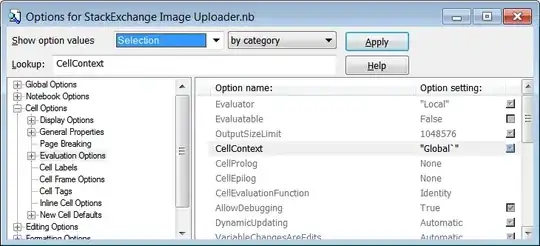
See CellContext:

Mathematica graphics

The below dialog box can be found in Format -> Option Inspector or Edit -> Preferences -> Advanced -> Open Option Inspector.

Mathematica graphics

When using custom CellContext you will need to use Global` to access global symbols, for example:

data = RandomReal[NormalDistribution[], 100];
ListPlot[MovingAverage[data, Global`windowLength]]

If you are hoping to do this automatically for each Section, that functionality does not yet appear to be present (outside of running a script to operate on the Notebook expression to apply these settings). See my own question:

Context unique to each group at a specified level

Also see:

Is there a way to separate variables between multiple notebooks?

Mr.Wizard
  • 271,378
  • 34
  • 587
  • 1,371