208

In today's news, scientists found a bright object on one of Curiosity's photos (it's near the bottom of the picture below). It's a bit tricky to find - I actually spent quite some time staring at the picture before I saw it.

Bright object

The question, then, is how one can systematically search for such anomalies. It should be harder than famous How do i find Waldo problem, as we do not necessarily know what we are looking for upfront!

Unfortunately, I know next to nothing about image processing. Playing with different Mathematica functions, I managed to find a transformation which makes the anomaly more visible at the third image after color separation -- but I knew what I was looking for already, so I played with the numerical parameter for Binarize until I found a value (0.55) that separated the bright object from the noise nicely. I'm wondering how can I do such analysis in a more systematic ways.

img = Import["http://www.nasa.gov/images/content/694809main_pia16225-43_946-710.jpg"];
Colorize @ MorphologicalComponents @ Binarize[#, .55] & /@ ColorSeparate[img]

enter image description here

Any pointers would be much appreciated!

Victor K.
  • 5,146
  • 3
  • 21
  • 34
  • 6
    To me it doesn't look bright so much as it looks less brown than the surroundings. ColorSeparate[ ColorConvert[Import["http://i.stack.imgur.com/z2jmA.jpg"], "HSB"]][[2]] –  Oct 10 '12 at 04:06
  • Great tip, @RahulNarain - extracting saturation does certainly bring it up. I agree that it's not that bright. – Victor K. Oct 10 '12 at 04:12
  • 4
    I should have included an image in my last comment: http://i.stack.imgur.com/cE26t.png –  Oct 10 '12 at 04:14
  • Would it be generally possible to make a map of something like brightness versus x and y measured in pixels. This would show both the noise and the "useful" signal. It seems that in such a case one may also see to what extent this "useful" signal exceeds the noise and have a possibility to rule out the one that is a local fluctuation comparable with the noise. – Alexei Boulbitch Oct 10 '12 at 08:12
  • Anyone know what the weird patterns in the Hue channel might be? Column[ImageAdjust[#] & /@ ColorSeparate[ImageTrim[img, {{500, 110}, {660, 15}}], "HSB"]] – cormullion Oct 10 '12 at 12:08
  • @cormullion: Probably JPEG artifacts. IIRC, JPEG uses fewer bits for the Hue channel. – Niki Estner Oct 10 '12 at 12:12
  • @nikie OK, interesting. It looks like the sort of data that might mean something, but probably doesn't... – cormullion Oct 10 '12 at 12:18
  • @cormullion It seems there's a high-res version of this image on the NASA site: http://www.nasa.gov/images/content/694811main_pia16225-43_full.jpg. With that one, I can't see the "blocky" artifacts in the hue channel. – Niki Estner Oct 10 '12 at 12:33
  • @nikie That's useful to know, thanks. For a minute I thought I could see some road signs ... – cormullion Oct 10 '12 at 13:33
  • 2
    Keep in mind those images are photoshoped from the original B&W images they receive and analyse. Images only get color and non-fisheye compensantion when they are sending out press releases. – gcb Oct 11 '12 at 00:53
  • @gcb Could you provide a link to that info? – Dr. belisarius Oct 14 '12 at 13:19
  • @belisarius sure, there are tons made public. all in their B&W fisheyed grainy glory :) e.g. http://mars.jpl.nasa.gov/msl/multimedia/raw/?rawid=FLA_403429841EDR_F0050104FHAZ00311M_&s=67 – gcb Oct 16 '12 at 01:01
  • 1
    @gcb: Maybe "Hazcam Left" is only for obstacle avoidance? The "mastcam" images on e.g. http://mars.jpl.nasa.gov/msl/multimedia/raw/?s=32 seem to be in color. They're fisheyed, though – Niki Estner Oct 17 '12 at 14:14
  • @belisarius you are correct! http://www.popsci.com/science/article/2012-08/how-mars-rover-curiositys-sundial-will-help-rover-see-mars-living-color – gcb Oct 17 '12 at 16:50
  • Good thing, too. It would have been very disappointing if all the algorithms below would just find things that were photoshoped in there. – Niki Estner Oct 17 '12 at 17:36

2 Answers2

268

Here's another, slightly more scientific method. One that works for many kinds of anomalies (darker, brighter, different hue, different saturation).

First, I use a part of the image that only contains sand as my training set (I use the high-res image from the NASA site instead of the one linked in the question. The results are similar, but I get much saner probabilities without the JPEG artifacts):

img = Import["http://www.nasa.gov/images/content/694811main_pia16225-43_full.jpg"];
sandSample = ImageTake[img, {0, 200}, {1000, 1200}]

enter image description here

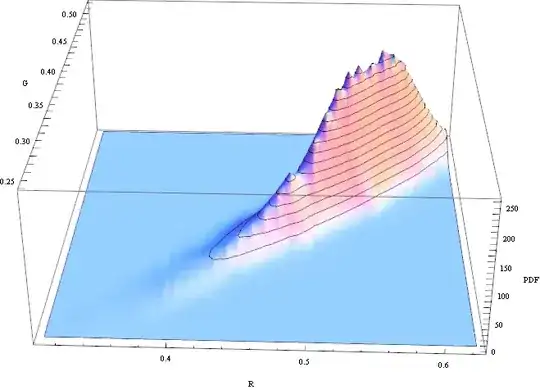
We can visualize the distribution of the R/G channels in this sample:

SmoothHistogram3D[sandPixels[[All, {1, 2}]], Automatic, "PDF",  AxesLabel -> {"R", "G", "PDF"}]
enter image description here

The histogram looks a bit skewed, but it's close enough to treat it as gaussian. So I'll assume for simplicity that the "sand" texture is a gaussian random variable where each pixel is independent. Then I can estimate it's distribution like this:

sandPixels = Flatten[ImageData[sandSample], 1];
dist = MultinormalDistribution[{mR, mG, mB}, {{sRR, sRG, sRB}, {sRG, sGG, SGB}, {sRB, sGB, sBB}}];
edist = EstimatedDistribution[sandPixels, dist];
logPdf = PowerExpand@Log@PDF[edist, {r, g, b}]

Now I can just apply the PDF of this distribution to the complete image (I use the Log PDF to prevent overflows/underflows):

rgb = ImageData /@ ColorSeparate[GaussianFilter[img, 3]];
p = logPdf /. {r -> rgb[[1]], g -> rgb[[2]], b -> rgb[[3]]};

We can visualize the negative log PDF with an appropriate scaling factor:

Image[-p/20]

enter image description here

Here we can see:

  • The sand areas are dark - these pixels fit the estimated distribution from the sand sample
  • Most of the Curiosity area in the image is very bright - it's very unlikely that these pixels are from the same distribution
  • The shadows of the Curiosity probe are gray - they're not from the same distribution as the sand sample, but still closer than the anomaly
  • The anomaly we're looking is very bright - It can be detected easily

To find the sand/non-sand areas, I use MorphologicalBinarize. For the sand pixels, the PDF is > 0 everywhere, for the anomaly pixels, it's < 0, so finding a threshold isn't very hard.

bin = MorphologicalBinarize[Image[-p], {0, 10}]

enter image description here

Here, areas where the Log[PDF] < -10 are selected. PDF < e^-10 is very unlikely, so you won't have to check too many false positives.

Final step: find connected components, ignoring components above 10000 Pixels (that's the rover) and mark them in the image:

components = 
 ComponentMeasurements[bin, {"Area", "Centroid", "CaliperLength"}, 
   10 < #1 < 10000 &][[All, 2]]
Show[Image[img], 
 Graphics[{Red, AbsoluteThickness[5], Circle[#[[2]], 2 #[[3]]] & /@ components}]]

enter image description here

Obviously, the assumption that "sand pixels" are independent gaussian random variables is a gross oversimplification, but the general method would work for other distributions as well. Also, r/g/b values alone are probably not the best features to find alien objects. Normally you'd use more features (e.g. a set of Gabor filters)

Niki Estner
  • 36,101
  • 3
  • 92
  • 152
98

Let's define a filtering chain:

isolateTheSand[x_Image] := ColorNegate@
                           Dilation[Closing[EdgeDetect[EntropyFilter[x, 1], 10], 100], 30];

getBrightObjects[x_Image] := ColorSeparate[ (* Credit Rahul's comment *)
                             ColorConvert[ImageMultiply[x, isolateTheSand[x]], "HSB"]][[2]];

makeMask[x_Image] := Dilation[ImageSubtract[#, DeleteSmallComponents@#] &@(ColorNegate@
                              Binarize@getBrightObjects[x]), 10];  

getBrighAndFoolSand[x_Image] := ImageMultiply[x, makeMask[x]];

And now use it on your image:

getBrighAndFoolSand@Import["https://i.stack.imgur.com/z2jmA.jpg"]

Mathematica graphics

Edit

It's always useful to be able to visualize the steps taken in an image transformation. Designing the process as a set of stages, each one resulting in a visible outcome helps a lot when debugging:

GraphicsRow[{#, isolateTheSand@#, getBrightObjects@#, makeMask@#, getBrighAndFoolSand@#} &@
                                                Import["https://i.stack.imgur.com/z2jmA.jpg"]]

Mathematica graphics

Dr. belisarius
  • 115,881
  • 13
  • 203
  • 453