The Outline stylesheet only seems to cover 6 levels of depth. Is there any way to increase that?
Here's an example. Hitting tab on the last level just indents its content, but doesn't add another level of depth.

The Outline stylesheet only seems to cover 6 levels of depth. Is there any way to increase that?
Here's an example. Hitting tab on the last level just indents its content, but doesn't add another level of depth.

In the following, I take Outline.nb file and
Tab and Shift+Tab key events, for all levels, (3) to reset the counter values to zero for all child levels including level 7.Get Outline.nb file:
ol = ToFileName[{$InstallationDirectory, "SystemFiles", "FrontEnd",
"StyleSheets", "Utility"}, "Outline.nb"];
stylnbk = Import[ol];
The code piece to be inserted into the toolbar:
insertToToolbar = {" | ", TooltipBox[ButtonBox["7", ButtonFunction :>
  (SelectionMove[ButtonNotebook[], After, Cell];
   NotebookWrite[ButtonNotebook[], Cell["XXXX", "Outline7"], All];
   SelectionMove[ButtonNotebook[], All, CellContents]),
 BaseStyle -> "ToolbarButton",
 Appearance -> None, ButtonFrame -> None,
 Evaluator -> Automatic,
 ImageSize -> Automatic, Method -> "Queued"],
"Insert outline level 7.", ActionDelay -> 0.35`]};
and the piece to add the new level:
level7CellGroup = Cell[CellGroupData[{Cell[StyleData["Outline7"],
  CellMargins -> {{320, 10}, {7, 7}},
  ReturnCreatesNewCell -> True,
  StyleKeyMapping -> {"Backspace" -> "Outline6",
    KeyEvent["Tab", Modifiers -> {Shift}] -> "Outline6"},
  CellGroupingRules -> {"SectionGrouping", 110},
  DefaultNewCellStyle -> "Outline7",
  DefaultReturnCreatedCellStyle -> "Outline7",
  ParagraphIndent -> 0, CounterIncrements -> "Outline7",
  MenuSortingValue -> 1500,
  MenuCommandKey -> "7",
  FontFamily -> "Verdana",
  FontSize -> 10,
  CounterBoxOptions -> {CounterFunction :> (CharacterRange[
         "\[GothicA]", "\[GothicZ]"][[#1]] &)}],
 Cell[StyleData["Outline7", "Numbered"],
  CellDingbat -> StyleBox[RowBox[{CounterBox["Outline7"], "."}],
    FontFamily -> "Verdana", TextAlignment -> Right]],
 Cell[
  StyleData["Outline7", "PreviewNumbered",
   StyleDefinitions -> StyleData["Outline7", "Numbered"]]],
 Cell[StyleData["Outline7", "Bulleted"],
  CellDingbat -> "\[FilledVerySmallSquare]"],
 Cell[
  StyleData["Outline7", "PreviewBulleted",
   StyleDefinitions -> StyleData["Outline7", "Bulleted"]]],
 Cell[StyleData["Outline7", "Presentation"],
  CellMargins -> {{350, 10}, {10, 10}}, FontSize -> 20]},
Closed]];
Next, create a new notebook from Outline.nb using a series of replacements
newStylSht = (stylnbk /.
    HoldPattern[DockedCells -> {Cell[BoxData[StyleBox[
        GridBox[{lst : {StyleBox["Outline Level: ", FontWeight -> "Bold"],
               PatternSequence[TooltipBox[__], " | "] ..,
               TooltipBox[__]}}, gbopts__], sbopts__]], cellopts__]}] :>
     DockedCells ->
      {Cell[BoxData[StyleBox[GridBox[{Join[lst, insertToToolbar]}, gbopts],
          sbopts]], cellopts]} /.
   HoldPattern[CounterAssignments -> cas : {{_, 0} ..}] :>
    CounterAssignments -> Insert[cas, {"Outline7", 0}, -1] /.
  HoldPattern[DefaultReturnCreatedCellStyle-> "Outline6"] :>
   Sequence[DefaultNewCellStyle -> "Outline7",
    DefaultReturnCreatedCellStyle-> "Outline6",
    CounterAssignments -> {{"Outline7", 0}}] /.
 HoldPattern[StyleKeyMapping -> skm:{"Backspace" -> "Outline5",
      KeyEvent["Tab", Modifiers -> {Shift}] -> "Outline5"}] :>
  StyleKeyMapping -> Insert[skm, "Tab" -> "Outline7", 1] /.
HoldPattern[Cell[CellGroupData[
    cgd:{Cell["Styles for Outline Documents", "Section"], ___}, opt___]]] :>
 Cell[CellGroupData[Insert[cgd, level7CellGroup, -1], opt]]);
Save the new notebook in the same directory:
flNm = ToFileName[{$InstallationDirectory, "SystemFiles", "FrontEnd",
   "StyleSheets", "Utility"},  "Outline7Levels.nb"];
NotebookSave[newStylSht, flNm]
To install the new stylesheet:
Select Install from the File menu:

.. or open a new notebook and from the Format menu select Edit StyleSheet, and click the button Install Stylesheet:

to invoke the Install Mathematica Item dialog window. In the dialog window, select From File as Source:
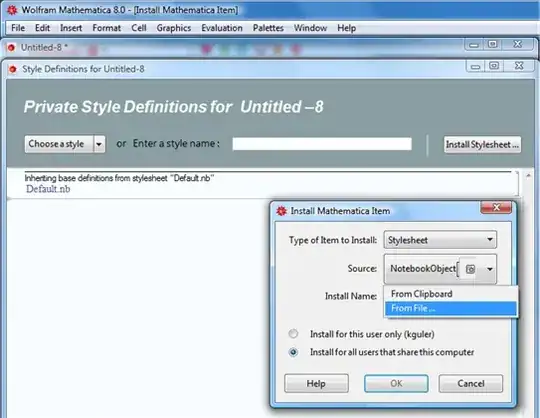
Navigate to the directory where the new stylesheet notebook is saved; select the file Outline7Levels.nb and give it a name, click OK:

The new stylesheet is now available in the Format menu:
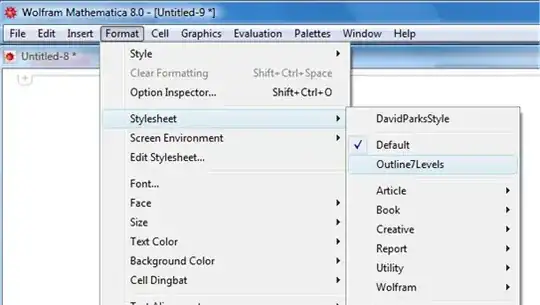
and the Format>>Style and Format>>Screen Environment sub-menus show the new styles:
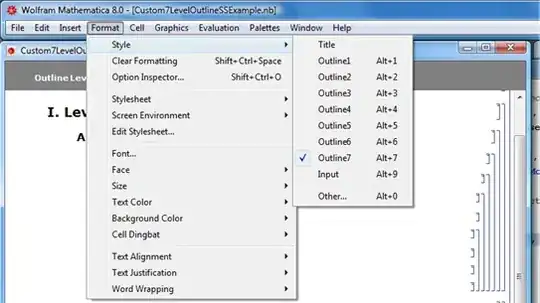


$InstallationDirectory\SystemFiles\FrontEnd\StyleSheets\Utility\Outline.nb(you can view the plain text content if you open it with, say,Notepad). You can probably make your own stylesheet with any number of levels usingOutline.nbas the starting point, but ... this involves more than adding a few lines to this file. – kglr Oct 11 '12 at 17:24