-5

I find the default Mathematica IDE lacking. I am missing a simple project file tree on the left (as in eclipse, visual studio etc.)

The following would be very cool:

All your files (in a given directory) would be displayed in a Mathematica Palette. Clicking them changes to the clicked file or opens it.

Has anyone seen something like this? Can anyone put together a quick proof of concept? It should not be that difficult ...

Mr.Wizard
  • 271,378
  • 34
  • 587
  • 1,371
NoEscape
  • 842
  • 4
  • 14

1 Answers1

23

as J.M. mentions, the Workbench is an Eclipse plug-in (and is available as such).

Now, to display all files in some directory, you can do this:

SetDirectory["~/Documents/Projects/other/playing"]

(this is an arbitrarily selected directory on my machine). Then define

doSomething[fname_] := CreateWindow[
  DialogNotebook[
   {
    TextCell[fname],
    Button["open", NotebookOpen[fname]],
    Button["beep", Beep[]],
    DefaultButton[]
    }
   ]
  ]

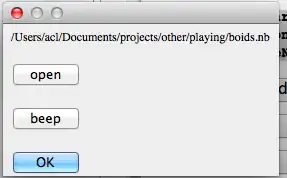
(this will take as an argument the file name and pop up a dialog asking what to do; I've put in placeholder actions here). Then

Grid[Partition[#, 2] &[
  Button[#, doSomething[ToFileName[Directory[], #]]] & /@ 
   FileNames[]]]

gives something like

Mathematica graphics

and clicking on the names brings this up:

Mathematica graphics

Of course this can be greatly elaborated.

acl
  • 19,834
  • 3
  • 66
  • 91
  • Nice. Perhaps FileNames["*.nb"] to avoid DS_Store and PDF opening... – cormullion Oct 12 '12 at 17:17
  • @cormullion you're right, if you want only nb and m files to appear. originally this was part of a palette I have where each file is treated differently according to extension (basically a way for me to avoid having to leave mathematica to manage my output files etc) – acl Oct 12 '12 at 17:21