7

I would like to generate images such as the four below.

That is: some text of different length fit within a Rectangle[] using Graphics[].

But I don't know how to "go to the next line" at the edge of the Rectangle[].

The text could either be a random length of "Lorem Ipsum" or alternatively some random text:

enter image description here


EDIT

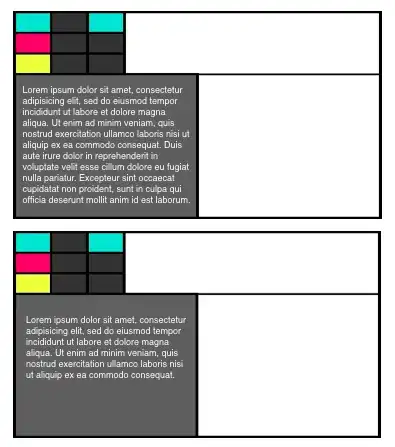
Provided kguler figured out my plan, here it is: I need to fit the text as below. I have yet not been able to place any solution well in my Graphics[], code below.

enter image description here

c0 = {RGBColor[23/85, 29/255, 142/255], RGBColor[244/255, 1, 59/255], 
      RGBColor[1, 0, 32/85], RGBColor[18/85, 72/85, 197/255]}


Graphics[{
  EdgeForm[Thickness[.005]], White,
  Rectangle[{0, 0}, {160, 90}],
  Black, Opacity[.7],
  Rectangle[{0, 0}, {80, 63}],
  Opacity[1],
  Flatten@({Flatten@(Table[
       RandomChoice[{GrayLevel[.15], c0[[#]]}], {3}] & /@ 
     Range[2, 4, 1]),
  MapThread[
   Function[{Xs, Ys},
    Rectangle[{Xs, Ys}, {Xs + 16, Ys + 9}]],
   {Flatten@Table[Range[0, 32, 16], {3}], 
    Flatten@(Table[#, {3}] & /@ 
       Range[63, 81, 9])}]}\[Transpose]),
  Black, Thickness[.005], Line[{{0, 63}, {159, 63}}]}, 
  Method -> {"ShrinkWrap" -> True},
  ImageSize -> 500]
VividD
  • 3,660
  • 4
  • 26
  • 42
500
  • 5,569
  • 6
  • 27
  • 49

2 Answers2

12

Rather than using a Rectangle, consider a Pane that is Framed

text = "Bunch of random text ";

Framed@Pane[StringJoin @@ Table[text, {10}], 300]

enter image description here

The second argument to Pane determines the width in points.

If you want more control over the text within the Pane, consider putting a TextCell inside the Pane. If you just use a TextCell, you can't control its width.

Framed@Pane[TextCell[StringJoin @@ Table[text, {10}], 13, 
  TextJustification -> 0], 300]

enter image description here

I appreciate that my proposed solution isn't a Graphics object, but it gives you the desired result. The question is whether you need this in a Graphics object or not.

Verbeia
  • 34,233
  • 9
  • 109
  • 224
9

Maybe something like this (using Inset and Pane to place text inside the rectangle):

txdt = ExampleData[{"Text", "LoremIpsum"}]; 
Manipulate[Graphics[{EdgeForm[Thick], Opacity[0], Rectangle[{0, 0}, {160, 90}], 
Opacity[1], 
Inset[Pane[
 Style[txdt, TextAlignment -> Left], {Scaled[1], Scaled[.75]}, 
 Alignment -> Center,
 Scrollbars -> Automatic, AppearanceElements -> {"ResizeArea"}, 
 ImageSizeAction -> "Scrollable"], {left, bottom}, {Left, 
 Bottom}, {right - left, top - bottom}], 
 Flatten@({Flatten@(Table[
        RandomChoice[{GrayLevel[.15], c0[[#]]}], {3}] & /@ 
      Range[2, 4, 1]), 
   MapThread[Function[{Xs, Ys}, 
     Rectangle[{Xs, Ys}, {Xs + 16, Ys + 9}]], {Flatten@
      Table[Range[0, 32, 16], {3}], 
     Flatten@(Table[#, {3}] & /@ 
        Range[63, 81, 9])}]}\[Transpose]), Black, Thick, 
 Line[{{0, 63}, {160, 63}}]}, PlotRange -> {{0, 160}, {0, 90}}, 
 ImageSize -> 400], {{left, 0}, 0, 140, 1}, {{bottom, 0}, 0, 55, 1}, 
 {{right, 160}, 10, 160, 1}, {{top, 75}, 0, 75, 1}]

With output:

manipulate to place text inside graphics rectangle:

Source: Inset trick based on TextRect courtesy of Wolfram's John Fultz: pls see MathGroup

EDIT: Without assuming that the current question is related to OP`s previous question, using just plain rectangles and text:

 Graphics[{EdgeForm[Thick], Opacity[0], Rectangle[{0, 0}, {160, 90}], 
   Opacity[1], 
   Inset[Pane[Style[#, 12, TextAlignment -> Left], {Scaled[1], 
      Scaled[.75]}, Alignment -> Center, Scrollbars -> Automatic, 
     AppearanceElements -> {"ResizeArea"}, 
     ImageSizeAction -> "Scrollable"], {5, 5}, {Left, 
     Bottom}, {150, 100}]}, PlotRange -> {{0, 160}, {0, 90}}, 
  ImageSize -> 400] &@
  RandomChoice@Take[ExampleData[{"Text", "LoremIpsum"}, "Lines"], 
  {1,-1,2}] & /@    Range@4 // Grid[Partition[#, 2]] & 

which gives

random text in rectangles

If the rectangles are known to be large enough so that scrolling will not be needed, then Pane is not needed; you can use the following version of the Inset:

 Inset[Style[Text[#], 12, TextAlignment -> Left], {5, 90}, {Left, 
   Top}, {150, 100}]

EDIT 2: Putting the text in the proper rectangle (in response the OPs edit), using txt1 from Lorem Ipsum

 txt1 = Take[ExampleData[{"Text", "LoremIpsum"}, "Lines"], {1, -1, 2}][[1]] //
 StringTake[#, 330] & ;

in

 Graphics[{EdgeForm[{Thickness[0.005`], Black}], White, 
 Rectangle[{0, 0}, {160, 90}], Black, Opacity[0.7`], 
 EdgeForm[{Thickness[0.005`], Black}], Rectangle[{0, 0}, {80, 63}], 
 Inset[Pane[
 Style[txt1, 12, TextAlignment -> Left], {Scaled[1], 
 Scaled[0.75`]}, Alignment -> Center, 
 ImageSizeAction -> "Scrollable"], {0, 8}, {Left, Bottom}, {78, 
 67}], Flatten[
 Transpose[{Flatten[(Table[
      RandomChoice[{GrayLevel[0.15`], c0[[#1]]}], {3}] &) /@ 
   Range[2, 4, 1]], 
 MapThread[
  Function[{Xs, Ys}, 
   Rectangle[{Xs, Ys}, {Xs + 16, Ys + 9}]], {Flatten[
    Table[Range[0, 32, 16], {3}]], 
   Flatten[(Table[#1, {3}] &) /@ Range[63, 81, 9]]}]}]], Null, 
Black, Thickness[0.005`], Line[{{0, 63}, {159, 63}}]}, 
PlotRange -> {{0, 160}, {0, 90}}, Method -> {"ShrinkWrap" -> True}, 
ImagePadding -> 2, ImageMargins -> 0, ImageSize -> 500]

you get

text in rectangle

kglr
  • 394,356
  • 18
  • 477
  • 896
  • Thank You very much for your solution and guessing my problem. Not been able yet to use it as in my edit avoiding the little sign on the lower left of the pane. Well not been able to place it accurately neither :-( – 500 Feb 03 '12 at 12:38
  • @500, hope the new edit is close to what you need. – kglr Feb 03 '12 at 13:35
  • Looks perfect ! Where did you define txt1 ? – 500 Feb 03 '12 at 13:43
  • @500, just added the definition of txt1. – kglr Feb 03 '12 at 14:40
  • Thank You very much. Is your solution compatible with the one to place an image on the other side : http://mathematica.stackexchange.com/questions/1254/fit-an-image-within-a-rectangle-in-graphics I have yet not been able to combine the two :-( – 500 Feb 03 '12 at 15:09
  • @500, Heike already combined the two in her answer to your other question. That leaves one more pane to fill in your canvas; I am afraid to guess that you will need some controls and buttons there:) – kglr Feb 03 '12 at 15:54
  • still a little problem with his solution. When exporting I get only a few lines... I need this for a presentation in 2 hours :-) I will explain what it is after ! – 500 Feb 03 '12 at 15:56
  • @500, sorry just noticed your last comment. From the timestamps of the comments on your other question, looks like Heike solved this issue too. Hope all pieces are working together fine now. – kglr Feb 03 '12 at 16:21
  • Yes, thank you for all your support ! – 500 Feb 03 '12 at 16:43