I found that if you navigate to the "Installed Add-Ons" page in the *Wolfram Documentation Center" accessed by following
Help ▸ Wolfram Documentation ▸ Add-ons and Packages
you will find a listing of all installed packages. Then if you open up the cell for one of the packages and open the sub-cell "MANAGE", you'll find a botton titled "UPDATE", but it seems to be greyed out:
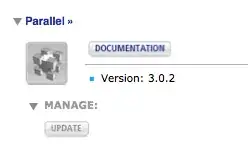
How do you enable this button (so that it's clickable) for your installed packages?
If you are the developer of an installed package, what needs to be done so that this button is enabled, and correctly updates the package from a given source?
Presumably PacletInfo.m should be appropriately modified.


Shortcuts`package this has to be truePacletManager`Package`updateButtonEnabled[{ "Shortcuts-0.0.1", "C:\\Users\\user\\AppData\\Roaming\\Mathematica\\Applications\\\ Shortcuts"}]but I don't think this feature is ready sinceRawBoxes@System`Dump`updateButtonGraphicsBoxis as gray asRawBoxes@System`Dump`updateButtonDisabledGraphicsBox– Kuba Oct 04 '16 at 18:21PacletManager? http://mathematica.stackexchange.com/a/120976/5478 – Kuba Oct 04 '16 at 18:33