20

Bug introduced in 7.0 or earlier and fixed in 13.1


I've run into a Grid layout problem for which I don't know a solution. I want to specify alignment to a specific character such as a decimal and an ItemSize on a per-Item basis. When I try to do this the decimal ends up on the right edge of the field rather than somewhere in the middle. My application is part of a larger, more complex Grid layout but here is a simple illustration:

gridIt[itemopts__] :=
 Module[{x},
  x = {{1.234, 12.34}, {123.4, 1234.}, {1234, 1.234}};
  x = Map[Item[#, itemopts] &, x, {2}];
  x = Prepend[x, {"Title", SpanFromLeft}];
  Grid[x, Alignment -> {Center, Center}, Dividers -> All]
 ]

gridIt[Alignment -> "."]

Mathematica graphics

gridIt[Alignment -> ".", ItemSize -> 4.4]
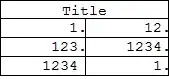
Mathematica graphics

Why does this happen and how can I work around it?

Mr.Wizard
  • 271,378
  • 34
  • 587
  • 1,371
  • 1
    One possible workaround is to use the Alignment -> \[AlignmentMarker] option and embed the \[AlignmentMarker] in the numbers as I showed here. – Alexey Popkov Oct 21 '12 at 06:09
  • @Alexey would you please consider posting that as an answer, and including an example? – Mr.Wizard Oct 21 '12 at 07:18
  • How about -- and this is ugly -- if you converted to strings and padded a fixed distance from the decimal point with whitespace? ...assuming you don't want to just pad right with zeros. – Mike Honeychurch Oct 22 '12 at 00:06

4 Answers4

4

This is messy:

If made the numbers strings and padded with whitespace:

padded[x_, cutoff_: 6] := Module[{tmp1, tmp2},
  tmp1 = StringSplit[ToString[x], "."];
  If[Length[tmp1] == 2,
   tmp2 = StringTake[tmp1[[2]] <> "      ", cutoff];
   tmp1[[1]] <> "." <> tmp2,
   tmp1[[1]] <> StringTake["       ", cutoff + 1]
   ]
  ]

I've made the cut off 6 because the default print precision is 6 so default you'll have at most 6 characters after the decimal place.

So now the revised gridIt:

ClearAll[gridIt];

gridIt[cutoff_, itemopts : OptionsPattern[{Grid}]] := Module[{x},
  x = Map[padded[#, cutoff] &, {{1.234, 12.34}, {123.4, 
      1234.}, {1234, 1.234}}, {2}];
  x = Map[Item[#, itemopts] &, x, {2}];
  x = Prepend[x, {"Title", SpanFromLeft}];
  Grid[x, Alignment -> {Center, Center}, Dividers -> All]]

gridIt[6, Alignment -> {Right, Center}]

gridIt[2, Alignment -> {Right, Center}, ItemSize -> 5]

enter image description here

As you shrink the item size you need to reduce the cut off value.

This is all a bit clumsy but may do the job.

Sjoerd C. de Vries
  • 65,815
  • 14
  • 188
  • 323
Mike Honeychurch
  • 37,541
  • 3
  • 85
  • 158
3

Give items more space on the right, set Spacings explicitly:

gridIt[itemopts__] := 
 Module[{x}, x = {{1.234, 12.34}, {123.4, 1234.}, {1234, 1.234}};
  x = Map[Item[#, itemopts] &, x, {2}];
  x = Prepend[x, {"Title", SpanFromLeft}];
  Grid[x, Alignment -> {Center, Center}, Dividers -> All, 
   Spacings -> {{2 -> 6, 3 -> 6}, Automatic}]]

gridIt[Alignment -> ".", ItemSize -> 4.4]

enter image description here

Vitaliy Kaurov
  • 73,078
  • 9
  • 204
  • 355
  • Interesting, but that has way too much white-space. What can be done? – Mr.Wizard Oct 20 '12 at 10:15
  • Yeah, I was also unsatisfied with it. That spacing spec puts white space on both sides of a divider. Not sure if we can do it on 1 side. Maybe compensate somehow with ItemSize - differently for left and right columns? – Vitaliy Kaurov Oct 20 '12 at 10:23
3

It is definitely a bug in Grid. Here is a workaround:

format[x_?NumericQ, spaces : {left_: 5, right_: 5}] := 
 MapAt[Row[{Spacer[left], #, Spacer[right]}] &, 
  SciForm[x, 4, -2, Align -> "."], 1]

Module[{x}, x = {{1.234, 12.34}, {123.4, 1234.}, {1234, 1.234}};
 x = Map[format[#, {7, 7}] &, x, {2}];
 x = Prepend[x, {Item["Title", Alignment -> Center], SpanFromLeft}];
 Grid[x, Alignment -> {Automatic, Center}, Dividers -> All]]

table

The SciForm function is from this post.

Alexey Popkov
  • 61,809
  • 7
  • 149
  • 368
  • I momentarily upvoted this, but when I try to use ItemSize it still breaks. Could you please show how I am supposed to control absolute cell width? – Mr.Wizard Oct 21 '12 at 08:13
  • @Mr.Wizard In the format function you should change the values 5 in Spacer[5]. It is the way to control absolute cell width. – Alexey Popkov Oct 21 '12 at 14:38
  • @Mr.Wizard I updated the format function. – Alexey Popkov Oct 21 '12 at 14:51
  • 1
    Alexey, the problem then is that it is relative width, or more specifically width + X spacing (margin). Suppose elements in the left and right columns are not the same lengths, but I want the columns to have the same absolute width. In this case I cannot use a fixed spacing, I need an ItemSize. Do you see what I am fighting with? Please know that I do appreciate your effort on this. – Mr.Wizard Oct 21 '12 at 14:58
  • 1
    @Mr.Wizard Unfortunately, at the moment I do not see any way to create a "normal" ItemSize or fix the bug. Only this not too easy-to-use workaround. But I am very interested in a solution or proper fix too. I think WRI must fix this really annoying problem. – Alexey Popkov Oct 21 '12 at 15:38
  • Alexey, on an unrelated matter, would you mind if I asked to have this question of yours migrated here? I'd now like to ask the same question myself, and I can either post my own or have this one migrated; your call. – Mr.Wizard Oct 22 '12 at 08:03
  • @Mr.Wizard I have nothing against the migration. – Alexey Popkov Oct 22 '12 at 08:08
2

Does this work as a workaround?

gridIt[itemopts__] := 
 Module[{x}, x = {{1.234, 12.34}, {123.4, 1234.}, {1234, 1.234}};
  x = Map[Item[#, itemopts] &, x, {2}];
  Column[{"Title",
    Grid[x, Alignment -> {Center, Center}, Dividers -> All]
    }, Dividers -> {True, {True}}, Spacings -> {-0.1, {0.5, 0.2}}, 
   Alignment -> Center]]
Rojo
  • 42,601
  • 7
  • 96
  • 188