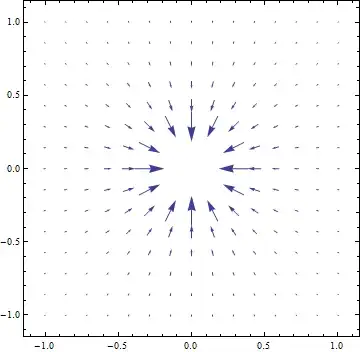
You can make use of option VectorScale - see the "More Information" section, and some singular examples at the end. Setting None will cause all the vectors to have the same length. Or you can improvise with a custom function to make the best view of the arrows (#5 the fifth argument is vector's norm):
VectorPlot[{-(x/(x^2 + y^2)^(3/2)), -(y/(x^2 + y^2)^(3/2))}, {x, -1, 1}, {y, -1, 1},
VectorScale -> {Automatic, Automatic, #}] & /@ {None, Function[If[#5 > 50, None, #5^.3]]}

You can also use StreamPlot
StreamPlot[{-(x/(x^2 + y^2)^(3/2)), -(y/(x^2 + y^2)^(3/2))}, {x, -1, 1}, {y, -1, 1}]

----- Edit: adding potential - as requested in the comments ----------
In your case potential is easily computed as integral over corresponding coordinates. Note automating clipping in the plot range. Here is the result with VectorPlot:
Show[ContourPlot[1/Sqrt[x^2 + y^2], {x, -1, 1}, {y, -1, 1},
  ContourStyle -> Directive[Red, Dashed], ColorFunction -> "Rainbow", Contours -> 20],
 VectorPlot[{-(x/(x^2 + y^2)^(3/2)), -(y/(x^2 + y^2)^(3/2))}, {x, -1, 1}, {y, -1, 1},
  VectorScale -> {Automatic, Automatic,
         Function[If[#5 > 50, None, #5^.3]]}, VectorStyle -> Black]]

and StreamPlot styled a bit differently
Show[ContourPlot[1/Sqrt[x^2 + y^2], {x, -1, 1}, {y, -1, 1},
  ContourStyle -> Directive[Red, Dashed], ColorFunction -> "GrayTones"],
 StreamPlot[{-(x/(x^2 + y^2)^(3/2)), -(y/(x^2 + y^2)^(3/2))}, {x, -1, 1}, {y, -1, 1},
     StreamStyle -> White]]




Read the FAQs! 3) When you see good Q&A, vote them up byclicking the gray triangles, because the credibility of the system is based on the reputation gained by users sharing their knowledge. ALSO, remember to accept the answer, if any, that solves your problem,by clicking the checkmark sign. – Vitaliy Kaurov Oct 21 '12 at 07:59Exclusionsis not an option ofVectorPlot. If you include it you only get an error message and no plot at all. – Sjoerd C. de Vries Oct 21 '12 at 13:26