13

Is there a way to color each face of a Cuboid with a different color?

I looked in the help but couldn't find anything. I found this Coloring the faces of a 3D object different colors (in Mathematica) which proposes building the cuboid with Polygon primitives; any other way?

Renan
  • 731
  • 9
  • 21
  • 1
    Since you want to add a color to each face, You really do need each face to be a separate polygon. I don't think there is a better way to accomplish this. What in particular do you wish could be improved upon this approach? – jVincent Oct 22 '12 at 20:47
  • Nothing special; I just wish to know if there is any other way of doing that. – Renan Oct 22 '12 at 20:49

2 Answers2

12

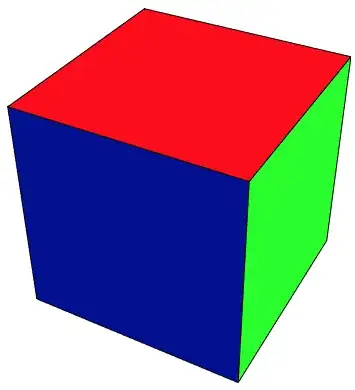
Just for completeness:

Graphics3D[{Lighting -> {
    {"Directional", Red, {.5, .5, 1}},
    {"Directional", Green, {1, .5, .5}},
    {"Directional", Blue, {0, 0, 0}}
    },
  Cuboid[]}, Boxed -> False]

cuboid

cormullion
  • 24,243
  • 4
  • 64
  • 133
  • Ingenious. Wouldn't have though ot this. Though it only works if there are no other objects casting a shadow. Cannnot something like Glow be used in that case? – István Zachar Oct 23 '12 at 09:29
  • @IstvánZachar there are no shadows in Graphics3D! – Oleksandr R. Mar 18 '13 at 10:20
  • @OleksandrR. Yes, silly me. But still adding other objects (like Cuboid[{1, 1, 1}]) messes up the colors, so my guess is this method is only applicable when there is only one object in the scene. – István Zachar Mar 18 '13 at 10:32
  • This seems to be less general than the accepted answer, since we can't easily apply GeometricTransformation to this: we'll get Graphics3DBox is not a Graphics3D primitive or directive error message and no output. Maybe I'm doing something wrong, though... – Ruslan Aug 22 '19 at 09:21
10

I don't think it is possible to color the faces of a single cuboid differently (other than the two sides of one face), though there are multiple methods to create multicolored cuboid-like objects.

Creating multiple polygons:

v = {{-1, -1, -1}, {1, -1, -1}, {1, 1, -1}, {-1, 1, -1}, {-1, -1, 
    1}, {1, -1, 1}, {1, 1, 1}, {-1, 1, 1}};
idx = {{1, 2, 3, 4}, {1, 2, 6, 5}, {2, 3, 7, 6}, {3, 4, 8, 7}, {4, 1, 
    5, 8}, {5, 6, 7, 8}};
Graphics3D[Table[{Glow@Hue[i/6], Polygon[v[[idx[[i]]]]]}, {i, 6}], Lighting -> None]
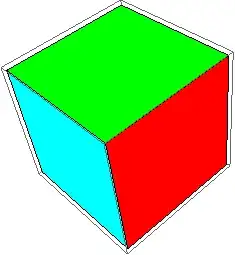
Mathematica graphics

Using textures, from the help on Texture:

sides = Graphics[{Hue@#, Rectangle[]}, ImageSize -> 50] & /@ 
   Most@Range[0, 1, 1/6];
vtc = {{0.01, 0.01}, {0.99, 0.01}, {0.99, 0.99}, {0.01, 0.99}};
Graphics3D[{Black, EdgeForm[Black],
  Table[{Texture[sides[[i]]], 
    GraphicsComplex[v, Polygon[idx[[i]], VertexTextureCoordinates -> vtc]]}, {i, 6}]}]
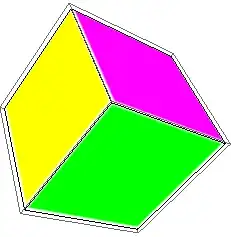
Mathematica graphics

István Zachar
  • 47,032
  • 20
  • 143
  • 291
  • This does nicely and can be easily adapted to other polyhedrons using PolyhedronData. Thanks! – Renan Oct 22 '12 at 22:40