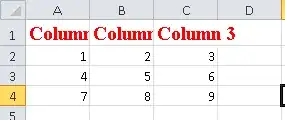
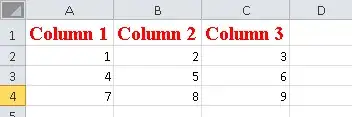
After some long time, I found a solution using VBScript. Below a script example to format the columns size. Its just a text file with the vbs extension, that has to be executed in the same directory of your xlsx file ("data.xlsx" in this example).
Dim objXLApp, objXLWb, objXLWs

Set objXLApp = CreateObject("Excel.Application")

objXLApp.Visible = False

Set objFSO = CreateObject("Scripting.FileSystemObject")
strFilePath = objFSO.GetAbsolutePathName(".")

Set objXLWb = objXLApp.Workbooks.Open(strFilePath & "\data.xlsx")

Set objXLWs = objXLWb.Sheets(1)

objXLWs.Columns("A:C").entirecolumn.autofit

objXLWb.Save
objXLWb.Close (False)

Set objXLWs = Nothing
Set objXLWb = Nothing

objXLApp.Quit
Set objXLApp = Nothing
The bad part is that it needs to run in Windows to work (I'm used to work on Mac) and that Excel needs to be installed in your machine (in the XLM way proposed by @AlexeyPopkov, you don't need windows or excel). The good part is that you can do a lot of formatting in an automated and much simpler way. The columns size was just one example. Now I can create some reports in Excel with MMA that are not so ugly.
You can call your script from Mathematica using Run command after export your XLSX file.
I'm organizing my code. As soon as possible I'll update this post with a richer format example.
Update
Here is the new version, completely in WL to:
- Export some date into excel xlsx file
- Create the script.vbs (formatExcelTable.vbs)
- Export and execute de script.vbs
In this version, I have a more interestin script, to create a Excel named table with some formatting. Here is the code:
script="
Dim objXLApp, objXLWb, objXLWs
Dim lo

Const xlSrcRange = 1
Const xlLeft  =-4131
Const xlCenter=-4108
Const xlRight =-4152

Set objXLApp = CreateObject(\"Excel.Application\")
objXLApp.Visible = False

Set objFSO = CreateObject(\"Scripting.FileSystemObject\")
strFilePath = objFSO.GetAbsolutePathName(\".\")

Set objXLWb = objXLApp.Workbooks.Open(strFilePath & \"\\data.xlsx\")
Set objXLWs = objXLWb.Sheets(1)

'~~> Hidding Gridlines
objXLApp.ActiveWindow.DisplayGridlines = false

'~~> Creating Excel Table
objXLWs.ListObjects.Add xlSrcRange, objXLWs.UsedRange, ,XlYes 'Range(\"A1:c4\")
objXLWs.ListObjects(1).Name = \"Table1\"
objXLWs.ListObjects(\"Table1\").TableStyle = \"TableStyleMedium4\"

'~~> Formatting Table Columns
With objXLWs.Range(\"Table1[Date]\")
        .ClearFormats
        .NumberFormat = \"dd/mm/yyyy\"
        .HorizontalAlignment = xlCenter
        .Font.Name = \"Calibri\"
        .entirecolumn.autofit
End With

With objXLWs.Range(\"Table1[Value]\")
        .ClearFormats
        .NumberFormat = \"#,##0.00\"
        .HorizontalAlignment = xlCenter
        .Font.Name = \"Calibri\"
        .entirecolumn.autofit
End With

With objXLWs.Range(\"Table1[Part]\")
        .ClearFormats
        .NumberFormat = \"0.0%\"
        .HorizontalAlignment = xlRight
        .Font.Name = \"Calibri\"
        .entirecolumn.autofit
End With


'objXLWb.Save  'Save the original file
'~~> Save as Excel File (xls) to retain format
objXLWb.SaveAs strFilePath & \"\\dataFormat.xlsx\", 51

'~~> File Formats
'51 = xlOpenXMLWorkbook (without macro's in 2007-2010, xlsx)
'52 = xlOpenXMLWorkbookMacroEnabled (with or without macro's in 2007-2010, xlsm)
'50 = xlExcel12 (Excel Binary Workbook in 2007-2010 with or without macro's, xlsb)
'56 = xlExcel8 (97-2003 format in Excel 2007-2010, xls)

objXLWb.Close (False)

Set objXLWs = Nothing
Set objXLWb = Nothing

objXLApp.Quit
Set objXLApp = Nothing
";

SetDirectory@NotebookDirectory[];
data={{
        {"Date","Value","Part"}
        ,{{2014,1,1},4,0.5}
        ,{{2014,2,1},5,0.3}
        ,{{2014,3,1},6,0.2}
     }
};
Export["data.xlsx",data]
Export["formatExcelTable.vbs",script,"Text"];
Run["formatExcelTable.vbs"]
Excel file pre-formatting:

Excel file pos-formatting:

It's very easy to change the script, in order to do new kinds of formatting.