7

In a Manipulate expression I have a slider control which has the Enabled option

Enabled -> Dynamic[bool]

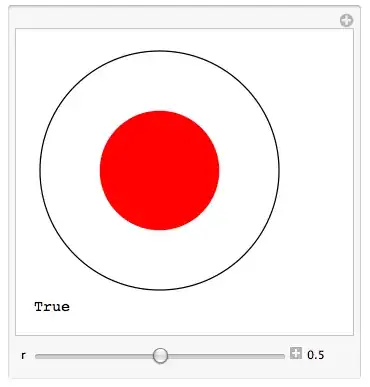
When bool changes from False to True, the content pane in the output cell of the Manipulate expression should change from
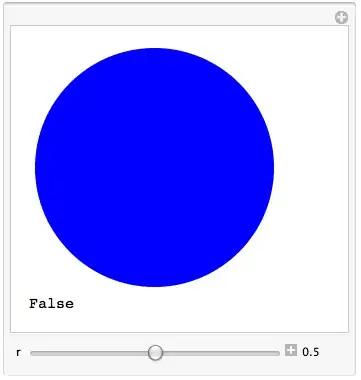
enter image description here

to

enter image description here

and the slider should go from disabled to enabled. The visual change takes place as expected, but the slider stays disabled.

Can anyone explain this behavior and suggest a way to fix it? Here is my code:

Manipulate[
  Column[{If[bool,
      content = {Black, Circle[], Red, Disk[{0., 0.}, r]},
      RunScheduledTask[bool = True, {2}]];
    Graphics[{content}, ImageSize -> 200],
    bool}],
  {{r, 0.5}, 0., 1., 0.1, Enabled -> Dynamic[bool],
                          Appearance -> "Labeled"},
  {content, ControlType -> None},
  ControlPlacement -> Bottom,
  Initialization :>
    (content = {Blue, Disk[]};
     bool = False)]

I did test a slider that was not inside a Manipulate expression and that had a dynamic Enabled option. It worked fine. So why not in Manipulate?

Update

I contacted Wolfram Research support and got back a suggestion for a work-around. It wasn't what I was hoping for, but it did lead to me something better than I had before. Only problem remaining is that the Mathematica editor's syntax checker doesn't like what I did. I'm living with that. Here are the details:

enter image description here

The question now boils down to: Can the syntax checker be propitiated?

Another Update

I received another response form WRI tech support.

After talking to our developers, it seems that your original method of using ControlType -> None should have worked after all. This now looks to be an issue of bad interaction between RunScheduledTask and DynamicModule. This issue has been filed into our database so that our development team can fix it at the earliest.

m_goldberg
  • 107,779
  • 16
  • 103
  • 257
  • 1
    It works fine on my machine, what version of Mathematica are you running? (I'm on MMA 8.0.4.0, Windows 7 64bit) – David Slater Oct 26 '12 at 01:26
  • Your code works as expected on my system (MMA V 8.0.4.0, Windows Vista 64bit) – kglr Oct 26 '12 at 01:26
  • I'm running 8.0.4 on OS X 10.6.8. I guess I should contact WRI support about a possible OS X issue. Thanks for checking this out on your systems. – m_goldberg Oct 26 '12 at 02:27
  • Your code ran as expected, but I cleaned it up a bit and put bool under your direct control so you can play around with it. – DavidC Oct 26 '12 at 02:41
  • @m_goldberg I'm running 8.0.4 on OS X 10.7.5. and it also works. – chris Oct 29 '12 at 08:14
  • @chris I guess it's time I upgraded Mountain Lion. I've been putting it off since it's a hassle and, up to now, Snow Leopard has been good to me. – m_goldberg Oct 29 '12 at 13:57
  • 4
    Every part of this question touches on something which horrifies me. DynamicModule variables were never designed to escape the confines of the DynamicModule which scopes them, but scheduled tasks do quite a nice job of punching a hole in those confines. We should figure out how to deal with that problem, but haven't yet. Module, on the other hand, creates an unexpected global (not local) variable which is scoped to the current kernel session. For this reason, mixing Module and Dynamic or Manipulate is always a bad idea. That's why you get the syntax highlighting. – John Fultz Nov 11 '12 at 22:54
  • 3
    [continued] So there are a number of ways to do this which might appear to work at first but which are open to subtle failures. Really, the only way to get this to work is to have the scheduled task and dynamic code communicate using a global variable. You'll have to initialize this variable properly. You can hide it in a private namespace. If you hope to have multiple manipulators functioning independently, it gets more challenging. I have some thoughts about per-instance creation of unique variable names, but it would take some effort to work this up. – John Fultz Nov 11 '12 at 22:59
  • @JohnFultz, thanks for your comments on this matter. In the end I gave up on trying to user RunScheduledTask in my Manipulate, the real one that is -- not the toy I built for this question. One thing that still puzzles me is that several commenters reported that the original code worked as expected on their systems. – m_goldberg Nov 12 '12 at 03:03
  • @m_goldberg, the system for syncing DynamicModule variables between the FE and kernel isn't airtight. It's possible for outside intervention such as a scheduled task to interfere with it in a way that causes things to appear to work. But that's an unreliable side effect of the implementation, not a guarantee of the design. – John Fultz Nov 12 '12 at 17:39
  • You would be horrified having seen my attempts to make a control with its state controlled by a scheduled task a few months ago. The task stored in the dynamic module, created on initialization and removed on deinitialization. Affecting a kernel variable, created by a module on initialization and injected on the scheduled task. That variable name stored as a string in another dynamic module variable so as to Remove it on deinit. And all the inner dynamic module code, inside a dynamic wrapper trying to keep that kernel variable with another dynamic module variable in sync... Both ways... BLERGH – Rojo Nov 16 '12 at 15:49

1 Answers1

5

I read an answer to another question that made use of Clock and the proverbial light bulb lit up in my head -- so now I can answer my own question, at least in the part that asks "suggest a way to fix it".

 Manipulate[
    If[Clock[{False, True}, 3, 1],
       content = {Black, Circle[], Red, Disk[{0., 0.}, r]}; bool = True];
    Graphics[{content}, ImageSize -> 200],
    {{r, 0.5}, 0., 1., 0.1, Appearance -> "Labeled", Enabled -> bool},
    {{bool, False}, ControlType -> None},
    {{content, {Blue, Disk[]}}, ControlType -> None},
    ControlPlacement -> Bottom]

I hope this answer doesn't horrify John Fultz as much as the question did.

m_goldberg
  • 107,779
  • 16
  • 103
  • 257