I'm occasionally in a situation where I have to use Mathematica on the terminal. I'd like to visualize the solutions I get from NDSolve, but when I use Plot, Mathematica just shows -Graphics- instead of trying to plot anything. I decided to write my own function for this:
AsciiPlot[functionsl_, {t_, tmin_, tmax_}] := Module[
{buffer, pts, width, height, ymin, ymax, s, functions, function,
allpts},
width = 77; height = 24;
buffer = Table[" ", {height}, {width}];
If[Head[functionsl] === List, functions = functionsl,
functions = {functionsl}];(*ensure functions is a list even if of length 1*)
allpts = Table[{x, (functions[[j]]) /. t -> x} // N, {j,
 Length[functions]}, {x, tmin, tmax, (tmax - tmin)/width}];

(*Min and max of all y's across all functions to plot*)
ymin = Min[allpts[[1 ;;, 1 ;;, 2]]];
ymax = Max[allpts[[1 ;;, 1 ;;, 2]]];
s = (ymax - ymin)/(tmax - tmin);

For[i = 1, i <= Length[functions], i++,
function = functions[[i]];
pts = allpts[[i]];

(*I think it is bad form to declare a function inside a module, but it needs the variables and it is a pain to pass them all as arguments*)
set[point_, letter_] := (
  buffer[[height - point[[2]] + 1, point[[1]]]] = letter;);
PickLetter[slope_] :=
 Piecewise[{{"-", -.65 s < slope < .65 s}, {"/", .65 s <= slope <
     3.5 s}, {"|",
    3.5 s <= slope},  {"\\", -3.5 s < slope <= -.65 s}, {"|",
    slope <= -3.5 s}}, "*"];
ScalePoint[p_] :=
 Round[{(p[[1]] - tmin)*(width - 1)/(tmax - tmin) +
    1, (p[[2]] - ymin)*(height - 1)/(ymax - ymin) + 1}];

Map[set[ScalePoint[#],
   PickLetter[D[function, t] /. t -> #[[1]]]] &, pts, 1];](*end for each function*)
Map[Print[StringJoin[#]] &, buffer, 1];]
How can I extend this to plot axes as well?
My strategy (forcing even one function to be a list) for plotting multiple functions to mimick the native Plot[]'s behavior seems pretty unintuitive. Is there a better way?
Also, I would have preferred a function that could work on a Raster object, which would allow me also to use things like ParametricPlot and even the 3D plots with no extra effort. I couldn't think of a way to get around needing the derivative short of trying to fit curves to the rasterized image and plotting those. Any tips?


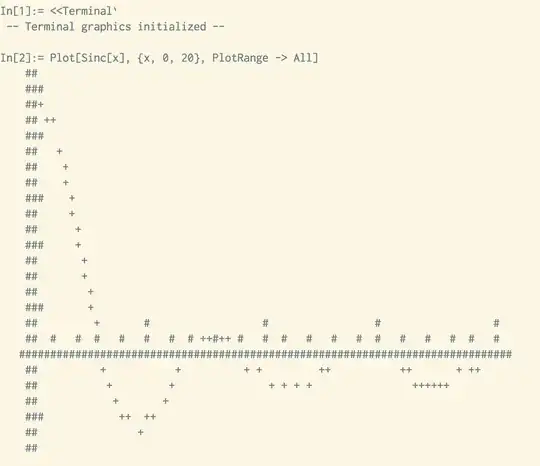


NDSolve, but when I usePlot, Mathematica just shows-Graphics-instead of trying to plot anything." - you'll want to look into$Displayand$DisplayFunction– J. M.'s missing motivation Nov 01 '12 at 03:00