2

I would like to plot the make-up of a population over time as it changes its composition. For this, I'd like to make a simplex plot, a classic method in some fields - such as this example from a paper in Biology Letters (Sasaki & Uchida, 2014):

Changing composition of population in terms of proportion of R, D, and C

My population consists of three types of entity, so a simplex plot would be a very natural way to visualise it. I have a set of coordinates for the population over time, which it would be easy to plot in an x-by-y graph (if the population consisted of only two types of entity), but I am having some difficulty working out how to plot these on a simplex. I wonder if anyone could advise as to best method? (Perhaps there is even a Mathematica function that I am unaware of.)

Each point in my data consists of three pieces of information: the proportion of each of the three types of entity at that time.

The data looks like this (here's the first few lines):

A         B         C
0.7065    0.2492    0.0443
0.7380    0.2342    0.0278
0.7429    0.2065    0.0506
0.7357    0.1712    0.0931
0.7652    0.1740    0.0608
0.7466    0.1452    0.1082
0.6907    0.1193    0.1900
0.6008    0.0870    0.3122
0.4817    0.0584    0.4599
0.5989    0.0701    0.3310
0.6907    0.0806    0.2287
0.5904    0.0592    0.3504

I would like to plot these points in the simplex and connect them with lines.

Many thanks if you can help.


Cited: Sasaki, T. & Uchida, S. 2014. Biol. Lett., 10: 20130903

Sprog
  • 179
  • 8
  • 1
    To help people in giving you an answer to your question perhaps you could give a list of typical data that you would like to plot, or the mathematica code you use to generate it? If you have a list of triples of proportions then it is relatively straightforward to combine this with 2D coordinates of the vertices of a triangle. This you could use to calculate a list of 2D points which you would then plot using Line[]. – Dunlop Mar 10 '17 at 15:35
  • Thanks for the suggestion - have added in some example data. – Sprog Mar 10 '17 at 16:08
  • This is old code but worth looking at: http://mathgis.blogspot.com/2008/12/how-to-make-tenary-plot.html . This question may be a duplicate of http://mathematica.stackexchange.com/q/39733/9490 – Jason B. Mar 10 '17 at 16:25

1 Answers1

4

Here's a start.

Grab some sample data for a trajectory from this excellent python package, and examine it in 3D:

data=Import["https://raw.githubusercontent.com/marcharper/python-ternary/master/sample_data/curve.txt","Table"];
ListPointPlot3D@data

Mathematica graphics

The way the data is constructed, you have a set of triples, where the sum of each triple is 1.0. In a ternary plot, these numbers, which represent fractions of a whole, are represented as the distance from the three corners.

You can define a helper function to go from ternary to cartesian coordinates. From the wiki page,

Consider an equilateral ternary plot where $a=100\%$ is placed at $(x,y)=(0,0)$ and $b=100\%$ at $(1,0)$. Then $c=100\%$ is $\left(\tfrac{1}{2},\tfrac{\sqrt{3}}{2}\right)$, and the triple $(a,b,c)$ is $\left(\tfrac{1}{2}\tfrac{2b+c}{a+b+c},\tfrac{\sqrt{3}}{2}\tfrac{c}{a+b+c}\right).$

ternaryToCartesian = {1/2 (2 #2 + #3)/(#1 + #2 + #3), 
    Sqrt[3]/2 #3/(#1 + #2 + #3)} &;

Make a background for the plot,

background = 
  Graphics[{FaceForm[None], EdgeForm[Black], 
    Polygon[{{0, 0}, {1, 0}, {1/2, Sqrt[3]/2}}]}];

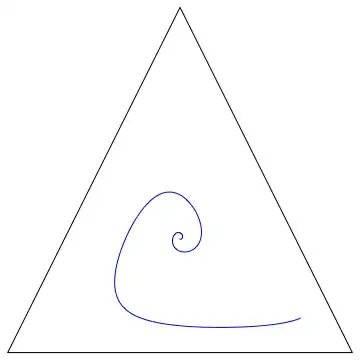
and then show the trajectory

Show[
 background,
 Graphics[
  {Blue, Line[ternaryToCartesian @@@ data]}
  ],
 AspectRatio -> 1]

Mathematica graphics

adding in gridlines and tick marks would be an interesting problem - one that has already been solved satisfactorily by the triangleTicks function defined here it turns out:

Show[
 background,
 Graphics@triangleTicks[],
 Graphics[
  {Blue, Line[ternaryToCartesian @@@ data]}
  ],
 AspectRatio -> 1]

Mathematica graphics

Jason B.
  • 68,381
  • 3
  • 139
  • 286
  • Brilliant - just what I was hoping for. – Sprog Mar 10 '17 at 19:18
  • The data url is corrupted. I suggest using the following synthetic data:
    data = With[{t = 
        Table[{0.3 + 0.1 (1 - u/4/\[Pi]) Sin[u], 
          0.3 + 0.1 (1 - u/4/\[Pi]) Cos[u]}, {u, 0, 4 \[Pi], 0.05}]}, 
      Transpose[
       Append[Transpose[t], 
        1 - Total[Transpose[t], 1]]]]; ListPointPlot3D@(data)
    
    – Ashot Matevosyan Mar 15 '22 at 23:39