Simple Answer
We can get this to work by simply setting two flags on the images. They need Interleaving -> True and they need to be "Byte" images. Happily Rasterize will do this for us if we ask it to:
Consider this:
Panel["asdasdasd",
 ImageSize -> 200,
 Appearance ->
  MapThread[Rule, {
    {"Default", "Hover"},
    Rasterize[Graphics[{#, Scale[Disk[], {1, .5}]}, ImageSize -> 50],
       "Image"] & /@
     {Red, Blue}
    }]
 ]
Extended Answer
One issue with this though is that when we expand the panel our image simply rescales. And if we look at, say,
Panel["asd",
 Appearance ->
  FrontEndResource["NotebookTemplatingExpressions",
   "ButtonDefaultAppearance"]
 ]
The Panel samples really nicely. And what's behind it is the little black borders we see in FrontEndResource["NotebookTemplatingExpressions","ButtonDefaultAppearance"].
Playing with it I've found the border has can't entirely box off the image, but otherwise as long as it's there it will have an effect. And this effect depends on how large the border is. The particulars of this aren't entirely clear to me yet, but the smaller it is the further from that border text seems to get placed.
Auto-formatting
With all that said, then, we can define a function to generate the appropriate sort of images--even from non-image objects (the formatting is wonky because I develop in code cells):
Options[AppearanceReadyImage] =
    Join[
        {
                BorderDimensions -> Automatic,
                Prolog -> Identity,
                ImagePadding -> None
                },
        Options@Rasterize
        ];
AppearanceReadyImage[i_?(ImageQ),ops:OptionsPattern[]]:=
    With[{img=
        ColorConvert[
            ImagePad[
                Replace[OptionValue[ImagePadding],{
                    Except[_Integer|{{_Integer,_Integer},{_Integer,_Integer}}]:>
                        Replace[OptionValue@Prolog,None->Identity]@i,
                    int_:>
                        ImagePad[
                            Replace[OptionValue@Prolog,None->Identity]@i,
                            int,GrayLevel[0,0]]
                    }],
                1,GrayLevel[0,0]],
            "RGB"
            ]},
        With[{dims=ImageDimensions@img},
            With[{
                mx=Floor@First@dims/2,my=Floor@Last@dims/2,
                x=First@dims,y=Last@dims
                },
                With[{
                    rleft=
                        Replace[
                            Replace[OptionValue@BorderDimensions,{
                                Automatic->Scaled[.5],
                                {{x_,_},_}|{x:Except[_List],_}:>
                                    Replace[x,Automatic->Scaled[.5]]
                                }],{
                            Except[_Scaled|_?NumericQ]->None,
                            w_?NumericQ:>
                                Range[Floor@-w/2,Floor@w/2],
                            Scaled[w_]:>
                                Range[Floor@-(y*w/2),Floor@(y*w/2)]
                            }],
                    rright=
                        Replace[
                            Replace[OptionValue@BorderDimensions,{
                                Automatic->Scaled[.5],
                                {{_,r_},_}|{r:Except[_List],_}:>
                                    Replace[r,Automatic->Scaled[.5]]
                                }],{
                            Except[_Scaled|_?NumericQ]->None,
                            w_?NumericQ:>
                                Range[Floor@-w/2,Floor@w/2],
                            Scaled[w_]:>
                                Range[Floor@-(y*w/2),Floor@(y*w/2)]
                            }],
                    rbottom=
                        Replace[
                            Replace[OptionValue@BorderDimensions,{
                                Automatic->Scaled[.8],
                                {_,_}|{_,x_}:>
                                    Replace[x,Automatic->Scaled[.8]]
                                }],{
                            Except[_Scaled|_?NumericQ]->None,
                            w_?NumericQ:>
                                Range[Floor@-w/2,Floor@w/2],
                            Scaled[w_]:>
                                Range[Floor@-(x*w/2),Floor@(x*w/2)]
                            }],
                    rtop=
                        Replace[
                            Replace[OptionValue@BorderDimensions,{
                                Automatic->Scaled[.5],
                                {_,{_,t_}}|{_,t_}:>
                                    Replace[t,Automatic->Scaled[.5]]
                                }],{
                            Except[_Scaled|_?NumericQ]->None,
                            w_?NumericQ:>
                                Range[Floor@-w/2,Floor@w/2],
                            Scaled[w_]:>
                                Range[Floor@-(x*w/2),Floor@(x*w/2)]
                            }]
                    },
                    Image[
                        ReplacePixelValue[
                            img,
                            Join[
                                If[rleft===None,
                                    {},
                                    Thread[{1,rleft+my}]
                                    ],
                                If[rright===None,
                                    {},
                                    Thread[{x,rright+my}]
                                    ],
                                If[rbottom===None,
                                    {},
                                    Thread[{rbottom+mx,1}]
                                    ],
                                If[rtop===None,
                                    {},
                                    Thread[{rtop+mx,y}]
                                    ]
                                ]->Black
                            ],
                            "Byte",
                            Interleaving->True
                        ]
                    ]
                ]
            ]
        ];
AppearanceReadyImage[
    e : Except[_Mouseover | _List | _Rule]?(Not@*ImageQ),
    ops : OptionsPattern[]] :=
    AppearanceReadyImage[
        Rasterize[e, "Image", FilterRules[{ops}, Options@Rasterize]],
        ops];
AppearanceReadyImage[k_ -> img_, ops : OptionsPattern[]] :=

  k -> AppearanceReadyImage[img, ops];
AppearanceReadyImage[l_List, ops : OptionsPattern[]] :=

  AppearanceReadyImage[#, ops] & /@ l;
AppearanceReadyImage[Mouseover[e1_, e2_],
   ops : OptionsPattern[]] :=
    {
        "Default" -> AppearanceReadyImage[e1, ops],
        "Hover" -> AppearanceReadyImage[e2, ops]
        };
As far as code blocks go it's more than I'd usually want to post here, but it does let us do fun stuff. We can build buttons from Framed expressions:
Button[
 "Try me!",
 Appearance ->
  AppearanceReadyImage[
   MapThread[Rule, {
     {"Default", "Hover", "Pressed"},
     Map[
      Framed["",
        ImageSize -> 100,
        Background -> #,
        RoundingRadius -> 5,
        FrameStyle -> Directive[Thickness[.3], GrayLevel[.8]]
        ] &,
      {None, GrayLevel[.95], LightBlue}
      ]
     }],
   ImageResolution -> 750
   ]
 ]
Classic button images
Or we can make write a convenience function for LinearGradientImage that will let us make buttons of any color:
Options[GradientAppearance] = {
    ImageSize -> {10, 20},
    ImagePadding -> 1,
    FrameStyle -> Darker
    };
GradientAppearance[
    color_?ColorQ,
    center :
            _?NumericQ | _Scaled |
                {_?NumericQ | _Scaled, _?NumericQ | _Scaled} :
            {Scaled[1], Scaled[.25]},
    ops : OptionsPattern[]] :=
    With[{
            imageSize =
                OptionValue[ImageSize],
            frameColor =
                Replace[OptionValue[FrameStyle], {
                    c_?ColorQ :>
                            c,
                    e_ :>
                            e@color
                    }],
            pad = OptionValue[ImagePadding]
            },
        With[{cents =
                Replace[
                    Replace[center, {
                            n_?NumericQ :>
                                {Scaled[1], n},
                            s_Scaled :>
                                {Scaled[1], s}
                            }], {
                        Scaled[s_] :>
                            s*Last@imageSize
                        },
                1]},
                If[pad =!= None,
                    ImagePad[#, pad, frameColor],
                    Identity] &@
                    LinearGradientImage[
                        Thread@{Center, cents} ->
                        {
                                color,

        Hue[#[[1]], #[[2]], #[[3]] + .05] &@ColorConvert[color, Hue],

        Hue[#[[1]], #[[2]], #[[3]] + -.1] &@ColorConvert[color, Hue]
                                },
                        imageSize
                        ]
                ]
    ];
GradientAppearance[{c_?ColorQ}, ops : OptionsPattern[]] :=

  "Default" -> GradientAppearance[c, ops];
GradientAppearance[c : {_?ColorQ, _?ColorQ},
   ops : OptionsPattern[]] :=
    MapThread[
        # -> GradientAppearance[#2, ops] &, {
                {"Default", "Hover"},
                c
            }];
GradientAppearance[c : {_?ColorQ, _?ColorQ, _?ColorQ},
   ops : OptionsPattern[]] :=
    MapThread[
        # -> GradientAppearance[#2, #3, ops] &, {
                {"Default", "Hover", "Pressed"},
                c,
                {Scaled[.25], Scaled[.25], Scaled /@ {.25, .65}}
            }];
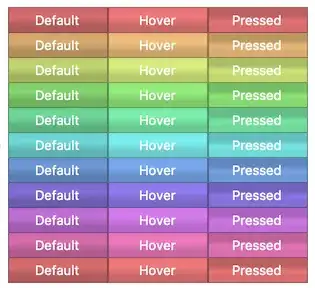
Putting this together we can get some very nice looking UI elements with very little code to tweak and mess about with:
Grid[
 Map[
  MapThread[
    Button[
      Style[#, White],
      ImageSize -> 100,
      Appearance ->
       #2
      ] &,
    List @@@ AppearanceReadyImage[
       GradientAppearance@{
         Hue[#, .5, .8],
         Hue[#, .5, .9],
         Hue[#, .5, .85]}
       ] // Transpose
    ] &,
  Range[0, 1, .1]
  ],
 Spacings -> {0, 0}
 ]
Single code-block:
Here're both large blocks in one to make copying easier:
Options[AppearanceReadyImage] =
    Join[
        {
                BorderDimensions -> Automatic,
                Prolog -> Identity,
                ImagePadding -> None
                },
        Options@Rasterize
        ];
AppearanceReadyImage[i_?(ImageQ),ops:OptionsPattern[]]:=
    With[{img=
        ColorConvert[
            ImagePad[
                Replace[OptionValue[ImagePadding],{
                    Except[_Integer|{{_Integer,_Integer},{_Integer,_Integer}}]:>
                        Replace[OptionValue@Prolog,None->Identity]@i,
                    int_:>
                        ImagePad[
                            Replace[OptionValue@Prolog,None->Identity]@i,
                            int,GrayLevel[0,0]]
                    }],
                1,GrayLevel[0,0]],
            "RGB"
            ]},
        With[{dims=ImageDimensions@img},
            With[{
                mx=Floor@First@dims/2,my=Floor@Last@dims/2,
                x=First@dims,y=Last@dims
                },
                With[{
                    rleft=
                        Replace[
                            Replace[OptionValue@BorderDimensions,{
                                Automatic->Scaled[.5],
                                {{x_,_},_}|{x:Except[_List],_}:>
                                    Replace[x,Automatic->Scaled[.5]]
                                }],{
                            Except[_Scaled|_?NumericQ]->None,
                            w_?NumericQ:>
                                Range[Floor@-w/2,Floor@w/2],
                            Scaled[w_]:>
                                Range[Floor@-(y*w/2),Floor@(y*w/2)]
                            }],
                    rright=
                        Replace[
                            Replace[OptionValue@BorderDimensions,{
                                Automatic->Scaled[.5],
                                {{_,r_},_}|{r:Except[_List],_}:>
                                    Replace[r,Automatic->Scaled[.5]]
                                }],{
                            Except[_Scaled|_?NumericQ]->None,
                            w_?NumericQ:>
                                Range[Floor@-w/2,Floor@w/2],
                            Scaled[w_]:>
                                Range[Floor@-(y*w/2),Floor@(y*w/2)]
                            }],
                    rbottom=
                        Replace[
                            Replace[OptionValue@BorderDimensions,{
                                Automatic->Scaled[.8],
                                {_,_}|{_,x_}:>
                                    Replace[x,Automatic->Scaled[.8]]
                                }],{
                            Except[_Scaled|_?NumericQ]->None,
                            w_?NumericQ:>
                                Range[Floor@-w/2,Floor@w/2],
                            Scaled[w_]:>
                                Range[Floor@-(x*w/2),Floor@(x*w/2)]
                            }],
                    rtop=
                        Replace[
                            Replace[OptionValue@BorderDimensions,{
                                Automatic->Scaled[.5],
                                {_,{_,t_}}|{_,t_}:>
                                    Replace[t,Automatic->Scaled[.5]]
                                }],{
                            Except[_Scaled|_?NumericQ]->None,
                            w_?NumericQ:>
                                Range[Floor@-w/2,Floor@w/2],
                            Scaled[w_]:>
                                Range[Floor@-(x*w/2),Floor@(x*w/2)]
                            }]
                    },
                    Image[
                        ReplacePixelValue[
                            img,
                            Join[
                                If[rleft===None,
                                    {},
                                    Thread[{1,rleft+my}]
                                    ],
                                If[rright===None,
                                    {},
                                    Thread[{x,rright+my}]
                                    ],
                                If[rbottom===None,
                                    {},
                                    Thread[{rbottom+mx,1}]
                                    ],
                                If[rtop===None,
                                    {},
                                    Thread[{rtop+mx,y}]
                                    ]
                                ]->Black
                            ],
                            "Byte",
                            Interleaving->True
                        ]
                    ]
                ]
            ]
        ];
AppearanceReadyImage[
    e : Except[_Mouseover | _List | _Rule]?(Not@*ImageQ),
    ops : OptionsPattern[]] :=
    AppearanceReadyImage[
        Rasterize[e, "Image", FilterRules[{ops}, Options@Rasterize]],
        ops];
AppearanceReadyImage[k_ -> img_, ops : OptionsPattern[]] :=

  k -> AppearanceReadyImage[img, ops];
AppearanceReadyImage[l_List, ops : OptionsPattern[]] :=

  AppearanceReadyImage[#, ops] & /@ l;
AppearanceReadyImage[Mouseover[e1_, e2_],
   ops : OptionsPattern[]] :=
    {
        "Default" -> AppearanceReadyImage[e1, ops],
        "Hover" -> AppearanceReadyImage[e2, ops]
        };

Options[GradientAppearance] = {
    ImageSize -> {10, 20},
    ImagePadding -> 1,
    FrameStyle -> Darker
    };
GradientAppearance[
    color_?ColorQ,
    center :
            _?NumericQ | _Scaled |
                {_?NumericQ | _Scaled, _?NumericQ | _Scaled} :
            {Scaled[1], Scaled[.25]},
    ops : OptionsPattern[]] :=
    With[{
            imageSize =
                OptionValue[ImageSize],
            frameColor =
                Replace[OptionValue[FrameStyle], {
                    c_?ColorQ :>
                            c,
                    e_ :>
                            e@color
                    }],
            pad = OptionValue[ImagePadding]
            },
        With[{cents =
                Replace[
                    Replace[center, {
                            n_?NumericQ :>
                                {Scaled[1], n},
                            s_Scaled :>
                                {Scaled[1], s}
                            }], {
                        Scaled[s_] :>
                            s*Last@imageSize
                        },
                1]},
                If[pad =!= None,
                    ImagePad[#, pad, frameColor],
                    Identity] &@
                    LinearGradientImage[
                        Thread@{Center, cents} ->
                        {
                                color,

        Hue[#[[1]], #[[2]], #[[3]] + .05] &@ColorConvert[color, Hue],

        Hue[#[[1]], #[[2]], #[[3]] + -.1] &@ColorConvert[color, Hue]
                                },
                        imageSize
                        ]
                ]
    ];
GradientAppearance[{c_?ColorQ}, ops : OptionsPattern[]] :=

  "Default" -> GradientAppearance[c, ops];
GradientAppearance[c : {_?ColorQ, _?ColorQ},
   ops : OptionsPattern[]] :=
    MapThread[
        # -> GradientAppearance[#2, ops] &, {
                {"Default", "Hover"},
                c
            }];
GradientAppearance[c : {_?ColorQ, _?ColorQ, _?ColorQ},
   ops : OptionsPattern[]] :=
    MapThread[
        # -> GradientAppearance[#2, #3, ops] &, {
                {"Default", "Hover", "Pressed"},
                c,
                {Scaled[.25], Scaled[.25], Scaled /@ {.25, .65}}
            }];


