2

Is there a way to control the size of self loops when rendering a Graph?

Example:

Graph[{1 -> 2, 1 -> 1}, VertexSize -> {1 -> 0.1, 2 -> 0.2},  PerformanceGoal -> "Quality"]
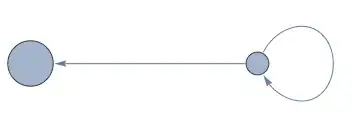
Mathematica graphics

How can I make the loop bigger or smaller?

I do not want to use a custom EdgeShapeFunction. Bult-in EdgeShapeFunctions are acceptable.

When using a user-defined edge shape function, the nice positioning of the arrowheads will be broken in the above graph. When using a built-in one, such as EdgeShapeFunction -> "CarvedArrow", everything is fine. Perhaps some of the builtin ones have an option to control the self loop size? Some do have options, but they are undocumented.

GraphPlot has SelfLoopStyle. Is there anything for Graph?

Szabolcs
  • 234,956
  • 30
  • 623
  • 1,263

1 Answers1

3

You could define your own scaling arc function:

arcFunc[g_, r_: 1.5][list_, DirectedEdge[x_, x_]] :=

 With[{v = 
    DynamicLocation["VertexID$" <> ToString[VertexIndex[g, x]], 
     Automatic, Center]}, 
  Arrow[BezierCurve[
    Join[{v}, 
     ScalingTransform[r {1, 1}, list[[1]]][
      list[[{5, 8, 10, 16, 18, 21}]]], {v}], SplineDegree -> 7]]]

g = Graph[{1 -> 2, 1 -> 1}, VertexSize -> {1 -> 0.1, 2 -> 0.2}, 
  EdgeShapeFunction -> {x_ \[DirectedEdge] x_ :> arcFunc[g, 1.7]}, 
  PerformanceGoal -> "Quality"]

or

g = Graph[{1 -> 2, 1 -> 1}, VertexSize -> {1 -> 0.1, 2 -> 0.2}];
Graph[g, EdgeShapeFunction -> {x_ \[DirectedEdge] x_ :> 
    arcFunc[g, 1.7]}, PerformanceGoal -> "Quality"]
halmir
  • 15,082
  • 37
  • 53
  • I did not know that it was possible to use a pattern when setting options such as EdgeShapeFunction. I am referring to x_ \[DirectedEdge] x_. Do you know where this is documented? – Szabolcs May 15 '17 at 14:01
  • 2
    @Szabolcs It's documented under scope in EdgeShapeFunction documentation page. – halmir May 15 '17 at 16:08
  • This answer does not work when I have specified EdgeLabels: Graph[{1 -> 1, 1 -> 2}, EdgeLabels -> {(1 -> 1) -> "E1", (1 -> 2) -> "E2"}, EdgeShapeFunction -> {x_ \[DirectedEdge] x_ :> arcFunc[g, 1.7]}]. How could I resolve this? – Hotschke Oct 05 '18 at 10:43
  • @Hotschke this function need to set PerformanceGoal -> "Quality". g = Graph[{1 -> 1, 1 -> 2}, EdgeLabels -> {(1 -> 1) -> "E1", (1 -> 2) -> "E2"}, EdgeShapeFunction -> {x_ [DirectedEdge] x_ :> arcFunc[g, 1.7]}, PerformanceGoal -> "Quality"] – halmir Oct 05 '18 at 14:54
  • Thanks for your answer. It works now. However, I do not know why this has something to do with PerformanceGoal. I cannot find an explanation in the documentation under EdgeShapeFunction or PerformanceGoal. Can you give me a hint? – Hotschke Oct 05 '18 at 15:00
  • @Hotschke argFunc uses DynamicLocation which is only showed up when PerformanceGoal set to "Quality". – halmir Oct 05 '18 at 15:06
  • Thanks for your help. DynamicLocation seems to be undocumented? – Hotschke Oct 05 '18 at 15:07
  • @Hotschke no, that is not documented – halmir Oct 05 '18 at 15:20
  • Why do you know about this? Are there additional resources I do not know about? – Hotschke Oct 05 '18 at 15:21
  • @Hotschek search DynamicLocation here than you could get all the information – halmir Oct 05 '18 at 15:26
  • :-) https://mathematica.stackexchange.com/questions/155157/dynamiclocation-usage – Hotschke Oct 05 '18 at 15:45