Update 2:
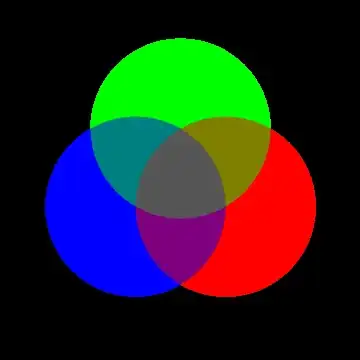
Use ImageApply to replace the channel values of each pixel with the values that correspond to blended values:
img=Image[Plus @@ (ImageData /@ MapThread[Graphics[{##}, PlotRange -> 2,
  Background -> Black] &,  {color,  Disk /@ coord}])];
ImageApply[If[Tr[#] == 0, #, #/Tr[#]] &, img]
or, better yet, (courtesy of J.M.)
ImageApply[Normalize[#, Tr] &, img]
Update 1:
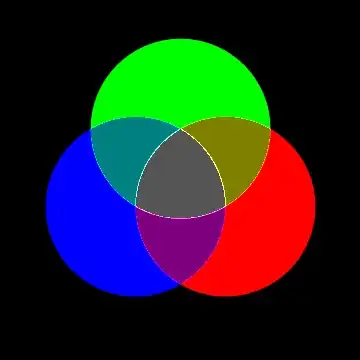
Post-process the original image to replace intersection colors with the blended versions:
ImageData[img] /.  {{1., 1., 1.} -> {1./3, 1./3, 1./3},
    {1., 1., 0.} -> {1./2, 1./2, 0.},
    {0., 1., 1.} -> {0., 1./2, 1./2},
    {1., 0., 1.} -> {1./2, 0., 1./2}} // Image
Original post:
You can use RegionPlot to get a picture with circle intersections colored using Blend:
circles = (0 <= (x - #[[1]])^2 + (y - #[[2]])^2 <= 1) & /@ coord;
subregions =  Most@(And @@ # & /@ (Thread[{#, circles}] & /@
   Tuples[{Identity, Not}, Length@circles] /. {x_, y_} :> x[y]));
subregioncolors = Thread[{#, color}] & /@
     Tuples[{Identity, # /. # -> Sequence[] &}, Length@color] /.
        {x_, y_} :> x[y] /. {} -> Sequence[];
subregioncolors = Map[Blend@Flatten@{#1, #1} & , subregioncolors];
RegionPlot[subregions, {x, -2, 2}, {y, -2, 2},
    PlotStyle -> subregioncolors, BoundaryStyle -> White,
    PlotPoints -> 150, Background -> Black]


ColorNegate[img]gives the same result? (whereimgis the first image in OP's question) – kglr Nov 18 '12 at 14:29