3

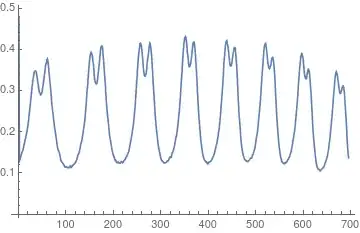
I'm doing an experiment on Zeeman effect, and I have to turn an image into a graphic, like the example below:

Example of the desired result[1]

What functions available does this image processing?

Thanks in advance,

Gabriel

1 - http://www.ifsc.usp.br/~lavfis/images/BDApostilas/ApEfZeeman/EfeitoZeeman_Davidovich.pdf

  • 3
    Something like ListPlot@Mean@ImageData[img] – Szabolcs Oct 11 '17 at 18:43
  • Well, it worked. Not as fine as in the example, but maybe that's because of the quality of the images I got in the lab. Thanks a lot!

    If someone knows another way to do that, I'd appreciate, to compare the results.

    Gabriel

    – Gabriel Das Neves Oct 12 '17 at 02:08
  • you would likely get a sharper plot if you grabbed one row of pixels instead of the mean. ListPlot@ImageData[[n]] where n is half the image height – george2079 Oct 12 '17 at 02:32
  • @george2079 Not a good idea with noisy data. The line patterns in the image are almost vertical so taking the mean of a column is a nice way to get a stable measure for the intensity. – halirutan Oct 12 '17 at 03:49
  • The image is most likely sRGB-encoded, hence consider converting it into Linear RGB: https://mathematica.stackexchange.com/q/15596/280 – Alexey Popkov Oct 12 '17 at 04:03

1 Answers1

4

First, you need the separated image for one of those measurements:

enter image description here

and then you can use something along the lines

img = Import["https://i.stack.imgur.com/gI1O1.png"];
grayData = ImageData[ColorConvert[RemoveAlphaChannel@img, "Grayscale"], "Real"];
ListLinePlot@Mean[grayData]

Mathematica graphics

halirutan
  • 112,764
  • 7
  • 263
  • 474