How can one convert between the implicit units used by Grid (ems and line height for horizontal and vertical dimensions) and printers points (in GraphicsGrid and Graphics)?
Grid[{{"sample", "text"}}, Frame -> All,
 ItemSize -> {{4, 7}, Automatic}]

Row@{Framed["sample", ImageSize -> 60, FrameMargins -> 0],
  Framed["sample", ImageSize -> 100, FrameMargins -> 0]}

GraphicsGrid[{{"sample", "text"}}, Frame -> All, ItemSize -> 7]

GraphicsGrid[{{Item["sample", ItemSize -> 4],
   Item["text", ItemSize -> 7]}}, Frame -> All(*,ImageSize->160*)]
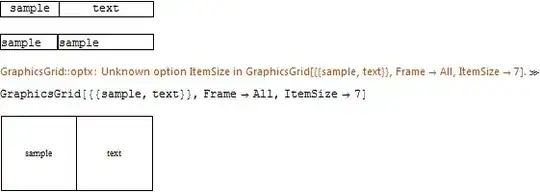
The last two examples show that, while the documentation of ItemSize states that "In GraphicsGrid, w and h are both measured in absolute printer's points", ItemSize cannot be used as an option for GraphicsGrid and it doesn't do anything as an option for an internal object wrapped in Item.
Realistic example
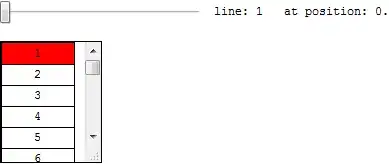
Here is a particular problem, that presents the issue of different units in the same object. The task is to automatically scroll a Pane to a certain line in a dataset.
Updated: Improved code according to Heike, to keep the line in focus at the top.
data = Range@200;
lineHeight = 1.5;
conversion = 14; (* magic number *)
paneHeight = 120;

update[n_] := (scrollToThis = n;
   pos = (scrollToThis - 1)*lineHeight*conversion);
update@1;

Row@{Slider[Dynamic[scrollToThis, (update@#) &], {1, Length@data, 1}],
   "  line: ", Dynamic@scrollToThis, "   at position: ", Dynamic@pos}
Dynamic[Framed[
  Pane[Grid[List /@ data, Frame -> All, ItemSize -> {5, lineHeight},
    Background -> {White, {scrollToThis -> Red}}],
   ImageSize -> {100, paneHeight}, Scrollbars -> {False, True},
   ScrollPosition -> {0, pos}, ImageMargins -> 0, FrameMargins -> 0],
  ImageMargins -> 0, FrameMargins -> 0],
 TrackedSymbols :> {scrollToThis, pos}]
Question
Is there a way to convert between different units (ems / lineheight <--> printers points) in a foolproof way?



22.77on my machine. – Mr.Wizard Feb 10 '12 at 10:43ScrollPositiononly accepts pixel measurements as briefly skimming the help suggests I don't see how this can be done reliably. – Mr.Wizard Feb 10 '12 at 10:46posshould be something likepos = (scrollToThis-1/2)*lineHeight*conversion+ paneHeight/2for some value of conversion if you want the highlighted cell to appear in the middle for any value ofscrollToThis. – Heike Feb 10 '12 at 10:5714keeps the focus line exactly at the top: any otherconversionnumber causes the focus line to lag behind or go faster than necessary. – István Zachar Feb 10 '12 at 11:22lineHeightin your latest code, the cells are shifted again. This is probably due to the fact that the height of the cells in the grid is determined by the setting forItemSizeplus the setting forSpacings. The latter is set toAutomaticby default so for full control you should set that to some absolute value as well (I've set it to{0,0}in my solution below). – Heike Feb 10 '12 at 11:47