One could use a mixture of Table, Cases and If to produce the desired result.
Here are the lists
list1 = {0, 1};
list2 = {{1}, {0, 1}, {0}};
First let's apply Cases with a manual input where we test list2 elements against zero.
Cases[list2, i_Integer -> If[i == 0, True, False], Infinity]
(* {False, True, False, True} *)
Next, rather than using 0, we will use the elements of list1. Table is helpful here.
out = Table[
  {i1,
   Cases[list2, i_Integer -> If[i == i1, True, False], Infinity]
   },
  {i1, list1}
  ]
(* {{0, {False, True, False, True}}, {1, {True, False, True, False}}} *)
The output was assigned to a variable out for subsequent processing.
The output is a nested list not quite the form that was requested.
Flatten is used to get the desired form.
Table[Flatten[sublist], {sublist, out}]
(* {{0, False, True, False, True}, {1, True, False, True, False}} *)
Finally Grid is used to place the result into a formatted table.
Grid[
 Table[Flatten[sublist], {sublist, out}],
 Frame -> All]
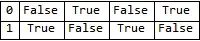
The complete operation can be done in one fell swoop without the use of intermediate variables. However, I believe it is easier to follow (especially when creating the steps) to break it down into small pieces.
Grid[
 Table[Flatten[sublist],
  {sublist,
   Table[
    {i1,
     Cases[list2, i_Integer -> If[i == i1, True, False], Infinity]
     },
    {i1, list1}
    ]}
  ],
 Frame -> All]


list1are present in elements oflist2. I would useOuter[MemberQ, list2, list1, 1](Transposeit afterwards if necessary). I'd recommend avoidingForif you are a beginner. – Szabolcs Nov 27 '17 at 08:54Printing them. If you put them in a variable then there's a lot you can do to present that data however you like. – aardvark2012 Nov 27 '17 at 10:29