0

I noticed that in Plot the function is evaluated at each sample point

Plot[func@x,{x,rStart1,rEnd1}]

which is fine for a regular function. If I substitute the function with an NDSolve, the problem is that at every sample point the NDSolve is evaluated so it is time consuming.

Plot[NDSolve[(*diff equation*)][[1]]@x,{x,rStart1,rEnd1}] 

I find a workaround to NDSolve only once, and pass it to the Plot[].

NDSolve[(*diff equation*)][[1]] //Plot[#@x, {x, rStart1, rEnd1}] &

I just wonder if there is a better way to do it, for example to Hold/Release or some magical trick to force it only being evaluated once.

Boson Bear
  • 383
  • 1
  • 10

2 Answers2

2

Two alternatives that would evaluate only once.

Let's verify that by using a counter

counter = 0;
Dynamic[counter]

With

With[
 {
  func = NDSolve[
     counter += 1;
     {y'[x] == y[x] Cos[x + y[x]], y[0] == 1}
     , y
     , {x, 0, 30}
     ][[1, 1, 2]]
  },
 Plot[
  func[x]
  , {x, 0, 30}
  , PlotRange -> All]
 ]

Evaluate

Plot[
 Evaluate[
  y[x] /. NDSolve[
    counter += 1;
    {y'[x] == y[x] Cos[x + y[x]], y[0] == 1}
    , y
    , {x, 0, 30}
    ]]
 , {x, 0, 30}
 , PlotRange -> All
 ]

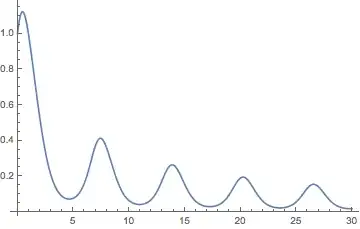
Mathematica graphics

rhermans
  • 36,518
  • 4
  • 57
  • 149
2

Perhaps the easiest way in V9+ is

ListLinePlot@ NDSolve[(*ode for y[x]*), y, x]

Example from @rhermans:

ListLinePlot@ 
 NDSolveValue[{y'[x] == y[x] Cos[x + y[x]], y[0] == 1}, y, {x, 0, 30}]

Mathematica graphics

Michael E2
  • 235,386
  • 17
  • 334
  • 747