34

I have enjoyed working with R inside Mathematica. But it would be nice If I could have a special R cell. For example, instead of typing

REvaluate["{
      data(iris)
      reg <- lm( Sepal.Length ~ Species, data=iris )
      summary.text <- capture.output(print( summary(reg)) )
   }"]

I would change the cell style to the special R code one and simply type in the code as I would do in a terminal window. Like so:

  data(iris)
  reg <- lm( Sepal.Length ~ Species, data=iris )
  summary.text <- capture.output(print( summary(reg)) )

Is there some way to create such a FrontEnd cell?

In the future I would like Mathematica to have code highlighting and autocompletion for such cells. This would make Mathematica the best environment for working with R.

Murta
  • 26,275
  • 6
  • 76
  • 166
  • This should give you one such cell: CellPrint[TextCell["x + b", "Input", CellEvaluationFunction -> (REvaluate[#1] &)]]. I belive you shoud be able to define this on a stylesheet level however, but it's not working for me right now. – jVincent Dec 20 '12 at 01:03
  • Very nice! Question, can't you just say CellEvaluationFunction->REvaluate? REvaluate should be equivalent to (REvaluate[#1]&) (by eta-expansion), unless CellEvaluationFunction passes more than one argument. (But since the default is Identity which takes just 1 arg, I think this is safe.) – Joel Klein Dec 20 '12 at 02:11
  • I think it can take a second argument which by default is InputForm -- at least thats what I conclude when I use Print as the function. – Mike Honeychurch Dec 20 '12 at 04:55
  • @m_goldberg tks for the editing. Much better! – Murta Dec 20 '12 at 10:10

2 Answers2

30

The following is a style for an R cell, inspired by this answer. You can add this to your stylesheet (change the styles to your liking):

Cell[StyleData["R"],
    CellMargins->{{66, 10}, {5, 10}},
    Evaluatable->True,
    Background->RGBColor[1,1,0.85],
    AutoQuoteCharacters->{},
    CellEvaluationFunction -> (REvaluate["{"<>ToString@#<>"}"]&),
    CellFrameLabels -> {{None,"R"},{None,None}},
    LanguageCategory->"R",
    FormatType->InputForm,
    FontFamily -> "Inconsolata-dz",
    MenuCommandKey->"8"
]

You can now create a new R cell by pressing Cmd8, but you'll have to manually remove the MenuCommandKey setting from the "Code" style before it'll work. Alternately, you can simply press Cmd0 and choose R from the list.

You then use it just like any other input/code cell. Paste your R code into the cell and hit ShiftReturn and it'll evaluate it (assuming RLink has already been called, etc.)

enter image description here

rm -rf
  • 88,781
  • 21
  • 293
  • 472
  • Very nice!.. but how I implement it as a new style? – Murta Dec 20 '12 at 01:22
  • @Murta Go to: Format > Edit Stylesheet > Enter a style name and enter R in the field. In the new style cell, press Cmd-Shift-E and then delete whatever is in there and paste the above. I explain the steps with pictures in the first part of this answer – rm -rf Dec 20 '12 at 01:24
  • Cool!.. It worked like a charm. Tks! – Murta Dec 20 '12 at 01:31
  • 1
    I just tested this and found a problem. AutoQuoteCharacters->{} is required otherwise if you enter a link to download data you get curly quotes which R doesn't like. I've taken the liberty of editing the answer. I have left LanguageCategory->"R" even though I don't think it is valid (but does not seem to cause an error). – Mike Honeychurch Dec 20 '12 at 05:30
  • Thanks for the edit @Mike :) I know there isn't any language category called "R", but I left it in there, just in case future versions introduce support for R syntax highlighting (and because, as you said, it doesn't cause any issues) – rm -rf Dec 20 '12 at 07:34
26

The R code highlighter

There is an undocumented symbol

RLink`Private`rcell

When you type it and press Shift+Enter, you get a syntax-highlighted R code cell based on my real-time syntax highlighter, which is connected to REvaluate and highlights the code as you type. Note that the cell where you type RLink`Private`rcell will be gone, replaced with the new R code cell.

If it is too much typing, you can make an alias like so:

rc := RLink`Private`rcell

and then evaluate rc instead.

Here is a sample screenshot:
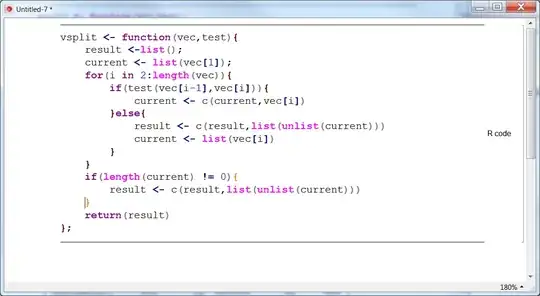
enter image description here

Some details

As noted in my answer about the highlighter, it does perform bracket and parentheses matching / highlighting as well. To make it more responsive, I disables re-parsing on all keys except left/right arrows and space bar, so you will have to press one of those to re-render. Normally they are pressed most frequently when working with code, so this should not be very noticable. Also, the cursor may disappear at times, but again, pressing these keys should make it re-appear. The same remark goes to the visibility of block selection.

Note that, as present, rcell does not understand the multi-line code string without curly braces. One way to fix this is to execute this code:

ClearAll[RLink`Private`replR]
RLink`Private`replR[code_String] :=
    REvaluate["{" <> code <> "}"]

Limitations

For Windows, the highlighter works fine. For other platforms, the highlighter was giving me crashes on some Linux flavors and on Mac. But, I got reports for other Linux flavors that it worked fine there. So, ymmv, but you can give it a try.

Apart from problems on specific platforms, the highlighter may have a few glitches. If you find some, I would appreciate if you report them to me.

Leonid Shifrin
  • 114,335
  • 15
  • 329
  • 420
  • Your code is now part of v9? :D – Mr.Wizard Dec 20 '12 at 11:47
  • 6
    @Mr.Wizard Yep:). I developed RLink. But the highlighter part is experimental and not documented therefore. – Leonid Shifrin Dec 20 '12 at 11:47
  • Now I understand why you were so busy for a while! Should I have known this earlier? I seem to do very poorly at staying informed. – Mr.Wizard Dec 20 '12 at 11:50
  • @Mr.Wizard Yes, I was busy mainly because of it. Re:earlier - I told folks that I consult for WRI and was developing RLink right when V9 was released, so about 3 weeks ago, in chat. Somehow I was sure that you saw that chat transcript. – Leonid Shifrin Dec 20 '12 at 11:54
  • Well if I did my memory decline has entered free-fall, so let's assume I didn't. :-s – Mr.Wizard Dec 20 '12 at 11:57
  • When entering code like this, is the cell executable, and automagically wrapped in ´REvaluate[]´? – Thomas Dec 20 '12 at 14:24
  • @Thomas Yes, it is. There is not much auto-magic,though.You can use ? (Information) to see how rcell is implemented: ?RLink`Private`rcell. The replR function is really just a proxy for REvaluate. The code that generates the cell itself is pretty similar to code of WReach referred to by @rm -rf in his answer. The connection to code highlighter is via this option: CellEventActions->RLink`Private`eventActions. The symbol RLink`Private`eventActions is defined by the highlighter package. The latter is located in the Kernel subfolder of RLink. – Leonid Shifrin Dec 20 '12 at 14:30
  • I started playing with this today, and there are a few usability problems: the need to delete "Enter R code here" every time; left/right arrows don't do what they's supposed to (move by one character); it's impossible to enter single quotes – Szabolcs Apr 18 '13 at 15:58
  • @Szabolcs Some of these problems were there in V8 (quotes), but some are only in V9 (arrows). I plan a full rewrite of this functionality, actually, for a number of reasons. And, I also had some plans for C cells. I can move it up my todo list if you are seriously interested. Meanwhile, you may try this on V8 where it works better (on Windows). – Leonid Shifrin Apr 18 '13 at 16:02
  • @Leonid Perhaps this shouldn't be a priority. It's easy to create an R cell without any syntax highlighting, so there's a practical and easy workaround. Syntax highlighting is nice, but it's not essential. There must be more important items to fix. – Szabolcs Apr 18 '13 at 16:11
  • @Szabolcs The problem I have currently is that I have a number of inter-related projects, which will all benefit from being dissected into smaller pieces. This also is a great chance to test my gist-based versioning system, and make a switch to a new way of development it potentially allows. But, there is a critical mass of tools that I need to develop to some stage where they will all play in concert. Currently I am swamped with work, and that leaves me no time at all, at the moment. So, I am waiting for some substantial time window to move these things along systematically. – Leonid Shifrin Apr 18 '13 at 16:25