The command CurrentValue (documentation) allows you to access various properties of fonts, such as x-height, line height, and various measures of width such as n-width and m-width. This has obvious applications in determining appropriate sizes of objects so that the text contained within them fits.
However it is not obvious how to pick up the characteristics of the font of styled output. For example, the following uses the width of the font in the input cell, not the selected style in the code (example adopted from this question).
 Framed @ Graphics[Text[
  Style["how quickly daft jumping zebras vex",
   FontFamily -> "Verdana", FontSize -> 20]],
 ImageSize -> CurrentValue["FontNWidth"]*35]

If I select the whole input cell (by its bracket, not just the text) and change the font, it works better, although of course "FontNWidth" is not a perfect indicator of actual width of characters:

How can I concisely get the CurrentValue dimensions from an arbitrarily chosen font?


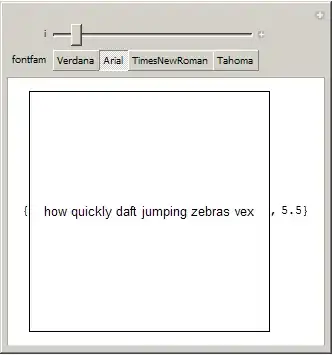

Dynamic*... – rm -rf Feb 13 '12 at 10:11CurrentValue["FontNWidth"]independent ofFontSizeandFontFamily. – Heike Feb 13 '12 at 21:24Manipulate[{Framed@ Graphics[ Text[Style[ DynamicWrapper["how quickly daft jumping zebras vex", p = CurrentValue["FontNWidth"]], FontFamily -> "Verdana", FontSize -> i]], ImageSize -> Dynamic[p]*46], Dynamic[p]}, {i, 10, 40}]– Verbeia Feb 13 '12 at 21:26Manipulatedoes but much simpler -- as per screen grabs. – Mike Honeychurch Feb 13 '12 at 21:40DynamicWrapperI hadn't tried your code. On my Mac your code doesn't work. The value of p is constant regardless of what you change the font size to, and consequently the image size never changes. – Mike Honeychurch Feb 13 '12 at 21:46