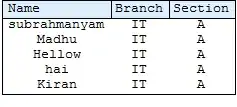
I generate different Grids with different columns. Automatically ImageSizes are fixed depending upon the data. So every Grid has a different size.
grid1=Grid[{{Item["Name", Frame -> True, Background -> LightBlue, Alignment -> Left],
             Item["Branch", Frame -> True, Background -> LightBlue,Alignment -> Left],
             Item["Section", Frame -> True, Background -> LightBlue,Alignment -> Left]},
            {"s", "IT", "A"},
            {"u", "IT", "A"},
            {"b","IT", "A"},
            {"b", "IT", "A"},
            {"b", "IT", "A"}}, Frame -> True
         ];

 grid2=Grid[{{Item["Name", Frame -> True, Background -> LightBlue, Alignment -> Left],
             Item["Branch", Frame -> True, Background -> LightBlue,Alignment -> Left],
             Item["Section", Frame -> True, Background -> LightBlue,Alignment -> Left]},
            {"subrahmanyam", "IT", "A"},
            {"Madhu", "IT", "A"},
            {"Kiran","IT", "A"},
            {"KalyanKumar", "IT", "A"},
            {"Pavan", "IT", "A"}}, Frame -> True
         ];
  grid3 = Grid[{{"Main", SpanFromLeft, SpanFromLeft,
 SpanFromLeft}, {Item["Name", Frame -> True,
  Background -> LightBlue, Alignment -> Left],
 Item["Branch", Frame -> True, Background -> LightBlue,
  Alignment -> Left],
 Item["Section", Frame -> True, Background -> LightBlue,
  Alignment -> Left],
 Item["Section", Frame -> True, Background -> LightBlue,
  Alignment -> Left]}, {"subrahmanyam", "IT", "A", "g"}, {"Madhu",
  "IT", "A"}, {"Kiran", "IT", "A"}, {"KalyanKumar", "IT",
 "A"}, {"Pavan", "IT", "A"}}, Frame -> True,
  ItemSize -> {{10, 7, 7, 7}, 1}];

 finalGrid=Grid[{{grid3},{grid1}, {grid2}, {grid1}, {grid2}, {grid1}, {grid2}}]
grid1Image=

grid2Image=
grid3Image=

finalImage=

If I place all the Grids columnwise within Grid, it doesn't look good.
So, I want to fix all the Grids with the same sizes. I tried various things, but nothing seems to work.
Can anybody help me?




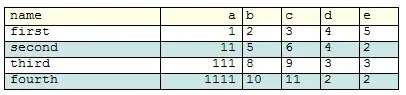


Gridhave only 3 columns,it is working fine.IfGridhave more number of 3 columns,it is not working.How can I solve that? – subbu Dec 26 '12 at 07:35{10,7,7}to match the number of columns you have, setting the width of each column. If the list you provide for column widths is shorter than the number of columns, widhts of remaining columns are determined by the default settings. By putting column width numbers in another layer of braces, you can cycle through these numbers to set the all the column widths. That is, if you have six columns, say, setting ItemSize->{{{10,5}}, 1} is equivalent to settingItemSize->{{10,5,10,5,10,5}, 1}. – kglr Dec 26 '12 at 08:26ItemSize->{{10,5,{2}}, 1}, then the first column will have width10, second5and third and remaining columns will have width2. Please see my edits to the post. – kglr Dec 26 '12 at 08:27Gridswith 3 columns and 4 columns,andItemSize->{{10}, 1}.The firstgridhas 3 columns meaning ,that the size is 30.Similarly, the secondgridhas 4 columns, meaning,that size is 40. Bothgridsizes are not equal so bothgridsdo not appear with the same size.Reason why I think yourItemSize->{{10}, 1}notation is not suitable for me. – subbu Dec 26 '12 at 09:02i = sum of ni+1 spacings + sum of ni column widths...If you don't mine can you explain clearly – subbu Dec 26 '12 at 17:26