This is partly an exercise in how to make new notebooks and also I need a message window for a dynamic I am developing where I want the messages to go somewhere I control. This question is along the same lines but is about a dialogue window. The idea is that I have a myPrint that goes to a notebook that acts as a message window. I want to be able to put myPrint in code so that an expression goes to a message window.
This is where I have got to: the code will generate a new notebook or uses an existing notebook called "myMessagesTemp.nb".
ClearAll[myPrint];
myPrint[exp_] := Module[{dir, fns, nb},
  dir = NotebookDirectory[];
  fns = FileNames[FileNameJoin[{dir, "myMessagesTemp.nb"}]];

  If[fns === {},
   nb = CreateNotebook[];
   NotebookSave[nb, FileNameJoin[{dir, "myMessagesTemp.nb"}]],
   nb = NotebookOpen[fns[[1]]]
   ];

  NotebookWrite[nb, Cell[exp, "Output"]]
  ]
Here is some code that illustrates how I would like the message window to work
Module[{},
 myPrint["Hello World"];
 myPrint["Hello Again"];
 Do[myPrint[n], {n, 4}];
 Do[myPrint[ToString[n]], {n, 4}];
 myPrint[x^2];
 ]
However what I get in my message window is
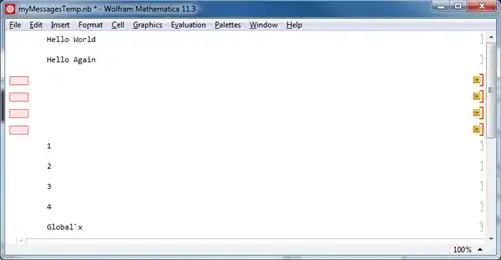
So some things have worked but there are pink boxes where I tried to print a number. How can I print more generally?
As an aside when I used the SE Uploader the pink boxes suddenly reverted to the expressions. Can this be explained?
Thanks


Cell[BoxData@ToBoxes@exp, "Output"]– Kuba Mar 23 '18 at 11:15