21

Background

We are dealing with very large TIFF image files that are imported, processed and exported using Mathematica 9.0.1. Many of our algorithms only work with an array representation of the images, where pixel values are stored in the form of nested lists. For this, we are currently using the function ImageData to directly convert images into an array representation.

Problem

I am struggeling with the increase in memory usage when converting images to the array representation using ImageData. What I am wondering about is that when I convert images with ImageData the allocated memory is four times higher compared to having only the images in memory.

Example

Consider the following example: I first create a stack of 50 images that is exported to a TIFF file. Then I import the file again with the option "Data". I check the memory before and after Import. Compared to importing the file without any option, this takes up four times more memory.

Export["testFile.tif", ConstantArray[Image[ConstantArray[0, {1024, 1024}], "Bit16"], 50]];
FileByteCount["testFile.tif"]

104901507

MemoryInUse[]

8617736552

imgData = Import["testFile.tif", "Data"];
MemoryInUse[]

9037228760

9037228760 - 8617736552

419492208

If I import the file without the option, the memory used is about 104905128 bytes. This gives a factor of about 4 (3.99) more memory needed. I repeated this several times and I have to admit I do not have any explanation.

Questions

  1. Is there a simple explanation for the increase of memory usage?
  2. How can I reduce the amount of allocated memory when using the array representation?

Attempts

After reading about the function DeveloperToPackedArray` in What is a Mathematica packed array? I tried to convert the data array hoping that this would give me a decrease in memory usage. Nevertheless, I am not really sure if I am using the function correctly in this case. The code I tried is the following:

packed = Developer`ToPackedArray[Import["testFile.tif", "Data"]];

System specifictation

  • OS: Windows 7 Professional, Service Pack 1 (64-bit)
  • Processor: Intel Xeon CPU E5630 @ 2.53 GHz (2 Processors)
  • Installed memory: 96 GB
  • Mathematica 9.0.1
  • Java version 1.7.0_07

Additional question

Still one problem remains: Is their a clean way in Mathematica, how I could reduce the number of bits used for Integer to change the amount of memory used for the array representation (ImageData) without losing information? Or do I have to stick to Image in that case?

g3kk0
  • 3,318
  • 17
  • 37
  • On which operating system are you? – halirutan Jan 10 '13 at 12:14
  • @Alexander Schmitz perhaps you could check the history settings? Link – Lou Jan 10 '13 at 12:16
  • @halirutan: I added some information about my system. – g3kk0 Jan 10 '13 at 12:20
  • @Lou: Thanks for the link. I already read this post. However, the problem is not that memory is not freed. It's not about the history of the current session. My problem is that I do not understand why an array-representation of images needs four times more memory. – g3kk0 Jan 10 '13 at 12:24
  • It would be useful if you test this behavior on smaller size files and provide a link to some such file (of a size say 10-20Mb) in the question, to give us something to play with. – Leonid Shifrin Jan 10 '13 at 12:54
  • 2
    I presume you've already ruled out using ImageFileApply and ImageFileFilter, which are "used to read, process, and write successive blocks of data from a very large image file whose size could exceed available memory", according to WRI. – cormullion Jan 10 '13 at 13:05
  • @cormullion: Thanks for your ideas. I have read about these two functions, yes. Usually, my files should fit into the memory without any problem. The thing I am curious about is why the array-representation needs four times more memory. – g3kk0 Jan 10 '13 at 13:45
  • @LeonidShifrin: Good idea, thanks. I wanted to post an example where the difference in memory of both import types can be seen easily (104905128 Bytes vs. 419492208 Bytes). If needed, the dataset can be reduced to 10 images if you use: ConstantArray[Image[ConstantArray[0, {1024, 1024}], "Bit16"], 10]]; – g3kk0 Jan 10 '13 at 13:50
  • 5
    I think it's just that a 16-bit TIFF uses two bytes per pixel, whereas a Mathematica Integer uses a minimum of 8 on a 64-bit system. – Simon Woods Jan 10 '13 at 14:33
  • Packing doesn't help because the data is only unpacked at the first level, i.e. Developer`PackedArrayQ /@ imgData gives {True, True, True ...} – Simon Woods Jan 10 '13 at 14:36
  • @SimonWoods: Nice ideas, thanks. I tried to store different types of images. The memory increase seems to be independent from the type. It must have something to do with Mathematica's representation and memory allocation for lists. Am I missing something completely?! – g3kk0 Jan 10 '13 at 14:47
  • My assertion that Mathematica uses 8 byte (64 bit) integers was wrong. At least on my PC, packed arrays of integers are 32 bit. – Simon Woods Jan 10 '13 at 21:35

2 Answers2

18

On my system (Windows 7 64-bit, 12GB, Mathematica v8) I only see a factor of 2 between the image file size and the memory used by the image data. This agrees with the observation that packed arrays of integers use 32 bits per element.

To confirm this, a ConstantArray containing values of $2^{31}-1$ (the maximum signed 32-bit integer) is packed and has a ByteCount corresponding to 32 bits per element, whereas increasing the value by 1 (to a 33 bit number) prevents packing and the array now takes 512 bits per element to store.

bitinfo = Module[{arr = ConstantArray[#, {1000}]},
    {If[Developer`PackedArrayQ[arr], "Packed", "Not packed"],
     ToString[Floor[ByteCount[arr], 1000]/125] <> " bits"}] &;

bitinfo[2^31 - 1]
(*  {Packed, 32 bits}  *)

bitinfo[2^31]
(*  {Not packed, 512 bits}  *)

Note that small integers still use a 32 bit representation, even though they could be stored using fewer bits.

bitinfo[1]
(*  {Packed, 32 bits}  *)

To understand what is happening with images and tiff files, I wrote this:

With[{f = "testFile.tif", data = ConstantArray[0, {1000, 1000}], 
  types = {"Bit", "Byte", "Bit16", "Real32", "Real"}}, 
 Column[{"Bits per pixel for different image types:\n", 
   TableForm[
    Table[Round[
        8 {ByteCount@#, Export[f, #]; FileByteCount@f, 
           ByteCount@Import[f], ByteCount@Import[f, "Data"]}/10^6] &@
      Image[data, type], {type, types}], 
    TableHeadings -> {types, {"Initial\nImage", "Exported\nfile", 
       "Imported\nImage", "Imported\ndata"}}]}]]

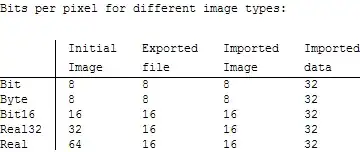
enter image description here

The data shows that the image created by Image[data, type] uses a bit depth corresponding to the specified type (with the exception of "Bit" images which use 8 bits per pixel). The exported tiff file uses either 8 bits or 16 bits per pixel (I think these are the only bit depths supported by Export for tiff files). The imported Image object has the same bit depth as the file, and as expected the packed array of image data uses a bit depth of 32.

The interesting thing is that Mathematica can use 8-bit or 16-bit integers for Image objects, but packed arrays of integers are always 32-bit. So it's normal that the same data requires more memory as an array than as an Image.

The mystery is why you are getting a factor of 4 between a 16-bit image and the corresponding array. Perhaps the bit depth of packed arrays has increased to 64 bits in version 9? Please consider running the code in this answer and reporting what you find.

Simon Woods
  • 84,945
  • 8
  • 175
  • 324
  • 7
    In V9, packed arrays uses 64-bit integers on a 64-bit operating system. SystemFiles/IncludeFiles/C/WolframLibrary.h gives the mint type definition and you can check the different definitions for 32- and 64-bit systems. Within Mathematica, Developer`$MaxMachineInteger will give the maximum signed machine integer, which is used in many places within Mathematica including the size of a packed integer array element. Image does use a different representation. – Joel Klein Jan 11 '13 at 04:55
  • Thank you for the good explanation. This really helped me a lot :) – g3kk0 Jan 11 '13 at 08:20
  • Judging by your results I suspect the "different representation" mentioned by @JoelKlein is System`RawArray (relevant functions also in the Internal` and Developer` contexts). This supports types "Byte", "Bit16", "Integer32", "Real32", and "Real". It seems that one cannot really manipulate these objects inside Mathematica, so its likely reason for being is interoperability. – Oleksandr R. Jan 20 '13 at 04:57
2

I also wanted to add the output of the code provided by Simon Woods. I executed it on my system (Windows 7 (64-bit), 96GB, Mathematica v9) as described in the question edit.

When i run the bitinfo function this gives me:

bitinfo[2^31 - 1]
(*  {Packed, 64 bits}  *)

bitinfo[2^31]
(*  {Not packed, 64 bits}  *)

bitinfo[1]
(*  {Packed, 64 bits}  *)

The With produces the following output:

output of With module

Regarding the output and the comment of Joel Klein, now everything seems to make sense. As Simon said, "Mathematica can use 8-bit or 16-bit integers for Image objects, but packed arrays of integers are always 32-bit." Considering that I am using Mathematica v9, the memory use is different, because as Joel said, "packed arrays use 64-bit integers on a 64-bit operating system".

g3kk0
  • 3,318
  • 17
  • 37