6

I wonder is it possible to render Graphics in Mathematica with bitdepth higher than "Byte" which is the maximum bitdepth supported by the Windows XP operating system (it is so-called "True Color")? Tracing the rasterization with the option TraceInternal->True shows that Graphics is always rendered to a matrix of Integers in the range from 0 to 255, then it may be converted to Reals if requested but such conversion does not increase the bitdepth, of course: it changes only the internal representation of the Image. For example, let us consider rendering of VertexColors:

Cases[Trace[
  Image[Graphics[
    Polygon[{{-1, 0}, {1, 0}, {0, Sqrt[3]}}, 
     VertexColors -> {Red, Green, Blue}], ImageSize -> 4], "Real"], 
  TraceInternal -> True], 
 x_List /; MatrixQ[Unevaluated@x, NumberQ], {1, Infinity}]

One can see matrixes of values between 0 and 255 in spite of requested "Real" bitdepth. Let us compare the results of rendering with different requested bitdepths:

In[21]:= Image[
  Graphics[Polygon[{{-1, 0}, {1, 0}, {0, Sqrt[3]}}, 
    VertexColors -> {Red, Green, Blue}], ImageSize -> 4], "Real"] === 
 Image[Image[
   Graphics[
    Polygon[{{-1, 0}, {1, 0}, {0, Sqrt[3]}}, 
     VertexColors -> {Red, Green, Blue}], ImageSize -> 4], "Byte"], 
  "Real"]

Out[21]= True

It is obvious that the requested bitdepth does not change the real rendering bitdepth.

So the question is: is it possible to render Graphics with bitdepth higher than Byte?

Alexey Popkov
  • 61,809
  • 7
  • 149
  • 368
  • 1
  • @Silvia Thanks. It would be interesting to know the output of my test code (in the question) under Windows 7 or 8. I am working under Windows XP. – Alexey Popkov Jan 12 '13 at 04:51
  • 2
    Related: http://stackoverflow.com/q/7780327/618728 – Mr.Wizard Jan 12 '13 at 10:19
  • 3
    I don't think it's possible to do anything in the kernel. When you rasterize a Graphics expression it is processed by System`ConvertersDump`ConvertGraphicToRasterDataPacket which assembles an ExportPacket and sends it to the front end. The front end returns a System`ConvertersDump`Bitmap expression, which contains compressed bitmap data with a bit depth of 8. The ExportPacket has a ColorSpace option but nothing for bit depth. So I think unless there is a front end option to change the rendering bit depth (I can't see one myself), I suspect the answer is no. – Simon Woods Jan 12 '13 at 13:34
  • @Simon how did you come by this knowledge? Experimentation? – Mr.Wizard Jan 12 '13 at 13:50
  • @Mr.Wizard, yes, experimentation with Trace and my Spelunk function. – Simon Woods Jan 12 '13 at 14:55
  • @Simon Which OS you are using? This behavior may be OS-specific (although I think it is probably not). In any case, I think it is worth to post you comment as an answer. – Alexey Popkov Jan 12 '13 at 15:53
  • Sorry for the late reply. My win7 gives True too. I personally doubt that Image can handle colors "deeper" than true color. – Silvia Jan 12 '13 at 19:22

1 Answers1

5

Based on experimentation with Mathematica 8.04 on Windows 7 64-bit:

I don't think it's possible to do anything in the kernel. When you rasterize a Graphics expression it is processed by System`ConvertersDump`ConvertGraphicToRasterDataPacket which assembles an ExportPacket and sends it to the front end. The front end returns a System`ConvertersDump`Bitmap expression, which contains compressed bitmap data with a bit depth of 8. The ExportPacket has a ColorSpace option but nothing for bit depth. So I think unless there is a front end option to change the rendering bit depth (I can't see one myself), I suspect the answer is no.

To investigate on your own system, you can run the Trace looking for calls to the front end:

g = Graphics[
   Polygon[{{-1, 0}, {1, 0}, {0, Sqrt[3]}}, 
    VertexColors -> {Red, Green, Blue}], ImageSize -> 4];

Trace[Image[g, "Real"], MathLink`CallFrontEnd, TraceInternal -> True]

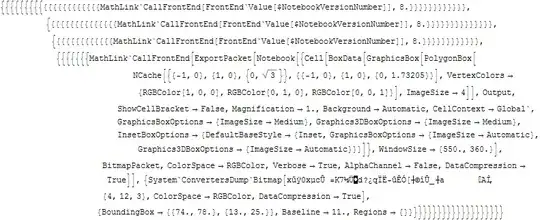
The output on my system contains 4 front end calls, of which the last one is interesting:

enter image description here

You can see that the ExportPacket contains a Notebook expression within which is the box form of the original graphics. Neither the Notebook options or the ExportPacket options contain anything that looks like a bit depth.

The expression returned from the front end is a System`ConvertersDump`Bitmap object, whose first element is a string of strange characters - this is the compressed bitmap data. You can copy the MathLink`CallFrontEnd expression from the trace output and evaluate it to get at the data (copying the compressed data string directly does not seem to work)

result = MathLink`CallFrontEnd[ (** copied from Trace output **)]

The data can be decompressed using:

Developer`RawUncompress[result[[1, 1]]]

{255, 255, 255, 255, 255, 255, 255, 255, 255, 255, 255, 255, 255, 255, 255, 255, 255, 255, 255, 255, 255, 255, 255, 255, 255, 255, 255, 255, 255, 255, 255, 255, 255, 255, 255, 255, 234, 184, 182, 188, 188, 165, 178, 233, 177, 255, 255, 255, 231, 216, 222, 74, 74, 107, 212, 229, 218, 255, 255, 255, 255, 255, 255, 183, 183, 232, 255, 255, 255, 255, 255, 255, 255, 255, 255, 255, 255, 255, 255, 255, 255, 255, 255, 255, 255, 255, 255, 255, 255, 255, 255, 255, 255, 255, 255, 255, 255, 255, 255, 255, 255, 255, 255, 255, 255, 255, 255, 255, 255, 255, 255, 255, 255, 255, 255, 255, 255, 255, 255, 255, 255, 255, 255, 255, 255, 255, 255, 255, 255, 255, 255, 255, 255, 255, 255, 255, 255, 255, 255, 255, 255, 255, 255, 255}

It is clear that the data is 8 bit.

Simon Woods
  • 84,945
  • 8
  • 175
  • 324
  • 2
    Very interesting, thank you. In v.8.0.4 this works, but in version 9.0.0 the attempt to Trace MathLink`CallFrontEnd crashes the kernel. – Alexey Popkov Jan 13 '13 at 04:53