7

Is there a "gallery" view of all the graphs available in GraphData?

I realize that some graphs may not lend themselves to such representation (e.g. some may have so many nodes that their thumbnails would all be unrecognizable, and indistinguishable, dark blobs). But even a gallery limited to those graphs that lend themselves to such representation would be of great help.

EDIT: the "gallery" does not need to be represented within Mathematica itself. A web page, PDF document, etc. would do just as well.

VividD
  • 3,660
  • 4
  • 26
  • 42
kjo
  • 11,717
  • 1
  • 30
  • 89

1 Answers1

9

First thing to remember is that GraphData is a very large collection - so gallery needs to be carefully constructed not to drain resources. Loading all images in the notebook would be at least strenuous:

GraphData[All] // Length
7184

Take a look at the following demonstrations:

The Documentation center also provides a small code snippet to browse graphs interactively. With slight modification here it is:

Manipulate[
 Column[{GraphData[graph], GraphData[graph, property]}], {{graph, 
   "PappusGraph"}, GraphData[All]}, {{property, "AllImages"}, 
  Complement @@ GraphData /@ {"Properties", "Classes"}}]

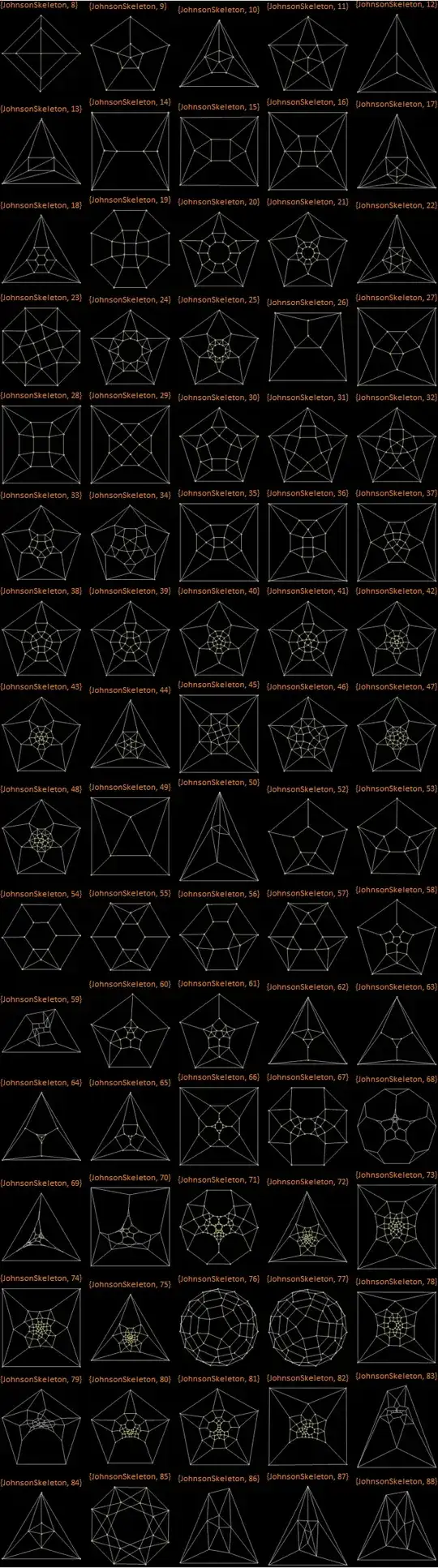
Or you can make up some sort of thumbnails gallery. You then can export thumbnails for a webpage or large image - to make a poster for example. Here is a start:

poster = Grid[Partition[Column[{
  Style[#, 12, Orange, FontFamily -> "Calibri"], 
  Show[SetProperty[GraphData[#], GraphStyle -> "BackgroundBlack"], ImageSize -> 120]}] & /@ 
     GraphData[All][[4540 ;; 4620]], 5], Background -> Black];

Export["test.png", poster]

enter image description here

Vitaliy Kaurov
  • 73,078
  • 9
  • 204
  • 355