When I enter f(x) in Mathematica, the f(x) appears as f (x). There's too much space between f and (x). How do I enter f(x)? For eg) ab appears normal in Mathematica but when I enter f(x) there's extra space between f and (x).
Asked
Active
Viewed 482 times
1

David G. Stork
- 41,180
- 3
- 34
- 96

user2134128
- 31
- 3
1 Answers
11
You can use f(x) in Mathematica. These are the steps. Open preferences, and look for CommonDefaultFormatTypes then change the Input and Output to TraditionalFormat, like this
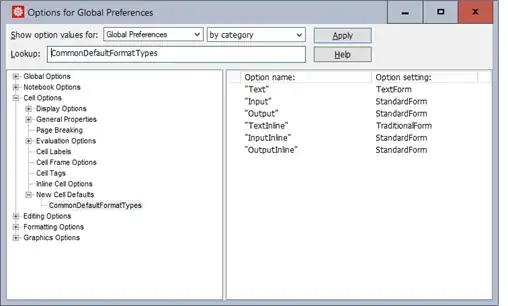

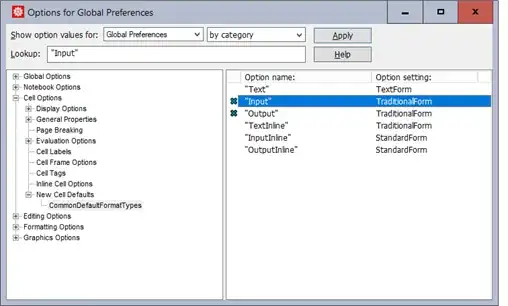
Now you can write
Plot(sin(x),{x,-Pi,Pi})
and
f(x_) := x^2;
Plot(f(x), {x, 0, 2})
and it work

You'll get this message from Mathematica first time
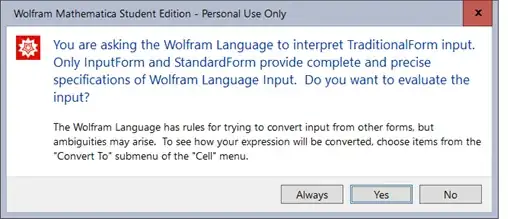
You can click Always so it do not show again.
I would not use this method as it can cause problems as the message above says, but it is something you can try if you want to enter math as traditional format.

Nasser
- 143,286
- 11
- 154
- 359
f[x]rather thanf(x). – JimB Aug 23 '18 at 04:30f[x]. This is because Mathematica allows and intends forf(x)to be interpreted asf * x, which is where the extra space comes from. – eyorble Aug 23 '18 at 04:48TraditionalForm. You can do this in an ordinary input cell by following the steps I described in this answer. But you have to distinguish between input cells and mathematical typesetting. If you want solely the latter, it would be better to choose an appropriate cell style from theFormatmenu first. – Jens Aug 23 '18 at 06:04abin Mathematica is interpreted as a single symbol, not $a\times b$. – user202729 Aug 23 '18 at 08:58