2

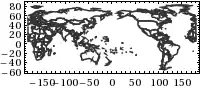
How can I change the Longitude range to 0-360 in the such plots?

Graphics[{GrayLevel[0.2],AbsoluteThickness[1.5],
  CountryData[
    "World", {"SchematicPolygon",{"Equirectangular",{0,180}}}
  ]/.Polygon->Line},
  Frame->True,ImageSize->200]

World map

Thanks

J. M.'s missing motivation
  • 124,525
  • 11
  • 401
  • 574
Karami
  • 201
  • 2
  • 8
  • I don't think longitude goes above +/- 180, though... – cormullion Jan 21 '13 at 12:18
  • 1
    @cormullion Among many examples of longitude extending beyond the $[-180,180]$ range, NASA's recent Cassini mission mapped Titan between 0 and 360 degrees longitude. In principle there's no limit to longitude; for instance, to describe a spiraling track around the earth, one might prefer to use as many multiples of 360 degrees as there are windings of the spiral (in order to maintain a local continuity of the longitude coordinate). – whuber Jan 21 '13 at 17:14
  • 1
    @whuber well, I learn something every day! – cormullion Jan 21 '13 at 17:18
  • It is common to use longitude between 0 and 360 in climate science (although 180W-180E is more common). In Mathematica, the command Longitude is also defined between -180 and 360. – Karami Jan 22 '13 at 09:08

1 Answers1

3

Simply like this:

map = Graphics[{GrayLevel[0.2], AbsoluteThickness[1.5], 
    CountryData[
      "World", {"SchematicPolygon", {"Equirectangular", {0, 
         180}}}] /. Polygon -> Line}, Frame -> True];

Show[map, 
 FrameTicks -> {{Automatic, 
    None}, {Transpose[{Range[13]*30 - 210, Range[13]*30 - 30}], 
    None}}, ImageSize -> 400]

enter image description here

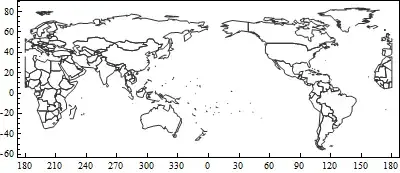
Show[map, 
 FrameTicks -> {{Automatic, 
    None}, {Transpose[{Range[13]*30 - 210, 
      RotateLeft[Range[13]*30 - 30, 7] /. x_ /; x > 180 :> x - 30}], 
    None}}, ImageSize -> 400]
enter image description here

Addendum

In answer to comment:-

map = Graphics[{GrayLevel[0.2], AbsoluteThickness[1.5], 
    CountryData[
      "World", {"SchematicPolygon", {"Equirectangular", {0, 
         180}}}] /. Polygon -> Line}, Frame -> True];

linepos = First[Position[map, Line]];
line = Extract[map, Most[linepos]];
newline = line /. {a_Real, b_} :> {a + 180, b};
map2 = ReplacePart[map, Most[linepos] -> newline];

p2 = ListContourPlot[
   Table[Sin[i + j^2], {i, 0, 3, 0.1}, {j, 0, 3, 0.1}], 
   Contours -> 15, ColorFunction -> "Rainbow", AspectRatio -> 1/2, 
   DataRange -> {{0, 360}, {-90, 90}}];

Show[p2, map2, ImageSize -> 400]

enter image description here

Chris Degnen
  • 30,927
  • 2
  • 54
  • 108
  • Thanks a lot. It was a great help. – Karami Jan 21 '13 at 13:16
  • Now I face with another problem.When I try the following, I do not get the two plots on each other with the newly defined range for longitude.For example: p2 = ListContourPlot[ Table[Sin[i + j^2], {i, 0, 3, 0.1}, {j, 0, 3, 0.1}], Contours -> 15, ColorFunction -> "Rainbow", AspectRatio -> 1/2, DataRange -> {{0, 360}, {-90, 90}}] ; Show[p1, map, ImageSize -> 400, FrameTicks -> {{Automatic, None}, {Transpose[{Range[13]*30 - 210, Range[13]*30 - 30}], None}}, ImageSize -> 400] – Karami Jan 21 '13 at 13:25
  • many thanks again – Karami Jan 21 '13 at 14:02