I tried to plot the following function as a Parametric Plot. When I include values for w up to 1 the plot looks fine, but I need this plot for values up to 100 or 1000.
z[w_, L_, re_, r1_, c1_, r2_, WoR_, WoT_, WoP_, c2_] =
     I w L + 1/(1/(I w c1) + 1/r1) + re +
      1/(1/(I w c2) + 1/r2 +
         1/(WoR*Coth[(I*WoT* w)^WoP]/(I*WoT* w)^WoP))
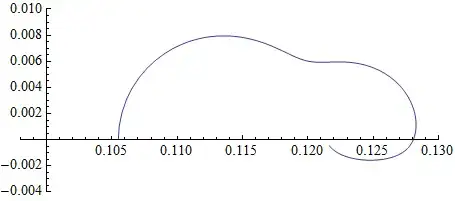
I want to have a Nyquist-Plot, so I plotted Real and Imaginary-Part with the following command:
ParametricPlot[{
   Re[z[w, 5.1867*10^(-7), 0.10549, 0.014394, 1.699,
     0.0098142, 5.5173*10^(-7), 7.428*10^(-13), 0.19962, 0.085349]],
   Im[z[w, 5.1867*10^(-7), 0.10549, 0.014394, 1.699,
     0.0098142, 5.5173*10^(-7), 7.428*10^(-13), 0.19962,
     0.085349]]}, {w, 0.000001, 1},
 PlotRange -> {{0.098, 0.13}, {-0.004, 0.01}}]
This works fine.
When I replace {w,0.000001,1} with {w,0.000001,1000} I get a weird plot.
Unfortunately I have no idea where the problem could be, so I posted the whole example. I think that there might be some numerical problem that is responsible for the weird edges in the second plot. For small w like 0.00001 the graph is not correct either, it should become negative.



ComplexExpandin the plot – b.gates.you.know.what Jan 21 '13 at 15:07MaxRecursion -> InfinityforParametricPlotsolve your problem? – Silvia Jan 21 '13 at 15:17