I need to do frame-by-frame analysis of videos. I can import the video files I need, but each file is too large to import at once. I can use the Import[fn, "Frames",{n}] command to import images one-by-one, but this takes a long time once n gets large. For example, the first frame it takes 0.14 sec, but the 200th frame takes 2.2 sec. Mathematica seems to be reading from the start of the file each time I do this. Obviously, this will not work.
Is there some way to speed this up. E.g. using streams? Or tricking Mathematica to use ImageCapture to get images from a video file instead of a webcam?
Thanks
Asked
Active
Viewed 4,378 times
25

Verbeia
- 34,233
- 9
- 109
- 224

Vilis Nams
- 331
- 3
- 4
5 Answers
15
About:
This is my second answer. After playing with Mathematica's video import I have noticed that it makes import mistakes (duplicated frames + artifacts) and thus developed ffmpeg package for Mathematica which is based on ssch answer.
https://github.com/kmisiunas/ffmpeg-mathematica
The speed of this package is as follows on moderate computer:
- Importing one frame is from 2 to 100 times slower, because current method for seeking frame is slow.
- Importing many frames (1000+) is from 2 to 10 times faster.
I am switching to ffmpeg importer because for bulk analysis it proved to be faster and more accurate than default method.
Usage:
Mimicking Mathematica's Import function:
FFImport[ "file.avi", {"Frames", 1}]
gives first frame (slow way).
FFImport[ "file.avi", {"Frames", Range[1,1000]}]
gives first 1000 frames (fast)
To test status of ffmpeg library you can run FFmpeg[].
More information about ffmpeg installation in the link above.

-
-
-
BTW, seeking is still very slow using ffmpeg - do you have an idea how to speed it up? – Karolis May 10 '14 at 11:46
-
When I try to import video file using FFImport, I am getting errors BinaryReadList::strmerr: Error on stream !/usr/local/bin/ffmpeg -i "30.796.avi" -frames:v 30163 -loglevel quiet -f rawvideo -pix_fmt rgb24 -. Error message: ø½[CapitalZeta] >>
General::stop: Further output of BinaryReadList::strmerr will be suppressed during this calculation. >> and it truncates mathematica. Can you help me.
– user12609 Oct 31 '14 at 13:19 -
-
Hi, yes I did. brew install ffmpeg Warning: ffmpeg-2.3.1 already installed – user12609 Nov 02 '14 at 22:21
-
-
I tested your software with the following video: https://drive.google.com/open?id=0B9wKP6yNcpyfNENvNHJMRGc0SG8 . It produces only black Images. Where is the error? – mrz Jun 28 '17 at 15:29
-
Submit an issue at https://github.com/kmisiunas/ffmpeg-mathematica/issues . Stack overflow comments are a wrong place – Karolis Jul 11 '17 at 19:49
-
@mrz, I think it is a problem with the command for ffmpeg. It must be related to the particular format you are using. I recommend playing with the commands to see what helps and modifying it in the source code. – Karolis Jul 11 '17 at 20:15
14
If you only want to read it linearly you can tell ffmpeg to dump the video to stdout and then read widthheightbytes-per-pixel bytes at a time to get the video frame-by-frame:
openVideo[fname_, w_, h_] :=
 Module[{video},
  video["stream"] =
   OpenRead[
    "!ffmpeg -i " ~~ fname ~~ " -loglevel quiet -f rawvideo -pix_fmt rgb24 -",
    BinaryFormat -> True];
  video["SkipFrame", n_Integer: 1] := Skip[video["stream"], Byte, n*3*w*h];
  video["NextFrame"] := Partition[Partition[
     BinaryReadList[video["stream"], "Byte", 3*w*h]
   , 3], w];
  video["NextFrame", n_Integer] := Table[video["NextFrame"], {n}];
  video["NextImage"] := Image[video["NextFrame"], "Byte"];
  video["NextImage", n_Integer] := Table[video["NextImage"], {n}];
  video]
Here's an example:
(* Create a test movie *)
file = $TemporaryPrefix <> "testvid.avi";
Export[file,Table[Rasterize[i, ImageSize -> {352, 200}], {i, 1, 50}]];

video = openVideo[file,352,200]
video["NextImage",2]
video["SkipFrame",10]
video["NextImage"]
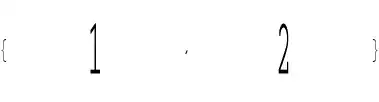
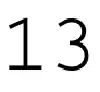
For some reason Mathematica seems to read through the entire video when doing Close[video["stream"]] and it might be worth to kill -15 the ffmpeg process manually to speed it up for large files.
For a 720x404 h264 mp4 video on a modest laptop it takes 13s to skip 200 frames and 0.07s to read a frame. The skipping could possibly be sped up by starting a new ffmpeg process that begins at desired frame. I would compare speeds to Import but Mathematica can't read it (for the test video Import takes .2s for first frame compared to .02s ). So as a bonus with this way you can work with many many more video formats :)

ssch
- 16,590
- 2
- 53
- 88
-
This works for me very well. However, I would like to add that it is absolutely necessary that the file name doesn't contain any spaces. – Quit007 Oct 20 '21 at 20:41
12
The performance can be improved by loading more than 100 frames at a time. To test this we can run:
LoadNFrames[n_] := (Import[video , {"Frames" , Range[1000, 1000 + n]} ]; n);

times = Table[ AbsoluteTiming[ LoadNFrames[n] ],
         {n, {1, 2, 5, 10, 20, 30, 50, 100, 150, 200, 300, 400, 500, 600, 700, 800}}]

One can see that in Mathematica there is a penalty for loading only few frames. We can improve the performance by preloading the video and storing it in a buffer. For instance:
buffer = Import[video, "ImageList"];

GetFrame[n_] := buffer[[n]]
The method uses a lot of memory, therefore, for large videos you will need to load parts of the video. I also typically cut the region of interest before putting it o the buffer.

Karolis
- 1,639
- 1
- 12
- 25
3
If using Windows you can try my MathMF package (see here) which loads video frames sequentially using the Media Foundation platform via LibraryLink.
The speed is pretty good. Exact timings will vary according to CPU speed and the performance of the decoder, but as an example my PC here can read a 1280x720 WMV file at 25 frames per second and a 760x554 AVI file at 73 frames per second.

Simon Woods
- 84,945
- 8
- 175
- 324
0
If you need to perform a frame by frame operation, you could use something like VideoMapList:
VideoMapList[myOperation[#Image]&, video]
This will apply myOperation to each frame, and return all the results in a list. The time to fetch the frames this way is much faster than the Import strategy.
Another advantage is that only one frame will be in memory at any one time.

carlog
- 301
- 2
- 3
Import[movie, {"ImageList", Range[...]}]– cormullion Jan 24 '13 at 07:56