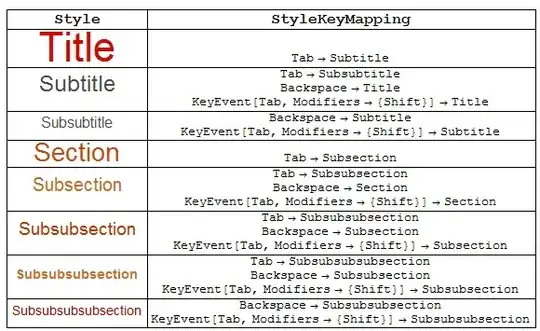
In Version 9, in cells with Title, Subtitle, Subsubtitle or Section, Subsection, Subsubsection, ..., Subsubsubsubsection (perhaps others) style, Backspace in the beginning of the cell changes the cell style to the style of the next level up the hierarchy (e.g., Subsubsection > Subsection > Section). Similarly, Tab changes the style of the cell to that of the lower level; e.g., Section > Subsection > Subsubsection > ...
StyleKeyMapping suboption in the style definitions controls the behaviour in response to Backspace and Tab
  somestyles ={"Title", "Subtitle", "Subsubtitle",   "Section", "Subsection", "Subsubsection",
  "Subsubsubsection",   "Subsubsubsubsection"};
  Grid[ Prepend[{Style[#,#], Column[CurrentValue[{StyleDefinitions, #, StyleKeyMapping}],
        Center]} & /@ somestyles,
   Style[#, Bold, 16] & /@ {"Style", "StyleKeymapping"}], Dividers -> All]


StyleKeyMapping. Try evaluatingCurrentValue[StyleKeyMapping]and see what comes out – Rojo Jan 25 '13 at 03:01CurrentValue[StyleKeyMapping], I get{"=" -> "WolframAlphaShort"}. – QuantumDot Jan 25 '13 at 03:16Title,Subtitle,SubsubtitleorSection,Subsection,Subsubsectionstyle.StyleKeyMappingoption in the style definitions controls the behaviour in response toBackspaceandTab. See, for example, CurrentValue[{StyleDefinitions, "Subsection", StyleKeyMapping}] – kglr Jan 25 '13 at 03:20Inputcells (which happens to be the setting forDefaultNewCellStyle); it means "typing = in the beggining of a new cell" changes the style of the cell fromInputtoWolframAlphaShort– kglr Jan 25 '13 at 03:24