n = 100; (*number of points*)
s = RandomSample@Range@n; (*the initial set*)
(*some aux functions*)
head[{x_, xs___}] := Select[{xs}, # <= x &];
tail[{x_, xs___}] := Select[{xs}, # > x &];

(*qsort function modified for sowing the information needed*)
qsort[{}] = {};
qsort[l : {x_, ___}] := Module[{lh, lt}, (Sow@{l, lh = head@l, x, lt = tail@l};
                                          Join[qsort@lh, {x}, qsort@lt])];

(*Perform the sort and extract the transformation rules for each step*)
t0 = (Reap@qsort@s) [[2, 1]] /. {l_, h_, x_, t_} :> Thread[l -> Flatten@{h, x, t}];
(*Delete unproductive transformations for speeding up the animation*)
t0 = t0 //. HoldPattern[x_ -> x_] | {} -> Sequence[];
(*Apply the transformations and get the list of succesive states*)
seqs = FoldList[#1 /. #2 &, s, t0];

(*Calculate the elements' paths to highlight them at each step*)
hL = ArrayPad[Unitize@Differences@seqs Rest@seqs, {{0, 1}, {0, 0}}] /. 0 -> Undefined;

(*Plot it*)
pstyle = PlotStyle -> Directive[Red, PointSize@Medium];
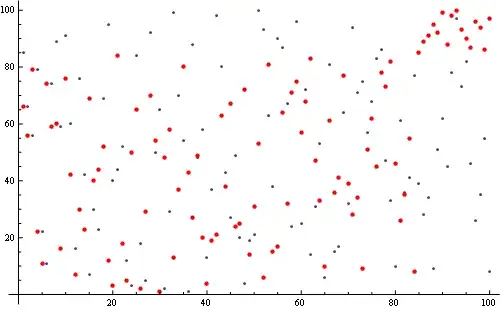
ListAnimate[ j = Show[ListPlot[#[[1]], ImageSize -> 500],
                      ListPlot[#[[2]], pstyle]] & /@ Transpose[{seqs, hL}]]

Export["c://test.gif", j, "DisplayDurations" -> 1]


SowandReap– ssch Jan 25 '13 at 10:34Trace. Have a look at this answer, where I was showing how to trace the execution of merge sort implementation (not quick sort, but also recursive). – Leonid Shifrin Jan 25 '13 at 12:55