First, set the option of Roots so that it doesn't expand quartics. Optionally, define a Format for Root.
SetOptions[Roots, Quartics -> False];
Unprotect[Root];
Format[Root[func_, v_], StandardForm] := Row[{"eq", "(", v, ")"}];
Protect[Root];
a1 = Roots[x^4 + r1 x^3 + r2 x^2 + r3 x + r4 == 0, x][[1]][[2]];
a2 = Roots[x^4 + r1 x^3 + r2 x^2 + r3 x + r4 == 0, x][[2]][[2]];
a3 = (-s2 - Sqrt[s2^2 - 4 s3])/2;
a4 = (-s2 + Sqrt[s2^2 - 4 s3])/2;
Solve[{a1 - a3 == 0, a2 - a4 == 0}, {s2, s3}]

Addendum
As I understood the question, you hope to simplify the display of a very complicated expression. A common way to do that is to define a Format for the expression. Common examples built in are InterpolatingFunctions and SparseArrays. For example:
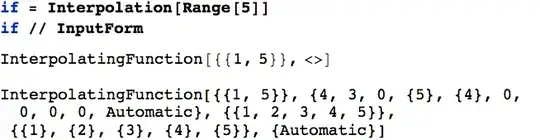
The first output is the formatted expression, simply letting you know that this is an InterpolatingFunction. The second is the actual expression; it's not particularly readable or informative, hence the formatted version. The InputForm represents the actual expression for pattern patching and other purposes. My response was intended to show you how to create this type of formatted ouput for your own expressions.
Reading your question and the other response more closely, I see you wish to "force Mathematica to find some similar terms under the radicals and replace them with substitutions". A built in tool to accomplish this is OptimizeExpression in the Experimental context. It's a bit tricky, but here's an example.
For convenience, we prepend two contexts to our $ContextPath.
$ContextPath = Join[{"Experimental`", "Compile`"},
  $ContextPath];
Here's a semi-complicated expression.
expr = x /. First[Solve[
  x^4 - x - 1 == 0, x
]]

Here's the optimized expression.
optExpr = OptimizeExpression[expr]

Note that the result is an OptimizedExpression containing a Block. The final statement of the Block refers to variables local to the block and those variables are themselves potentially complicated expressions. Here's the final statement for this example.
finalOptExpr = Extract[optExpr, {1, 2, -1}, HoldForm]

And here are the names of the variables used in this expression.
optSymbolQ[s_Symbol] := StringTake[ToString[s], 1] == "$";
finalVarNames = Union[ToString /@
  Cases[finalOptExpr, _Symbol?optSymbolQ, Infinity]]

(* Out: {"$11", "$5", "$7", "$9"} *)
Thus, the original complicated expression can be written in terms of these four symbols. Those symbols, in turn are the following.
Extract[optExpr, {1, 2}];
Column[# == ToExpression[#] & /@ finalVarNames]

Of course, these are defined in terms of previously defined variables - for example:
$2

Really, though, the point behind OptimizeExpression is to optimize the expression for numerical computation by collecting repetitive sub-parts so that they don't need to be repeatedly evauated. And I do think that there is a limit to how far this can, particuarly for something as complicated as your fourth degree with arbitrary coefficients.


Protect[Root]? – Dr. belisarius Jan 29 '13 at 08:22Quartics->False, theRootscommand returns indexedRootobjects - delete theFormatcommand to see what I mean. I defined theFormatforRootto condense this a bit. Other than that, there's nothing particularly special about the choice ofeq. – Mark McClure Jan 29 '13 at 14:34