I want to make an InputField with a horizontal cursor, like this:
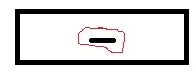
Note that the blinking cursor should be horizontal and not the mouse pointer! Nevertheless, text input should still be horizontal and not vertical.
The code below shows an InputField with the standard vertical cursor but I want a horizontal one.
x = Null;
Style[InputField[Dynamic[x], ImageSize -> {180, 60}, Alignment -> Center], Bold, 20]
Is this possible?


Rotate[Style[InputField[Dynamic[x], ImageSize -> {180, 60}, Alignment -> Center],Bold, 20], Pi/2]. – cormullion Feb 12 '13 at 11:24inputfieldas well as a horizontal cursor. – subbu Feb 12 '13 at 11:32x = Null; l = Graphics[{Thick, Line[{{0, 0}, {.07, 0}}]}]; MouseAppearance[ Style[InputField[Dynamic[x], ImageSize -> {180, 60}, Alignment -> Center], Bold, 20], l]– Ajasja Feb 12 '13 at 11:38horizontalcursor with inInputFieldnot mousePointer. – subbu Feb 12 '13 at 11:46Rotate[Style[ InputField[Dynamic[x], ImageSize -> {60, 180}, Alignment -> Center],Bold, 20], Pi/2]? – partial81 Feb 13 '13 at 07:51inputFieldas well as horizontalcursor,but he did verticalinputfield– subbu Feb 15 '13 at 05:34