Actually related question 127248. But in that post, the answer from Kuba suggest provide a URL for API-user. But I still hope the API can output the file into the local disk directly. Is it possible?
As the Kuba's comment, the browser cannot write the local disk otherwise it will lead to malicious scripts overflow. But as I know the browser has some ability to write data into disk, such as those video or web-page cache file.
I mean:
FormPage[{"FileNames" -> <|"Interpreter" -> "String",
    "Hint" -> "File names copy from Excel"|>,
  "Directory" -> <|"Interpreter" -> "String",
    "Hint" ->
     "Specify a directory to download"|>}, (URLDownload[{#FileNames}, \
#Directory]) &, AppearanceRules -> <|"Title" -> "Test API"|>,
 PageTheme -> "Blue"]
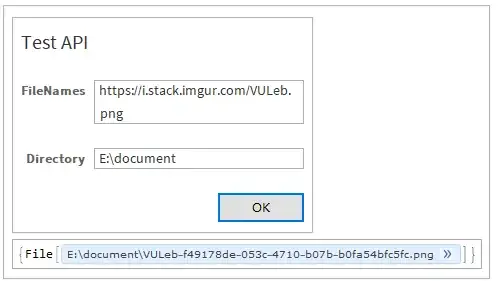
It will download https://i.stack.imgur.com/VULeb.png into my directory E:\document. But if I use CloudDeploy to deploy an API:
CloudDeploy[
 FormPage[{"FileNames" -> <|"Interpreter" -> "String",
     "Hint" -> "File names copy from Excel"|>,
   "Directory" -> <|"Interpreter" -> "String",
     "Hint" ->
      "Specify a directory to download"|>}, \
(URLDownload[{#FileNames}, #Directory]) &,
  AppearanceRules -> <|"Title" -> "Test API"|>,
  PageTheme -> "Blue"], "DownFiles", Permissions -> "Public"]

It cannot into local disk download anymore. How to implement it? If the browser cannot write the data into the E:\document but just can write into some cache directory, I also will accept the way..


![Missing[NotAvailable]](https://i.stack.imgur.com/3gWjj.png)
Downloadsfolder on your friend's machine by returning the appropriate MIMEType for the result. – b3m2a1 Apr 29 '19 at 16:33CloudObjectwith the right MIMEType and then return the URL to that viaHTTPRedirect– b3m2a1 May 01 '19 at 19:31