19

I've recently stumbled across this site: Koalas to the Max, and the first thought that came to my mind was "I want to recreate this with Mathematica".

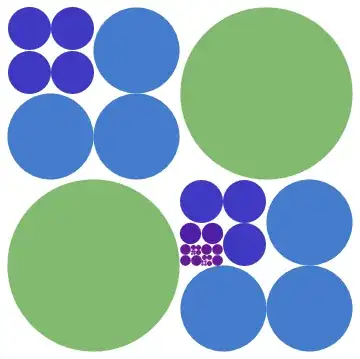
As a first step I tried to create a Disk that splits itself up into four disks, when the mouse cursor touches it. Those four disks should in turn split themselves up. Here's what I have so far:

makeDisks[pos_] := makeDisks[1, pos]
makeDisks[level_, pos_] :=
 Module[{
   disk = Disk[pos, 1/level]},
  Mouseover[Dynamic@disk, Dynamic[disk = makeDisks[level + 1, #] & /@ 
   (pos + # & /@ (1/(2 level)) Tuples[{-1, 1}, 2])]]
  ]

(* test with the following *)

Graphics[{makeDisks[1]}, PlotRange -> {{-1, 1}, {-1, 1}}]

For the first disk this seems to work just as I want it. For later steps, however, I got the positioning wrong and some of the disks go back to larger ones, when another one is touched. How can these issues be fixed?

As a next step I want to add colors to the disks. Maybe this can be done by using MapIndexed with makeDisks on the ImageData of some image. The colors in each step should probably be the mean values of appropriate subsets of the image data.

Any help to move this little program forward is highly appreciated!

einbandi
  • 4,024
  • 1
  • 23
  • 39

2 Answers2

20

Here's a simple way using buttons, for some reason AutoAction is not working so you have to click, anyone know why?

nextPos[p_, r_] := {p + # r/2, r/2} & /@ Tuples[{1, -1}, 2]

DynamicModule[{diskList = {{ {0, 0}, 1}}},
 Graphics[Dynamic[
   Button[{ColorData["Rainbow"][Last@#], Disk @@ #},
      diskList = DeleteCases[Join[diskList, nextPos @@ #], #]
      ,AutoAction -> True
      ] & /@ diskList]]
 ]

circles

The coloring is only based on depth (radius)

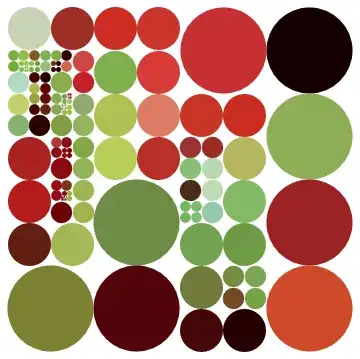
Basing color on underlying image:

background = ImageCrop[ExampleData[{"TestImage", "Peppers"}], AspectRatio -> 1];

DynamicModule[{diskList = {{{0, 0}, 1}}}, Graphics[Dynamic[
   Button[{RGBColor@ImageValue[background,First@#, DataRange -> {{-1, 1}, {-1, 1}}],
       Disk @@ #} 
     ,diskList = DeleteCases[Join[diskList, nextPos @@ #], #]
     ,AutoAction -> True] & /@ diskList]]]

pepper

Using code from @Szabolcs comment it's possible to split the disks without clicking:

(* Create at most 2^6=64 disks in a row *) 
rmin = 2^-6;
DynamicModule[{diskList = {{{0., 0.}, 1.}}}, Graphics[Dynamic[
  EventHandler[{RGBColor@ImageValue[background, First@#, DataRange -> {{-1, 1}, {-1, 1}}], 
                Disk @@ #}
    ,{"MouseMoved" :>
      If[Last@# > rmin, diskList =DeleteCases[Join[diskList, nextPos @@ #], #]]}
   ] & /@ diskList]]
]
ssch
  • 16,590
  • 2
  • 53
  • 88
  • (+1) AutoAction doesn't work here either. But even if it did, wouldn't it trigger a split on every move? In the original, a split is only triggered when the mouse moves into a disk the first time (but not when the mouse happens to be over a newly generated disk) – Szabolcs Feb 19 '13 at 17:08
  • @Szabolcs Indeed, potentially it would also create a crazy amount of disks, so would need some minimum r limit – ssch Feb 19 '13 at 17:13
  • I mean, this would happen: DynamicModule[{diskList = {{{0, 0}, 1}}}, Graphics[Dynamic[ EventHandler[{ColorData["Rainbow"][Last@#], Disk @@ #}, {"MouseMoved" :> (diskList = DeleteCases[Join[diskList, nextPos @@ #], #])}] & /@ diskList]]] – Szabolcs Feb 19 '13 at 17:14
  • Sorry, there's a stupid copy/paste problem on OS X that always bites me. – Szabolcs Feb 19 '13 at 17:14
  • A related question: "What's the fixed point of overlap for the parent and all child disks, so that I can just keep my mouse at one point and keep clicking?" :D #lazy – rm -rf Feb 19 '13 at 17:31
  • 1
    Autoaction seems not working with Graphical Buttons. Test it Module[{i = Disk[]}, #@ Button[Dynamic@i, Dynamic[i = Rectangle[]], AutoAction -> True]] & /@ {Identity, Graphics} – Dr. belisarius Feb 19 '13 at 17:44
  • This is awesome, thanks! I'll wait until tomorrow to see if somebody comes up with something else, but after the latest update, this pretty much nails it! :) I really have to look into EventHandler. Never used it before... – einbandi Feb 19 '13 at 18:26
  • 2
    Sadly it gets progressively slower as the number of disks increases... – Ajasja Feb 19 '13 at 21:03
  • I just ran across this. Fun to play with. – rcollyer Jul 31 '13 at 18:59
15

Alternative

DynamicModule[{visited = False}, 
    Dynamic@EventHandler[
      If[visited, 
       Thread@Translate[#0@#, {1, -1}~Tuples~2]~Scale~
        0.5, {ColorData["Rainbow"]@Random[], #}], 
      "MouseEntered" :> (visited = True)]] &[Disk[]] // Graphics

Other version. Works "more or less" fine. Read comments

SetAttributes[translateOnHover, HoldFirst];
s : translateOnHover[onVar_, animationLength_, animationRate_: 200][
   prim_] := 
 With[{creationTime = Clock[Infinity]~Refresh~None}, 
  DynamicModule[{visited = False}, 
   Dynamic@If[visited, 
     With[{visitedTime = Clock[Infinity]~Refresh~None}, 
      With[{currentTime := 
         1/animationLength (Clock[{0, visitedTime + animationLength, 
              1`/animationRate}, visitedTime + animationLength, 1] - 
            visitedTime)}, 
       Thread@Translate[s, ({1, -1}~Tuples~2) /. 
           pt : {_, _} :> Dynamic[pt currentTime]]~Scale~
        Dynamic[currentTime /. t_ :> 1 - t + 0.5 t^2]]], 
     EventHandler[{ColorData["Rainbow"]@Random[], prim}, 
      "MouseEntered" :> 
       If[onVar && 
         Refresh[Clock[Infinity], None] - creationTime > 
          animationLength, visited = True]]]]]

With[{animationLength = 0.8, animationRate = 80}, 
  DynamicModule[{on = False}, 
   Column[{Row[{Button["Start", on = True, Enabled -> Dynamic[! on]], 
       Spacer[20], 
       Button["Stop", on = False, Enabled -> Dynamic[on]]}], 
     Graphics[
      translateOnHover[on, animationLength, animationRate][Disk[]], 
      ImageSize -> Medium, PlotRange -> 1.2 {{-1, 1}, {-1, 1}}]}, 
    Alignment -> Center]]] // Panel
Rojo
  • 42,601
  • 7
  • 96
  • 188
  • Nice use of #0! – ssch Feb 19 '13 at 19:06
  • What is MouseEntered? Is there a link somewhere to a list of undocumented EventHandler events? – Szabolcs Feb 19 '13 at 20:23
  • @Szabolcs it is triggered when the mouse enters, there's also MouseExited. I'm trying to remember where I got that from. – Rojo Feb 19 '13 at 20:24
  • 1
    Re your last edit: During animations I get a lot of "shaking", it seems like the plot range may be changing rapidly. For disks next to the edge the whole plot is shaking, for others only the animated part. Do you see this too? – Szabolcs Feb 19 '13 at 20:27
  • @Szabolcs, I see only a tiny bit of shaking, probably less than what you see. The PlotRange is explicitly set in the last line, so I have no idea why that happens. – Rojo Feb 19 '13 at 20:31
  • @Szabolcs does it get better by increasing the plot range? (changing the last line from PlotRange->1.2 ... to, say PlotRange-> 1.5 ... – Rojo Feb 19 '13 at 20:32
  • @Rojo I'll try that but in the meantime please see this One weird thing is that it wasn't shaking nearly as much during the screen recording as it normally does. EDIT: changing the PlotRange doesn't help. But I need to be back to work now. – Szabolcs Feb 19 '13 at 20:39
  • @Szabolcs I see that, and so far, no clue what it may be. Let me know if you think of something – Rojo Feb 19 '13 at 20:45
  • @Szabolcs Perhaps it's the explicit nested translations and scalings that link all together. Blame that Normal that doesn't work. I'll try to do it "by hand" and see if it works – Rojo Feb 19 '13 at 20:56
  • +1. But, Sometimes the disks move to the wrong position (see the white hole in the lover left corner). – Ajasja Feb 19 '13 at 21:07
  • @Szabolcs It doesn't shake for me, but I think I understand what you mean by shaking and it might be a mac specific issue with dynamic stuff. Sometimes your palette shakes in the corner of my screen... – rm -rf Feb 19 '13 at 23:10
  • 1
    @rm-rf The "shaking" is definitely not mac specific. I get it too. (Windows 7, Mma 8) – einbandi Feb 19 '13 at 23:42