2

Hope you're having a great day!

I made another post in regard of how to insert an image onto a face of a Polyhedron. I hope you could help me on this one too!

I want to change the length of the edges of my netimage polyhedron without changing his 3D model. Is it possible?

My polyhedron is:

PolyhedronData["DuerersSolid", "NetImage"]

I want to change its edges. Is it possible?

Carl Lange
  • 13,065
  • 1
  • 36
  • 70
  • 1
    To clarify, for my own interest: you want to have essentially the base 3D model be modified? But still remain the same? This is pedagogically opposed in my brain, can you explain what you are looking for slightly more? You can most definitely change the length of sides as you wish (I do not know how off-hand) but you would then change the model into a new one? (To my understanding then, the 3D model would be different.) – CA Trevillian May 21 '19 at 12:49
  • yeah! The first thing you said! I want to modify the lenght of the edges without changing the actual Polyhedron – Mattia Rugna May 21 '19 at 12:58
  • so, do you mean to enlarge it? – CA Trevillian May 21 '19 at 12:58
  • Yeah, I actually want to change its size and lenght :) – Mattia Rugna May 21 '19 at 13:05

1 Answers1

2

Since the "NetImage" property of PolyhedronData is just an Image, you can only ImageResize it:

ImageResize[PolyhedronData["DuerersSolid", "NetImage"], Scaled@2]

This can cause rasterization artefacts and defects, which is probably not what you want.

You may want "Net" instead:

PolyhedronData["DuerersSolid", "Net"]

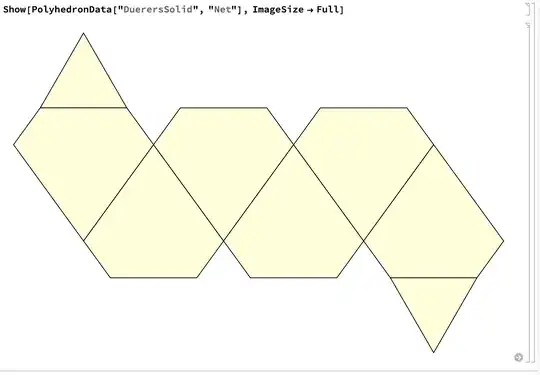
This outputs a scaleable Graphics object. You can see in the InputForm of this object (InputForm@PolyhedronData["DuerersSolid", "Net"]) that it does not have specific units in mind, and is scaleable. To scale it from the notebook interface, simply click on it and drag the handles. To scale it from code, you can use Show and ImageSize like the following:

Show[PolyhedronData["DuerersSolid", "Net"], ImageSize -> Full]
enter image description here

You can also get other types of output from "Net", including "Graph" and a list of coordinates.

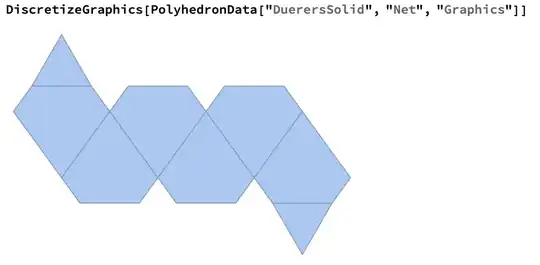
You can also do things such as create a MeshRegion from the Graphics object using DiscretizeGraphics:
enter image description here

It's important to note that these properties ("Net" and "NetImage") are not computed directly from a 3D object - they are pre-computed.

Carl Lange
  • 13,065
  • 1
  • 36
  • 70